


Suzanne Smith

ServiceNow Employee
Options
- Subscribe to RSS Feed
- Mark as New
- Mark as Read
- Bookmark
- Subscribe
- Printer Friendly Page
- Report Inappropriate Content
05-21-2015
10:24 AM
Incident priority is a critical part of resolving incidents. Without a framework for establishing priority, it is difficult to meet service level agreements and trigger incident escalations appropriately. If priority becomes a subjective process of personal interpretation, incidents cannot be resolved in an efficient and logical way.
Incident priority in ServiceNow:
The ServiceNow Incident module supports three factors for determining incident priority:
- Impact: Business loss and potential damage (for example, financial, customer, regulation, security, reputation, brand) caused by the incident
- Urgency: Speed at which the business expects the incident to be resolved
- Priority: sequence in which the incident should be resolved
In the ServiceNow base system, incident priority is determined by impact and urgency based on the following data lookup rules:
| Impact | Urgency | Priority |
|---|---|---|
| 1 - High | 1 - High | 1 - Critical |
| 1 - High | 2 - Medium | 2 - High |
| 1 - High | 3 - Low | 3 - Moderate |
| 2 - Medium | 1 - High | 2 - High |
| 2 - Medium | 2 - Medium | 3 - Moderate |
| 2 - Medium | 3 - Low | 4 - Low |
| 3 - Low | 1 - High | 3 - Moderate |
| 3 - Low | 2 - Medium | 4 - Low |
| 3 - Low | 3 - Low | 5 - Planning |
Data lookup rules allow administrators to create rules that set one or more field values when certain conditions are met. On the incident form, the Priority field is read-only and automatically set based on the values in the Impact and Urgency fields. That said, here's where things get interesting because administrators can:
- edit the priority lookup rules
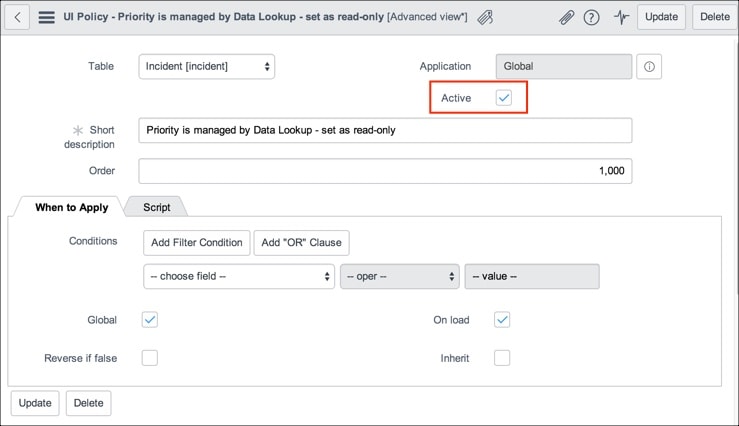
- disable the Priority is managed by Data Lookup - set as read-only UI policy and create their own business logic
Editing priority lookup rules:
The priority lookup rules are stored in a data lookup table. The table is comprised of matcher and setter fields. The data lookup queries for values equaling the matcher fields. When the data lookup finds a match, it returns the setter field value. So, in our priority data lookup, if the query finds an Impact of Medium with an Urgency of Low, it returns a Priority of Low. You can edit the setter and matcher fields using the following process:
- Navigate to System Policy > Rules > Priority Lookup Rules.
- Click an order number. For example, click 600.
- Edit the Priority Data Lookup. For example, if you clicked 600 in step 2, you could change the Priority from Low to Medium for an incident with an Impact of Medium and an Urgency of Low.
- Edit or delete existing information and add new information as required.
Disabling priority UI policy:
UI policies can be used to dynamically change information on a form or define custom process flows. In the base system, there is an active incident priority UI policy. First, you need to disable that UI policy. Then, you can create your own business logic.
- Navigate to System UI > UI Policies.
- Filter the list to find the Priority is managed by Data Lookup - set as read-only UI policy.
- Clear the Active option.
Now you have lots of possibilities. Add your own business logic, such as business rules and UI policies, around incident priority to meet your specific requirements.
For a thoughtful look at incident priority, read the blog post by stephenmann titled Whose Incident Priority Is It Anyway?
ServiceNow offers more information about incident priority and data lookup in the product documentation:
Labels:
- 57,595 Views
8 Comments
You must be a registered user to add a comment. If you've already registered, sign in. Otherwise, register and sign in.