Jaspal Singh

Mega Patron
Options
- Subscribe to RSS Feed
- Mark as New
- Mark as Read
- Bookmark
- Subscribe
- Printer Friendly Page
- Report Inappropriate Content
08-02-2019
01:01 PM
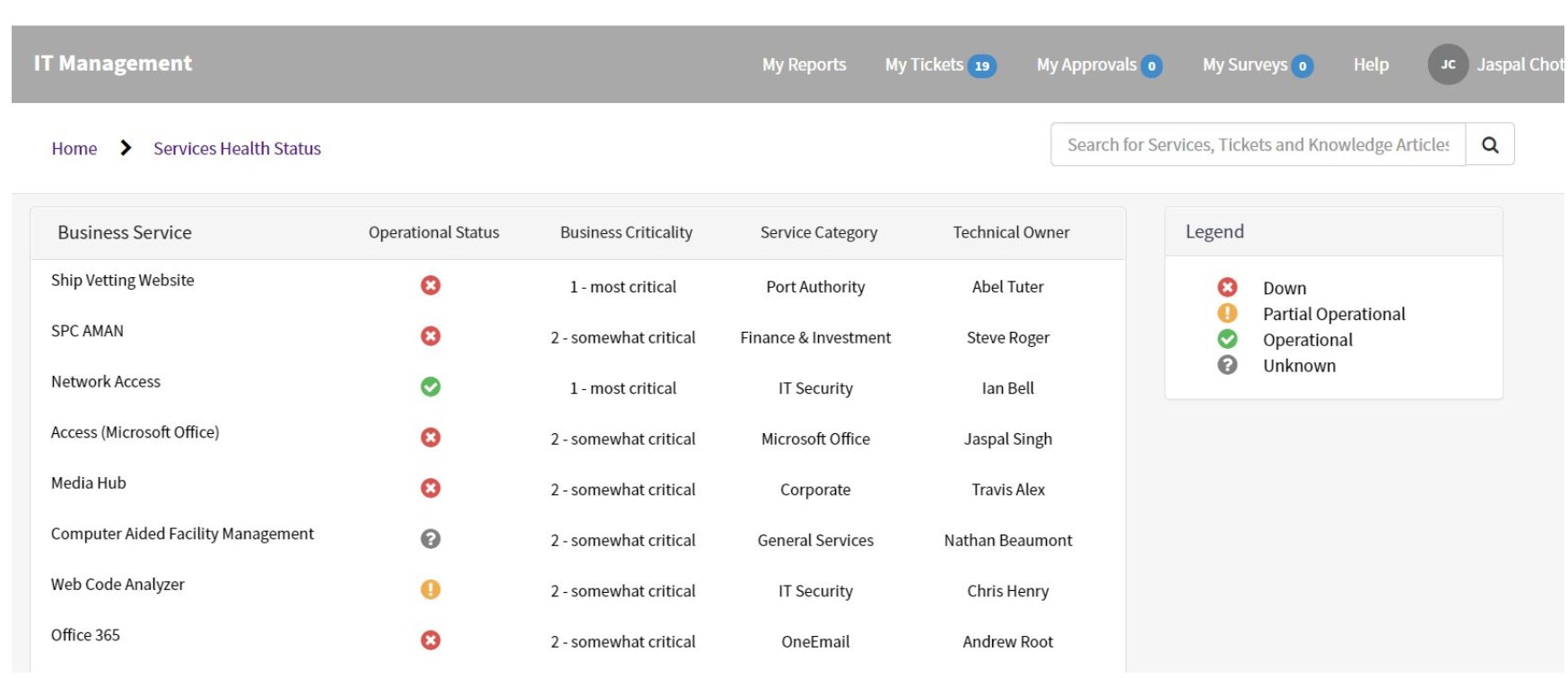
Not often we come across a scenario where we need to track the Service status for the services stored in our Business Service (cmdb_ci_service) table. If so, we have Operational status field available that can be used for checking the operational status but this then requires multiple actions (Operational stauts field update, outage record creation, etc). We came across one such scenario where we got a custom dashboard created that requires just a single action (operational status field update) which looks something as below.
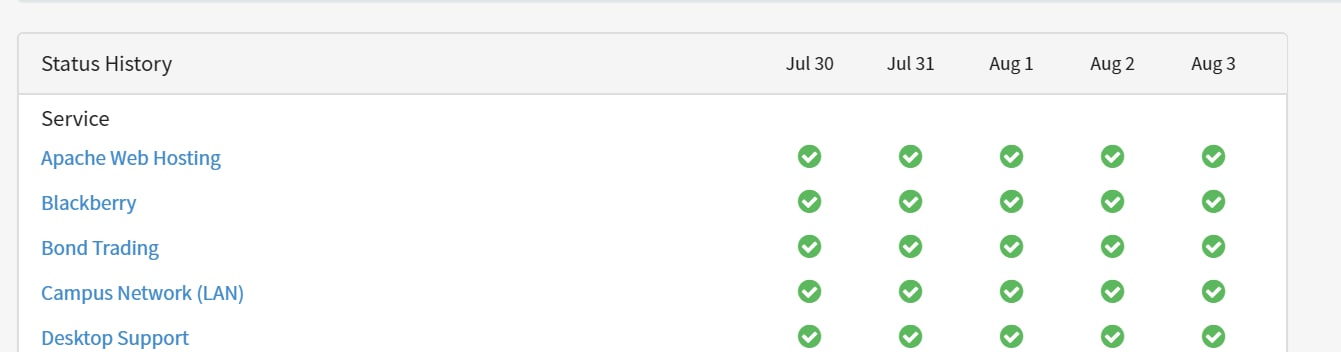
ServiceNow does provides us with an Business Services Status dashboard but this requiers an entry in Outage table (filling of form field) before it can be displayed on the portal which is as below.
OOB case has more of outage thing (Operational status down) that is displayed rather showing all Business Services with its current Operational status.
In our business case Operational status when updated for the Business Service on the backend displays the same on the portal thus helping us with
1. Avoiding creation of Outage record.
2. Display all Business Services (can be limited as required).
3. Additional details (Techincal Owner, Status, Business Criticality) specific for the Business Services.
4. Legends.
For setting up something as above below steps is to be followed.
1. Creation of New Page: business_services_health_status
2. Creation of Widget: business_services_health_status
3. Creation of Widget: services_legends
Creation of Widget: business_services_health_status
a. HTML snippet.
<div class="panel panel-default">
<div class="panel-heading"> </div>
<div class="panel-body">
<table class="tb">
<thead>
<th scope="col">
<!--<h2 class="panel-title title">
${Status History}
</h2>-->
<h2 class="panel-title title">
${Business Service}
</h2></th>
<th scope="col" ng-repeat="date in ::data.dates" class="date-column">Operational Status</th>
<th scope="col" ng-repeat="date in ::data.dates" class="date-column">Business Criticality</th>
<th scope="col" ng-repeat="date in ::data.dates" class="date-column">Service Category</th>
<th scope="col" ng-repeat="date in ::data.dates" class="date-column">Technical Owner</th>
</thead>
<tbody>
<th scope="col" colspan="6"></th>
</tr>
<tr ng-repeat-end ng-repeat="service in ::category.services">
<td scope="row">
<small ng-if="::service.subscribed" class="subscribed" title="${Subscribed to updates}" aria-label="${Subscribed to updates}"><i class="fa fa-envelope"></i></small>
</td>
<td ng-repeat="n in [0] track by $index" class="outage-row" style="
padding-top: 15px;">
<span class="fa" ng-class="::service.outages[0-$index].icon"
sp-tooltip
aria-label="{{::data.dates[$index].month + ' ' + data.dates[$index].day + ' - ' + service.outages[0-$index].msg}}"
role="application"
tooltip-smart="true"
tooltip-template="{{::service.outages[0-$index].msg + ' - ' + data.dates[$index].month + ' ' + data.dates[$index].day}}">
</span>
</td>
<!--Business Criticality-->
<td ng-repeat="n in [0] track by $index" class="outage-row" style="
padding-top: 15px;">
<small class="fontis ng-binding" ng-bind-html="::service.buscriticality" style="
font-size: small;"/>
</td>
<!--Service Category-->
<td ng-repeat="n in [0] track by $index" class="outage-row" style="
padding-top: 15px;">
<small class="fontis ng-binding" ng-bind-html="::service.parentis" style="
font-size: small;"/>
<!-- Techincal Owner-->
<td ng-repeat="n in [0] track by $index" class="outage-row" style="
padding-top: 15px;">
<small class="fontis ng-binding" ng-bind-html="::service.techowner" style="
font-size: small;"/>
</td>
</td>
</tr>
</tbody>
</table>
</div>
</div>
b. Server snippet.
(function() {

	data.categories = [];
	var svs = new GlideRecord("cmdb_ci_service");
	svs.addQuery("sys_class_name", "cmdb_ci_service");
        svs.addEncodedQuery('busines_criticalityIN1 - most critical,2 - somewhat critical');//shows operational status 1 & 2 Business services
	svs.setLimit(options.number_of_services || 250);
	svs.orderByDesc("operational_status");
	svs.query();
	var currentCategory = "-";
	var catIndex = -1;
	while (svs.next()) {
		var ostatus=svs.operational_status;
		var cat = svs.getValue("category");
		if (cat != currentCategory) {
			catIndex++;
			currentCategory = cat;
			data.categories[catIndex] = {};
			data.categories[catIndex].name = cat;
			data.categories[catIndex].label = svs.getDisplayValue("category");
			if (data.categories[catIndex].label == "")
				data.categories[catIndex].label = gs.getMessage("Service");
			data.categories[catIndex].services = [];
		}
		var svc = {};
		svc.sys_id = svs.getUniqueValue();
		svc.name = svs.getDisplayValue();
		svc.techowner=svs.u_technical_owner.getDisplayValue();
		svc.buscriticality=svs.busines_criticality.getValue();
		svc.parentis=svs.parent.getDisplayValue();
		svc.safeName = GlideStringUtil.escapeHTML(svc.name);
		svc.subscribed = isSubscribed(svc.sys_id);
		var svcOutageDay={};
		var outs=[];
		if(svs.operational_status=='9'){ //Non-Operational
			//gs.log('Os is ',svs.operational_status);
			svcOutageDay.icon = "fa-times-circle";
				svcOutageDay.msg = gs.getMessage("{0} - Multiple issues", svc.safeName);
		}
		else if(svs.operational_status=='7'){ //Operational
		svcOutageDay.icon = "fa-check-circle";
				svcOutageDay.msg = gs.getMessage("{0} - No issues", svc.safeName);
				}
			else if(svs.operational_status=='1'){ //Unknown
		svcOutageDay.icon = "fa-question-circle";
				svcOutageDay.msg = gs.getMessage("{0} - Unknown ", svc.safeName);
				}
		else if(svs.operational_status=='8'){ //Partial Operational
		svcOutageDay.icon = "fa-exclamation-circle";
				svcOutageDay.msg = gs.getMessage("{0} - Partial Operational", svc.safeName);
				}

			outs.push(svcOutageDay);
		svc.outages = outs;
		data.categories[catIndex].services.push(svc);

	}
data.dates = [];
	for (var i = 1; i > 0; i--) {
		var d = new GlideDate();
		d.subtract(1000 * 3600 * 24 * (i - 1));
		data.dates.push(d.getDisplayValueInternal());
	}

	function isSubscribed(id) {
		var subs = new GlideRecord("m2m_sp_status_subscription");
		subs.addQuery("sys_user", gs.getUserID());
		subs.addQuery("cmdb_ci_service", id);
		subs.query();
		return subs.hasNext();
	}
})();
c. Client snippet.
function() {
  /* widget controller */
  var c = this;
}
Creation of Widget: services_legends
a. HTML snippet.
<div class="panel panel-{{::options.color}} b" aria-hidden="true">
  <div class="panel-heading">
    <label class="panel-title">${Legend}</label>
  </div>
  <div class="panel-body">
    <div class="col-xs-12">

      <!-- Down -->
      <div class="col-xs-12">
      <div class="col-xs-2"><i class="fa fa-times-circle" tooltips tooltip-template="{{::data.timesMsg}}"></i></div>
      <div class="col-xs-10">{{::data.timesMsg}}</div>
    </div>

      <!-- Partial Operational-->
    <div class="col-xs-12">
      <div class="col-xs-2"><i class="fa fa-exclamation-circle" tooltips tooltip-template="{{::data.partialMsg}}"></i></div>
      <div class="col-xs-10">{{::data.partialMsg}}</div>
    </div>

      <!--Operational-->
      <div class="col-xs-12">
      <div class="col-xs-2"><i class="fa fa-check-circle" tooltips tooltip-template="{{::data.noIssuesMsg}}"></i></div>
      <div class="col-xs-10">{{::data.noIssuesMsg}}</div>
    </div>

    <!--Unknown-->
      <div class="col-xs-12">
      <div class="col-xs-2"><i class="fa fa-question-circle" tooltips tooltip-template="{{::data.questionMsg}}"></i></div>
      <div class="col-xs-10">{{::data.questionMsg}}</div>
    </div>

  </div>
</div>
b. Server snippet.
data.multipleMsg = gs.getMessage("Multiple issues");
data.degradationMsg = gs.getMessage("Service degradation");
data.maintenanceMsg = gs.getMessage("Planned maintenance");
data.noIssuesMsg = gs.getMessage("Operational");
data.timesMsg=gs.getMessage("Down");
data.questionMsg = gs.getMessage("Unknown");
data.partialMsg=gs.getMessage('Partial Operational');
c. Client snippet.
function() {
  /* widget controller */
  var c = this;
}
Since, we had cloned OOB Business Service Status, most of HTML, Client & Server part of the code remains the same with updates so as to make it work per our requirment for custom widget.
Once, configured the Widgets with above code all is required is to place it in a container for the page business_services_health_status that was created by Opening the page in Page Designer. Once placed widgets below is the output that is expected.
Page required can be mad public or can be limited to few users on basis of role to be accessed. Since, its only the operational field that is to be worked with for getting up-to date view of services status on the dashboard it makes life for the Business or Technical owner much simpler. As OOB is dependant on creation of an outage record.
Since, it was one of our requirement to make life simpler for Owners thought of sharing hoping it may help others as well.
Thanks,
Jaspal Singh
- 21,501 Views
You must be a registered user to add a comment. If you've already registered, sign in. Otherwise, register and sign in.