- Mark as New
- Bookmark
- Subscribe
- Mute
- Subscribe to RSS Feed
- Permalink
- Report Inappropriate Content
06-05-2019 01:20 PM
Hi,
I'm after some assistance for the collective.
I have a record producer that allows users to create incidents via the portal, one of the fields on the form is a reference field that looks up Business Services by name, however I have the need to either allow users to enter an alias or a synonym, but I cant see how to do it.
As an example I have a business Service - Email, I want a user to be able to type outlook or email and it selects the business service Email - what is the best way to achieve this?
Thanks in advance.
Solved! Go to Solution.

- Mark as New
- Bookmark
- Subscribe
- Mute
- Subscribe to RSS Feed
- Permalink
- Report Inappropriate Content
06-05-2019 02:46 PM
Just use:
ref_ac_columns=u_alias,ref_ac_columns_search=true
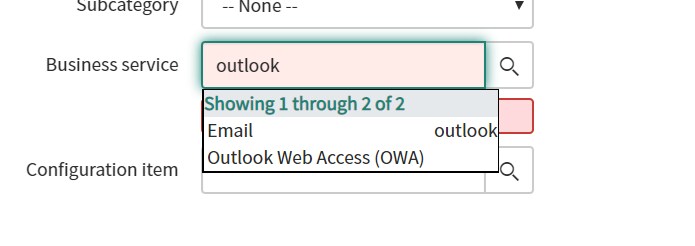
Adding name duplicated the display value. It now looks like this:

- Mark as New
- Bookmark
- Subscribe
- Mute
- Subscribe to RSS Feed
- Permalink
- Report Inappropriate Content
06-05-2019 02:44 PM
I created a field on the business service table that holds the aliases I want to allow the user to look up. I added Outlook to that alias map. I used the auto completer attributes to add ref_ac_columns=name;u_alias,ref_ac_columns_search=true to the attribute list in the dictionary override for incident. Beneath is a screenshot of the outcome:

- Mark as New
- Bookmark
- Subscribe
- Mute
- Subscribe to RSS Feed
- Permalink
- Report Inappropriate Content
06-05-2019 02:46 PM
- Mark as New
- Bookmark
- Subscribe
- Mute
- Subscribe to RSS Feed
- Permalink
- Report Inappropriate Content
06-06-2019 12:43 AM
Mike,
Thanks for the reply.
If I wanted to have multiple aliases, would that be possible and if so how would I do it?
Regards.
- Mark as New
- Bookmark
- Subscribe
- Mute
- Subscribe to RSS Feed
- Permalink
- Report Inappropriate Content
06-06-2019 08:07 AM