- Mark as New
- Bookmark
- Subscribe
- Mute
- Subscribe to RSS Feed
- Permalink
- Report Inappropriate Content
09-11-2022 07:07 AM
Respected Community,
When Selecting 'Task' (Choice) in Variable Field- Job Responsibilities, then only a Variable field- 'Task entry' becomes Mandatory & Visible.

*Outcome (Achieved but with Gap below)-

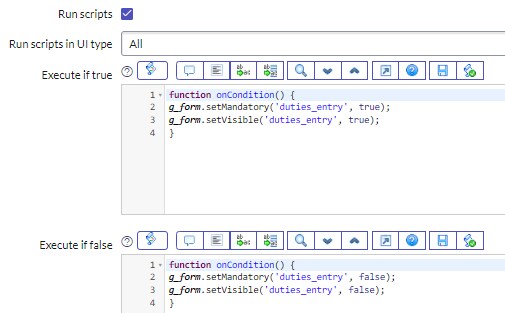
When Selecting 'Duties' (Choice) in Variable Field- Job Responsibilities, then only a Variable field- 'Duties entry' becomes Mandatory & Visible.

*Outcome (Achieved but with Gap)-

When Selecting 'Responsibilities' (Choice) in Variable Field- Job Responsibilities, then only a Variable field- 'Responsibilties entry' becomes Mandatory & Visible.

*Outcome (Achieved but with Gap)-

& When Selecting 'All' (Choice) in Variable Field- Job Responsibilities, then all three Variable fields- 'Task entry', 'Duties entry' & 'Responsibilties entry' becomes Mandatory & Visible.

*Outcome (Not Achieved as Duties Entry Missing, Sometimes its Visible & many times NOT)-

I tried to achieve this by UI Actions OR UI Scripts also, but not getting results, please help me with revise script or process, I will be thankful!
Thanks in advance
Solved! Go to Solution.
- Labels:
-
Service Catalog
- Mark as New
- Bookmark
- Subscribe
- Mute
- Subscribe to RSS Feed
- Permalink
- Report Inappropriate Content
09-11-2022 08:08 AM
OR else I believe you can achieve this using UI policy actions as well with below conditions in UI policy. you can create 3 UI Policies with details mentioned below:
Keep
On load : checked (on all UI Policies)
Reverse if false : checked (on all UI Policies)
1. UI policy for Task:
Condition - Job Responsibilities IS Task OR ALL
In UI policy actions - Task entry : mandatory - true, visible - true
2. UI policy for Duties:
Condition - Job Responsibilities IS Duties OR ALL
In UI policy actions - Duties entry: mandatory - true, visible - true
3. UI policy for Responsibilities:
Condition - Job Responsibilities IS Responsibilities OR ALL
In UI policy actions - Responsibilities entry: mandatory - true, visible - true
Please mark my respsone as helpful/correct, if it answer your question.
Thanks
- Mark as New
- Bookmark
- Subscribe
- Mute
- Subscribe to RSS Feed
- Permalink
- Report Inappropriate Content
09-11-2022 07:17 AM
Hi
For the spacing issue, please use setDisplay() instead of setVisible().
Please mark the response as helpful/correct, if it answers your question.
Thanks
Nikita
- Mark as New
- Bookmark
- Subscribe
- Mute
- Subscribe to RSS Feed
- Permalink
- Report Inappropriate Content
09-11-2022 07:29 AM
Thanks Nikita can you please me with other issue as well
- Mark as New
- Bookmark
- Subscribe
- Mute
- Subscribe to RSS Feed
- Permalink
- Report Inappropriate Content
09-11-2022 07:56 AM
Hello Rishabh,
This is happening because you have I believe 3 UI policies and hence they are conflicting with each other. I would suggest you to create a single UI policy with the below condition:
Condtion: Job responsibility is one of Task, Duties, Responsibilities, All
In Execute if true: Please replace the correct field name and field Values (like All, Task, Duties backend value)
var jobResponsibility = g_form.getValue("job_responsibility");
if (jobResponsibilty == "All") {
g_form.setDisplay("task_entry", true);
g_form.setDisplay("duties_entry", true);
g_form.setDisplay("responsibilities_entry", true);
g_form.setMandatory("task_entry", true);
g_form.setMandatory("duties_entry", true);
g_form.setMandatory("responsibilities_entry", true);
} else if (jobResponsibility == "Task") {
// While hiding the fields you first need to set Mandatory as false and then set Display as false;
g_form.setMandatory("duties_entry", false);
g_form.setMandatory("responsibilities_entry", false);
g_form.setDisplay("duties_entry", false);
g_form.setDisplay("responsibilities_entry", false);

g_form.setDisplay("task_entry", true);
g_form.setMandatory("task_entry", true);
} else if (jobResponsibility == "Duties") {
// While hiding the fields you first need to set Mandatory as false and then set Display as false;
g_form.setMandatory("task_entry", false);
g_form.setMandatory("responsibilities_entry", false);
g_form.setDisplay("task_entry", false);
g_form.setDisplay("responsibilities_entry", false);

g_form.setDisplay("duties_entry", true);
g_form.setMandatory("duties_entry", true);
} else if (jobResponsibility == "Responsibilities") {
// While hiding the fields you first need to set Mandatory as false and then set Display as false;
g_form.setMandatory("task_entry", false);
g_form.setMandatory("duties_entry", false);
g_form.setDisplay("task_entry", false);
g_form.setDisplay("duties_entry", false);

g_form.setDisplay("responsibilities_entry", true);
g_form.setMandatory("responsibilities_entry", true);
}
in Execute if false:
g_form.setMandatory("task_entry", false);
g_form.setMandatory("duties_entry", false);
g_form.setMandatory("responsibilities_entry", false);
g_form.setDisplay("task_entry", false);
g_form.setDisplay("duties_entry", false);
g_form.setDisplay("responsibilities_entry", false);
Please mark my respsone as helpful/correct, if it answer your question.
Thanks
- Mark as New
- Bookmark
- Subscribe
- Mute
- Subscribe to RSS Feed
- Permalink
- Report Inappropriate Content
09-11-2022 08:08 AM
OR else I believe you can achieve this using UI policy actions as well with below conditions in UI policy. you can create 3 UI Policies with details mentioned below:
Keep
On load : checked (on all UI Policies)
Reverse if false : checked (on all UI Policies)
1. UI policy for Task:
Condition - Job Responsibilities IS Task OR ALL
In UI policy actions - Task entry : mandatory - true, visible - true
2. UI policy for Duties:
Condition - Job Responsibilities IS Duties OR ALL
In UI policy actions - Duties entry: mandatory - true, visible - true
3. UI policy for Responsibilities:
Condition - Job Responsibilities IS Responsibilities OR ALL
In UI policy actions - Responsibilities entry: mandatory - true, visible - true
Please mark my respsone as helpful/correct, if it answer your question.
Thanks