- Mark as New
- Bookmark
- Subscribe
- Mute
- Subscribe to RSS Feed
- Permalink
- Report Inappropriate Content
06-19-2019 12:40 PM
I have a request item with a multi row variable set containing 2 variables. What I would like to see is that when the Request is opened that this variable set is pre-populated with two rows that the user can Edit or Add to. I tried g_form.setValue('var_set_name',[{"var1":"value1","var2":"value2"}]); in an onLoad Catalog Client Script applying to the Variable Set (and also tried the item). I suspect I am missing something like initialize() a variable row and then setValue() but I haven't found anything like this and I'm hoping this is easier than I am thinking.
Solved! Go to Solution.
- Labels:
-
Service Catalog


- Mark as New
- Bookmark
- Subscribe
- Mute
- Subscribe to RSS Feed
- Permalink
- Report Inappropriate Content
06-19-2019 10:50 PM
Hi there,
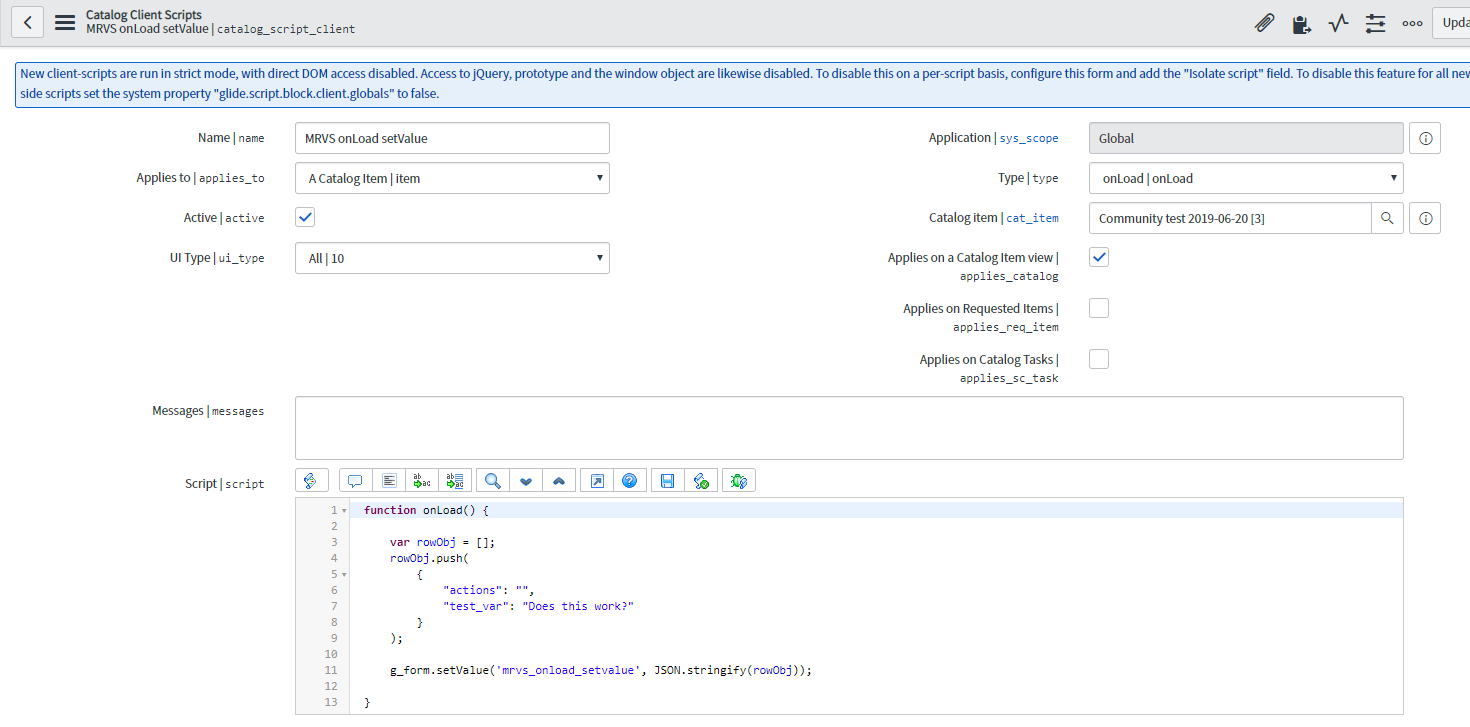
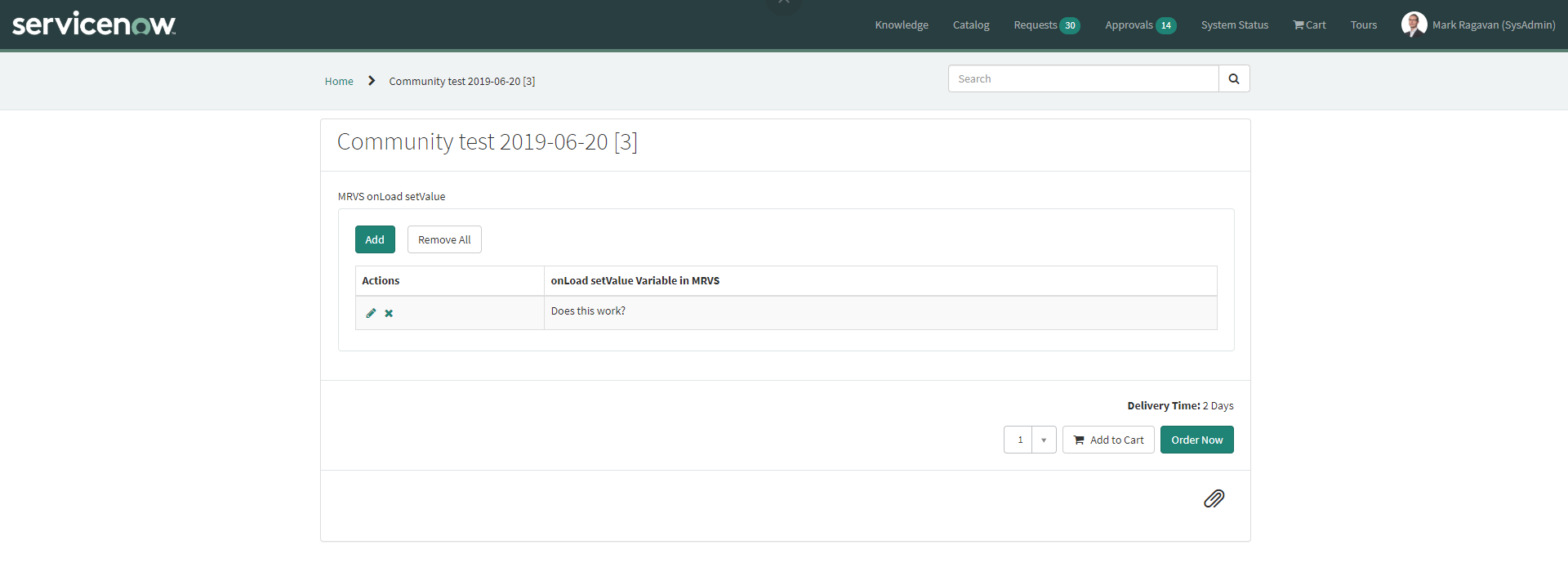
See below working example (tested in Madrid). It's about a Catalog Client Script on your Catalog Item (not on the MRVS!).


function onLoad() {

	var rowObj = [];
	rowObj.push(
		{
			"actions": "",
			"test_var": "Does this work?"
		}
	);

	g_form.setValue('mrvs_onload_setvalue', JSON.stringify(rowObj));

}
Note: setValue ==> MRVS name, in my case I named the MRVS "mrvs_onload_setvalue"
If my answer helped you in any way, please then mark it as helpful.
Kind regards,
Mark
---
Kind regards,
Mark Roethof
Independent ServiceNow Consultant
10x ServiceNow MVP
---
~444 Articles, Blogs, Videos, Podcasts, Share projects - Experiences from the field
- Mark as New
- Bookmark
- Subscribe
- Mute
- Subscribe to RSS Feed
- Permalink
- Report Inappropriate Content
06-19-2019 10:43 PM
Hi Eric
To prepopulate your variable set with a couple of rows, you could use the following OnLoad catalog client script, applying to the catalog item (not the variable set). In the below example, the variable set I have used is 'new_set' which has the variables 'var_1' and 'var_2'.
function onLoad() {
var arr = [];
arr.push({
var_1: "abc",
var_2: "123"
},
{
var_1: "xyz",
var_2: "456"
});
g_form.setValue('new_set',JSON.stringify(arr));
}
Please mark this answer CORRECT/HELPFUL if it solved your query.
- Mark as New
- Bookmark
- Subscribe
- Mute
- Subscribe to RSS Feed
- Permalink
- Report Inappropriate Content
06-19-2019 10:50 PM
Hi there,
See below working example (tested in Madrid). It's about a Catalog Client Script on your Catalog Item (not on the MRVS!).
function onLoad() {

	var rowObj = [];
	rowObj.push(
		{
			"actions": "",
			"test_var": "Does this work?"
		}
	);

	g_form.setValue('mrvs_onload_setvalue', JSON.stringify(rowObj));

}
Note: setValue ==> MRVS name, in my case I named the MRVS "mrvs_onload_setvalue"
If my answer helped you in any way, please then mark it as helpful.
Kind regards,
Mark
---
Kind regards,
Mark Roethof
Independent ServiceNow Consultant
10x ServiceNow MVP
---
~444 Articles, Blogs, Videos, Podcasts, Share projects - Experiences from the field
- Mark as New
- Bookmark
- Subscribe
- Mute
- Subscribe to RSS Feed
- Permalink
- Report Inappropriate Content
07-01-2019 03:44 AM
Hi Mark,
How to addrows from a table?
Thanks,
Diane
- Mark as New
- Bookmark
- Subscribe
- Mute
- Subscribe to RSS Feed
- Permalink
- Report Inappropriate Content
04-07-2025 11:28 PM
Hello Mark,
How to setValue if the field is reference type field?
Like suppose onload I am trying to pull logged in user details like company, country, manager.
and
Does the above script for on change user scenario
Thanks in advance.