- Mark as New
- Bookmark
- Subscribe
- Mute
- Subscribe to RSS Feed
- Permalink
- Report Inappropriate Content
11-11-2020 08:46 AM
I have two tables...Table A and Table B..
Table A is the main table....and I need to set Table B as embedded list in table A...
How can I achieve this requirement?
Solved! Go to Solution.


- Mark as New
- Bookmark
- Subscribe
- Mute
- Subscribe to RSS Feed
- Permalink
- Report Inappropriate Content
11-11-2020 10:05 AM
Hi there,
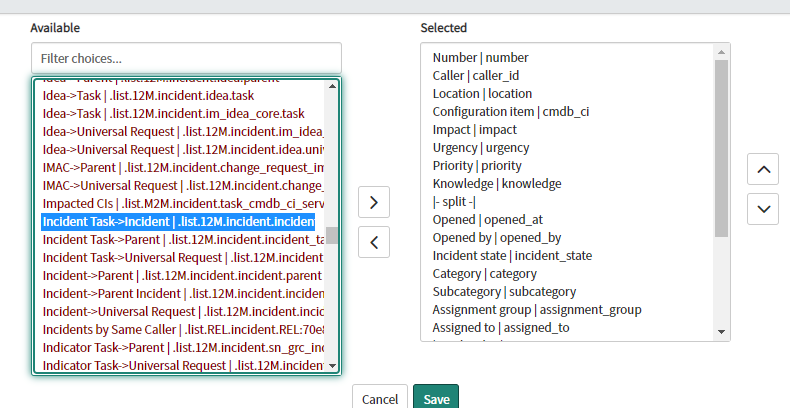
When Table B has a reference to Table A, then on the form lay-out of Table A, you can just add Table B.
For example:


If my answer helped you in any way, please then mark it as helpful.
Kind regards,
Mark
2020 ServiceNow Community MVP
2020 ServiceNow Developer MVP
---
LinkedIn
Community article list
Kind regards,
Mark Roethof
Independent ServiceNow Consultant
10x ServiceNow MVP
---
~444 Articles, Blogs, Videos, Podcasts, Share projects - Experiences from the field

- Mark as New
- Bookmark
- Subscribe
- Mute
- Subscribe to RSS Feed
- Permalink
- Report Inappropriate Content
11-12-2020 08:15 AM
Hi,
If table B has a field which refers table A then on the form of Table A you can show Table B as embedded list.
Regards
Ankur
Ankur
✨ Certified Technical Architect || ✨ 10x ServiceNow MVP || ✨ ServiceNow Community Leader
- Mark as New
- Bookmark
- Subscribe
- Mute
- Subscribe to RSS Feed
- Permalink
- Report Inappropriate Content
11-12-2020 08:40 AM
https://community.servicenow.com/community?id=community_question&sys_id=55d91e37db1c2410a08a1ea6689619cd