- Mark as New
- Bookmark
- Subscribe
- Mute
- Subscribe to RSS Feed
- Permalink
- Report Inappropriate Content
09-03-2020 07:38 AM
1. create a download button that should appear on the incident form to download the record in CSV format
Solved! Go to Solution.


- Mark as New
- Bookmark
- Subscribe
- Mute
- Subscribe to RSS Feed
- Permalink
- Report Inappropriate Content
09-03-2020 10:01 AM
This should help you
UI Action:
function downloadFile(){

	var sysId = g_form.getUniqueValue();
	var tableName = g_form.getTableName();
	var gDialog = new GlideDialogWindow('download_csv');
	gDialog.setSize('600','600');
	gDialog.setPreference('sysparm_sysID', sysId);
	gDialog.setPreference('sysparm_tableName', tableName);
	gDialog.setTitle('Download Incident');
	gDialog.render();
}
UI Page:
HTML:
<?xml version="1.0" encoding="utf-8" ?>
<j:jelly trim="false" xmlns:j="jelly:core" xmlns:g="glide" xmlns:j2="null" xmlns:g2="null">

	<g:ui_form>
		<input type="hidden" name="recordSysId" id="recordSysId" value="${sysparm_sysID}"/>
		<input type="hidden" name="tableName" id="tableName" value="${sysparm_tableName}"/><input type="button" onclick="downloadCSV()" name="Download" value="Download"></input>
		<input type="button" onclick="onCancel()" name="Cancel" value="Cancel"></input>
	</g:ui_form>

</j:jelly>
Client Script:
function downloadCSV(){

	var tableName = gel('tableName').value;
	var recordSysId = gel('recordSysId').value;
	top.window.open('/' + tableName + '.do?CSV&sys_id='+recordSysId); // Is working fine
	GlideDialogWindow.get().destroy();
}

function onCancel() {
	GlideDialogWindow.get().destroy();
	return false;
}
Output:

Once they click "Download" the record would be downloaded as CSV
If they click "Cancel" the dialog window will be closed
Regards
Ankur
Ankur
✨ Certified Technical Architect || ✨ 10x ServiceNow MVP || ✨ ServiceNow Community Leader
- Mark as New
- Bookmark
- Subscribe
- Mute
- Subscribe to RSS Feed
- Permalink
- Report Inappropriate Content
09-03-2020 07:55 AM
Hi Lara,
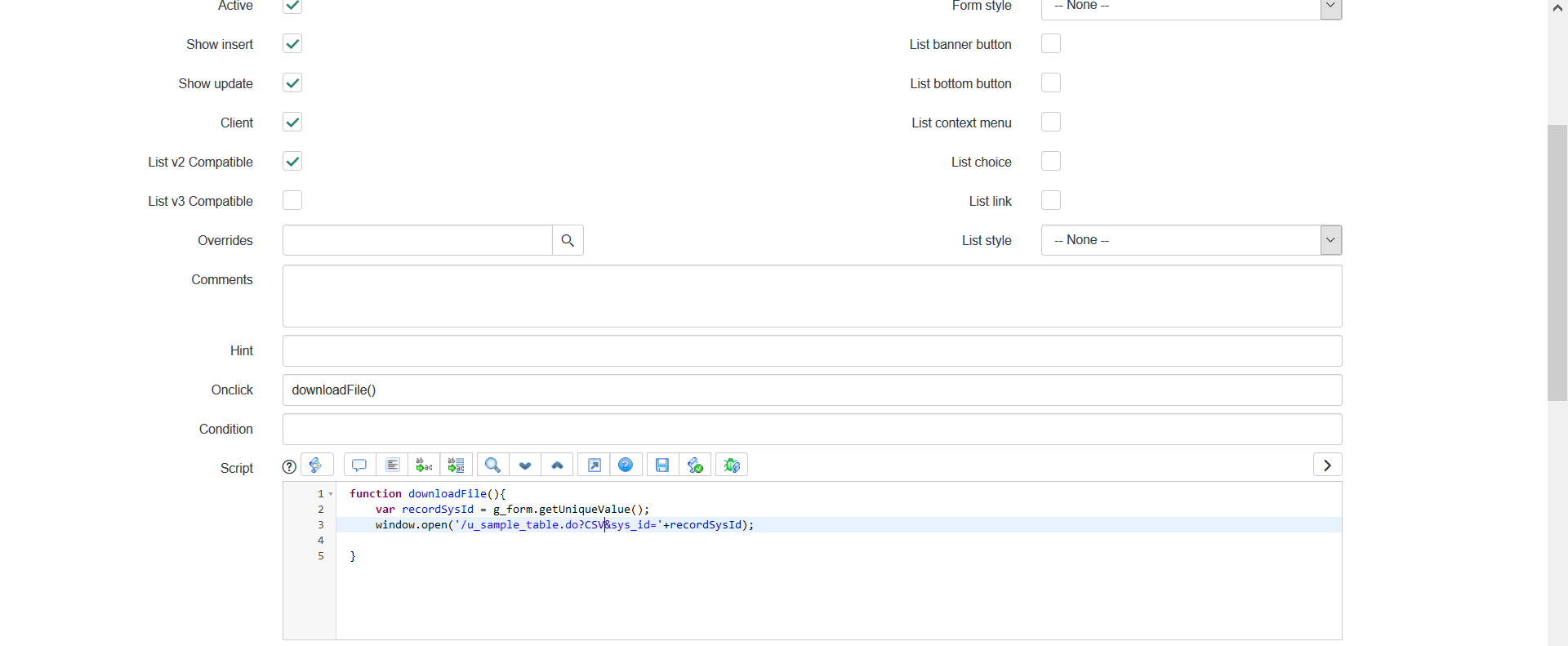
please use this in the client side UI Action to download the record as CSV
Onclick: downloadFile()
Script:
function downloadFile(){

var recordSysId = g_form.getUniqueValue();

var tableName = g_form.getTableName();

window.open('/' + tableName + '.do?CSV&sys_id='+recordSysId);

}
Screenshot below:

Regards
Ankur
Ankur
✨ Certified Technical Architect || ✨ 10x ServiceNow MVP || ✨ ServiceNow Community Leader
- Mark as New
- Bookmark
- Subscribe
- Mute
- Subscribe to RSS Feed
- Permalink
- Report Inappropriate Content
09-03-2020 08:36 AM
Hi Ankur,
window.open('/' + tableName + '.do?CSV&sys_id='+recordSysId);this is not working.
Adding
top.window.open('/' + tableName + '.do?PDF&sys_id='+recordSysId); // Is working fine
The Requirement is that it should populate a dialogue box and in that dialogue box download and Cancel button should appear.
If I click download then only it should download else cancel the download
- Mark as New
- Bookmark
- Subscribe
- Mute
- Subscribe to RSS Feed
- Permalink
- Report Inappropriate Content
09-03-2020 08:46 AM
Hi Lara,
Create UI Page and call that from UI Action
Regards
Ankur
Ankur
✨ Certified Technical Architect || ✨ 10x ServiceNow MVP || ✨ ServiceNow Community Leader
- Mark as New
- Bookmark
- Subscribe
- Mute
- Subscribe to RSS Feed
- Permalink
- Report Inappropriate Content
09-03-2020 10:01 AM
This should help you
UI Action:
function downloadFile(){

	var sysId = g_form.getUniqueValue();
	var tableName = g_form.getTableName();
	var gDialog = new GlideDialogWindow('download_csv');
	gDialog.setSize('600','600');
	gDialog.setPreference('sysparm_sysID', sysId);
	gDialog.setPreference('sysparm_tableName', tableName);
	gDialog.setTitle('Download Incident');
	gDialog.render();
}
UI Page:
HTML:
<?xml version="1.0" encoding="utf-8" ?>
<j:jelly trim="false" xmlns:j="jelly:core" xmlns:g="glide" xmlns:j2="null" xmlns:g2="null">

	<g:ui_form>
		<input type="hidden" name="recordSysId" id="recordSysId" value="${sysparm_sysID}"/>
		<input type="hidden" name="tableName" id="tableName" value="${sysparm_tableName}"/><input type="button" onclick="downloadCSV()" name="Download" value="Download"></input>
		<input type="button" onclick="onCancel()" name="Cancel" value="Cancel"></input>
	</g:ui_form>

</j:jelly>
Client Script:
function downloadCSV(){

	var tableName = gel('tableName').value;
	var recordSysId = gel('recordSysId').value;
	top.window.open('/' + tableName + '.do?CSV&sys_id='+recordSysId); // Is working fine
	GlideDialogWindow.get().destroy();
}

function onCancel() {
	GlideDialogWindow.get().destroy();
	return false;
}
Output:
Once they click "Download" the record would be downloaded as CSV
If they click "Cancel" the dialog window will be closed
Regards
Ankur
Ankur
✨ Certified Technical Architect || ✨ 10x ServiceNow MVP || ✨ ServiceNow Community Leader