- Mark as New
- Bookmark
- Subscribe
- Mute
- Subscribe to RSS Feed
- Permalink
- Report Inappropriate Content
11-01-2019 08:12 AM
Hi, I have been working on the ServiceNow platform for a while and now moved onto the development side (gone though the online training). However I am a little stuck and hoping for help or guidance.
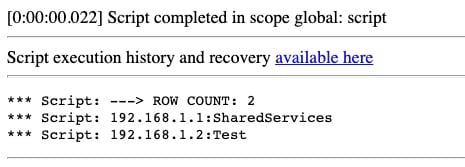
I have a script that works in Scripts - Background module. It basically displays data from a table:
var tableRecords = new GlideRecord('u_cisco_servers');

tableRecords.orderBy('location.name');
tableRecords.addActiveQuery();
tableRecords.query();

var message = gs.print('---> ROW COUNT: ' + tableRecords.getRowCount());

while (tableRecords.next()){
gs.print(tableRecords.getValue('u_ip_address') + ':' + tableRecords.u_membership_group);
}
This works as expected:

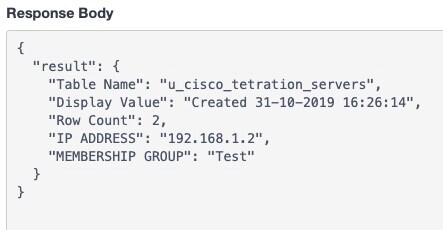
However when I add this script the the Scripted REST API module, it does not iterate through the rows and provide the same information via REST:
(function process(/*RESTAPIRequest*/ request, /*RESTAPIResponse*/ response) {

var tableRecords = new GlideRecord('u_cisco_servers');

 tableRecords.orderBy('location.name');
 tableRecords.addActiveQuery();
 tableRecords.query();

 var message = gs.print('---> ROW COUNT: ' + tableRecords.getRowCount());

while (tableRecords.next()){

var responseObj ={
"Table Name" : tableRecords.getTableName(),
"Display Value" : tableRecords.getDisplayValue(),
"Row Count" : tableRecords.getRowCount(),
"IP ADDRESS": tableRecords.getValue('u_ip_address'),
"MEMBERSHIP GROUP": tableRecords.getValue('u_membership_group'),
};

response.setBody(responseObj);

})(request, response);
This is the response:
I have looked online and through the documentation and can't seem to find the right information.
Any help would be appreciated.
Solved! Go to Solution.
- Labels:
-
Best Practices


- Mark as New
- Bookmark
- Subscribe
- Mute
- Subscribe to RSS Feed
- Permalink
- Report Inappropriate Content
11-04-2019 10:02 PM
Hi,
basically you need to declare an array and then push each json object in that array; the final script would look something like this
what you are doing is; as soon as you are entering into the while loop you are forming the json object and returning the response object
(function process(/*RESTAPIRequest*/ request, /*RESTAPIResponse*/ response) {

var arr = [];

var tableRecords = new GlideRecord('u_cisco_servers');

 tableRecords.orderBy('location.name');
 tableRecords.addActiveQuery();
 tableRecords.query();

 var message = gs.print('---> ROW COUNT: ' + tableRecords.getRowCount());

while (tableRecords.next()){

var responseObj ={
"Table Name" : tableRecords.getTableName(),
"Display Value" : tableRecords.getDisplayValue(),
"Row Count" : tableRecords.getRowCount(),
"IP ADDRESS": tableRecords.getValue('u_ip_address'),
"MEMBERSHIP GROUP": tableRecords.getValue('u_membership_group'),
};

arr.push(responseObj);

}

response.setBody(arr);

})(request, response);
Mark ✅ Correct if this solves your issue and also mark 👍 Helpful if you find my response worthy based on the impact.
Thanks
Ankur
Ankur
✨ Certified Technical Architect || ✨ 10x ServiceNow MVP || ✨ ServiceNow Community Leader

- Mark as New
- Bookmark
- Subscribe
- Mute
- Subscribe to RSS Feed
- Permalink
- Report Inappropriate Content
11-04-2019 09:54 PM
Hi,
Go through below link for scripted REST API,
Regards,
Pratiksha
- Mark as New
- Bookmark
- Subscribe
- Mute
- Subscribe to RSS Feed
- Permalink
- Report Inappropriate Content
11-04-2019 10:02 PM
Hi,
basically you need to declare an array and then push each json object in that array; the final script would look something like this
what you are doing is; as soon as you are entering into the while loop you are forming the json object and returning the response object
(function process(/*RESTAPIRequest*/ request, /*RESTAPIResponse*/ response) {

var arr = [];

var tableRecords = new GlideRecord('u_cisco_servers');

 tableRecords.orderBy('location.name');
 tableRecords.addActiveQuery();
 tableRecords.query();

 var message = gs.print('---> ROW COUNT: ' + tableRecords.getRowCount());

while (tableRecords.next()){

var responseObj ={
"Table Name" : tableRecords.getTableName(),
"Display Value" : tableRecords.getDisplayValue(),
"Row Count" : tableRecords.getRowCount(),
"IP ADDRESS": tableRecords.getValue('u_ip_address'),
"MEMBERSHIP GROUP": tableRecords.getValue('u_membership_group'),
};

arr.push(responseObj);

}

response.setBody(arr);

})(request, response);
Mark ✅ Correct if this solves your issue and also mark 👍 Helpful if you find my response worthy based on the impact.
Thanks
Ankur
Ankur
✨ Certified Technical Architect || ✨ 10x ServiceNow MVP || ✨ ServiceNow Community Leader
- Mark as New
- Bookmark
- Subscribe
- Mute
- Subscribe to RSS Feed
- Permalink
- Report Inappropriate Content
11-05-2019 12:32 AM
Thank you both, I managed to figure it out eventually with the array.