How to fix NaN error?

- Mark as New
- Bookmark
- Subscribe
- Mute
- Subscribe to RSS Feed
- Permalink
- Report Inappropriate Content
07-28-2018 12:18 PM
Hey guys, I have a script include as follows:
var ourcompanyClientDateTimeUtils = Class.create();
ourcompanyClientDateTimeUtils.prototype = Object.extendsObject(AbstractAjaxProcessor, {

withinBusinessHours: function() {
   var retVal; // Return value
   var pn     = this.getParameter('sysparm_hours');
   var requestedDate= this.getParameter('sysparm_requestedDate');
   var reqDateTime = new GlideDateTime(requestedDate);
   gs.log(reqDateTime);
   if(pn > 0){
       //Get a schedule by sys_id to calculate duration
	   var schedule = new GlideSchedule();
		//schedule.load('090eecae0a0a0b260077e1dfa71da828');
		 schedule.load('08fcd0830a0a0b2600079f56b1adb9ae');
	   //Get the current date/time in correct format for duration calculation
       var actualDateTime = new GlideDateTime();
       actualDateTime.setDisplayValue(gs.nowDateTime());

   //Create variable to capture the date we want to compare against
   //requestedDate = new GlideDateTime("2017-06-16 00:00:00");
   //Date difference calculated based on specified schedule
	   var difDay = schedule.duration(actualDateTime,reqDateTime).getDayPart()*24;
	   var difHour = schedule.duration(actualDateTime,reqDateTime).getDurationValue().split(':')[0].substr(-2);
	   var dif = difDay + parseInt(difHour.replace(/^[0]+/g,""));

	  gs.log("SMRZ - " + dif + "," + pn + "," + difDay + "," + difHour );

		if(dif >= pn){
		   retVal = "True";
	   } else {
   retVal = "False";
   }
   gs.log(retVal);
   return retVal;
   }

   },

    type: 'ourcompanyClientDateTimeUtils'
});
And I have a client script as follows:
function onChange(control, oldValue, newValue, isLoading) {
    g_form.hideFieldMsg('needed_by');
	if (isLoading || newValue == '') {
		return;
	}

   //Type appropriate comment here, and begin script below
	/************* This Checks whether the selected date is within a week **********/

   //alert(newValue);
   var ga = new GlideAjax('ourcompanyClientDateTimeUtils');
   ga.addParam ('sysparm_name','withinBusinessHours');
   ga.addParam ('sysparm_hours','45');
   ga.addParam ('sysparm_requestedDate',newValue);
   ga.getXML(CheckScheduleAgainstDatesParse);
}
   function CheckScheduleAgainstDatesParse (response) {
	  var answer = response.responseXML.documentElement.getAttribute("answer");
	   if(answer == 'False'){
                       g_form.showFieldMsg('needed_by','Please allow at least a week','error');
                       g_form.clearValue('needed_by');
               }
   }
The function is simple. I have a few dates in a form (catalog item) and I do not want the user to be able to select dates that are within a week of the current date. Currently, the form works for the dates that have passed or are within a week of the current date, however, it fails for some of the dates that are way ahead, like 08/09/2018 and 08/21/2018 and a few more. If a date that is within a week or has passed, the value should return to --None-- and the user should have to select again, however, when 08/09/2018 and 08/21/2018 and a few others are selected, the value changes to --None-- when it shouldn't.
I created a log in my script include as you can see. It is:
gs.log("SMRZ - " + dif + "," + pn + "," + difDay + "," + difHour );
For a date that has passed or is within a week, I get this log: SMRZ - NaN,45,0,00
However, for a date that is beyond a week and is not working, I get this log: NaN,45,72,00 (ofc the numbers vary depending on date but the NaN is still there)
For a date that is working perfectly fine, I get this log: 882,45,864,18
Please help me with this issue! Any urgent help will be greatly appreciated. I need to complete this in a few days!
Thank you!
- Labels:
-
Service Catalog

- Mark as New
- Bookmark
- Subscribe
- Mute
- Subscribe to RSS Feed
- Permalink
- Report Inappropriate Content
07-28-2018 01:09 PM
you replaced 0 with "" and then doing parseInt. You can not parseInt "". that is the issue
- Mark as New
- Bookmark
- Subscribe
- Mute
- Subscribe to RSS Feed
- Permalink
- Report Inappropriate Content
07-30-2018 05:07 AM
Hey Puneet, what line are you talking about?
If you're talking about this line:
var dif = difDay + parseInt(difHour.replace(/^[0]+/g,""));
I took out the parseInt, but a few dates like 08/21/2018 still did not work.
What is ironic now, is that if I do not make any changes to the code, the form seems to work fine. It works fine for a day or two and then breaks on its own. I feel like there might be something wrong with the schedule if that is that case since I don't think that a piece of code can remain the same but the functionality changes day after day.
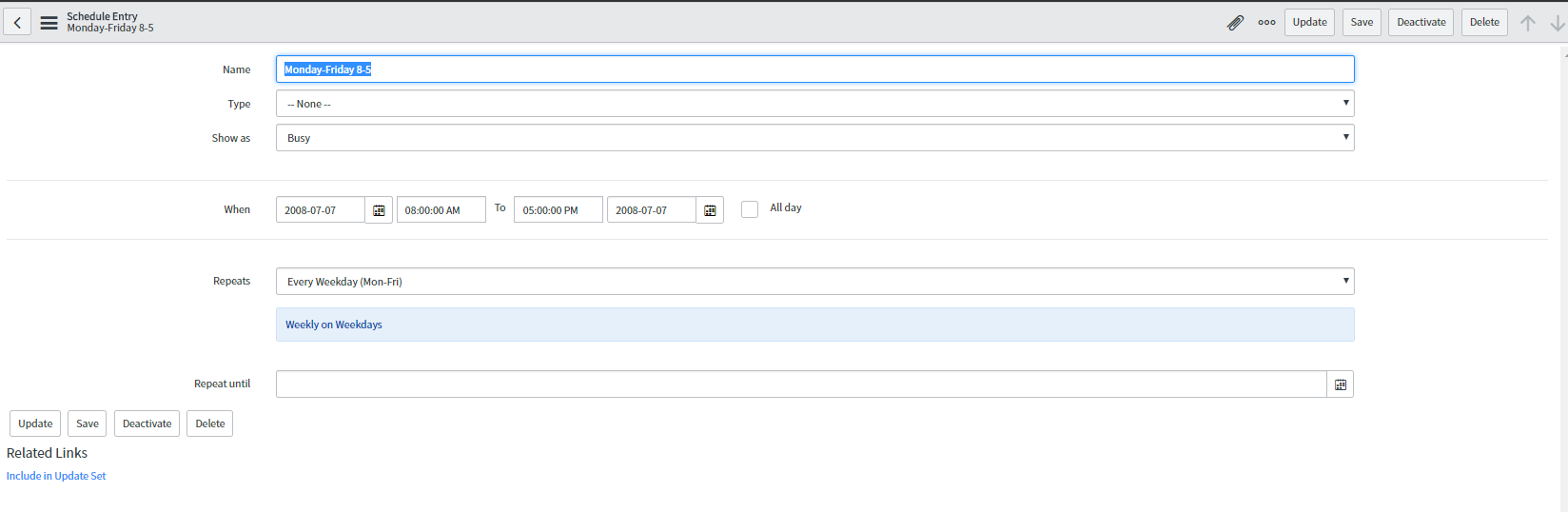
This is the schedule that I am using at the moment:

Do you think I should make a new schedule?
- Mark as New
- Bookmark
- Subscribe
- Mute
- Subscribe to RSS Feed
- Permalink
- Report Inappropriate Content
07-30-2018 05:46 AM
It will only work fine if difhour value is not 0 or not blank
- Mark as New
- Bookmark
- Subscribe
- Mute
- Subscribe to RSS Feed
- Permalink
- Report Inappropriate Content
07-30-2018 10:23 AM
So what should I change this code to:
var dif = difDay + parseInt(difHour.replace(/^[0]+/g,""));
??