How to remove roles from ACL?

- Mark as New
- Bookmark
- Subscribe
- Mute
- Subscribe to RSS Feed
- Permalink
- Report Inappropriate Content
02-09-2022 05:05 AM
Hi,
I have ACL- incident.*, type- record, operation- read.
Roles- itil, sn_incident_write
I want to remove the above roles from the ACL.
But i am not able to see the option to remove.
Also all the fields of ACL records are read only.
Could someone help me to resolve this?
Thanks in advance.
- Labels:
-
Incident Management


- Mark as New
- Bookmark
- Subscribe
- Mute
- Subscribe to RSS Feed
- Permalink
- Report Inappropriate Content
02-09-2022 05:43 AM
Seems your profile is not granted security_admin role.
Suggest you to check with your other Admin colleague to grant you security_admin role. Once done you need to logout & login again & perform above steps again.

- Mark as New
- Bookmark
- Subscribe
- Mute
- Subscribe to RSS Feed
- Permalink
- Report Inappropriate Content
02-09-2022 05:15 AM
Hello,
Please follow the below steps:-
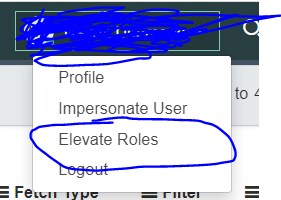
First click on the profile name and click on elevate roles:-

Then popup will be opened check the security check box and click on ok:-

Now open the ACL you will see the ACL is now editable:-
Then once opened click on the red cross for the roles you want to remove:-

Please mark answer correct/helpful based on Impact.
- Mark as New
- Bookmark
- Subscribe
- Mute
- Subscribe to RSS Feed
- Permalink
- Report Inappropriate Content
02-09-2022 05:40 AM
When i elevate role, i see the role 'workspace_list_admin' instead of security_admin. That is the reason i am not able to remove roles.
Any other solution?