- Mark as New
- Bookmark
- Subscribe
- Mute
- Subscribe to RSS Feed
- Permalink
- Report Inappropriate Content
04-22-2024 05:41 AM - edited 04-22-2024 05:42 AM
How can i transfer articles from one knowledge base to another knowledge base? What is the best practice for this?
Solved! Go to Solution.
- Mark as New
- Bookmark
- Subscribe
- Mute
- Subscribe to RSS Feed
- Permalink
- Report Inappropriate Content
04-22-2024 06:27 AM
Hi @Jayant Balyan ,
You can follow the steps mentioned in Servicenow support article please find the article below,
https://support.servicenow.com/kb?id=kb_article_view&sysparm_article=KB0852780
Please mark this comment as Correct Answer/Helpful if it helped you.
Regards,
Swathi Sarang
- Mark as New
- Bookmark
- Subscribe
- Mute
- Subscribe to RSS Feed
- Permalink
- Report Inappropriate Content
04-22-2024 06:02 AM
I think you can use this script;
var gr = new GlideRecord("kb_knowledge");
gr.addQuery("kb_knowledge_base","old_knowledge_base_sys_id");
gr.query();
while(gr.next()){
gr.setValue("kb_knowledge_base=<new_knowledge_base_sys_id");
gr.update();
}
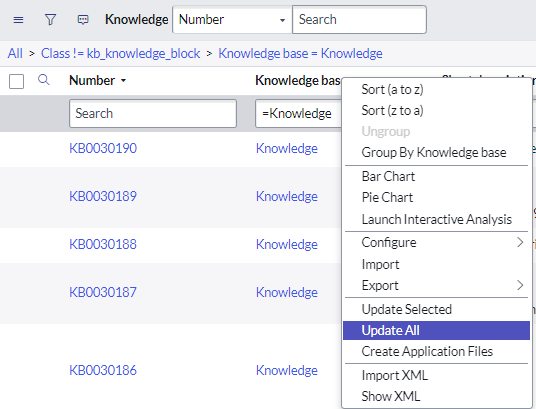
Or you can set from knowledge articles list via update all option.
- Mark as New
- Bookmark
- Subscribe
- Mute
- Subscribe to RSS Feed
- Permalink
- Report Inappropriate Content
04-22-2024 06:27 AM
Hi @Jayant Balyan ,
You can follow the steps mentioned in Servicenow support article please find the article below,
https://support.servicenow.com/kb?id=kb_article_view&sysparm_article=KB0852780
Please mark this comment as Correct Answer/Helpful if it helped you.
Regards,
Swathi Sarang
- Mark as New
- Bookmark
- Subscribe
- Mute
- Subscribe to RSS Feed
- Permalink
- Report Inappropriate Content
04-23-2024 02:25 AM
Hi @swathisarang98 ,
I tried this script, but it worked only for Version 1 Knowledge articles. for some Articles with V2 and V3 it did not include. how can i include logic so that it works for all the version articles.
Thanks & Regards,
Gautami
- Mark as New
- Bookmark
- Subscribe
- Mute
- Subscribe to RSS Feed
- Permalink
- Report Inappropriate Content
04-23-2024 10:47 AM
@SodadasiG try doing the below ,
Simply change the 'moveKBArticle' function to this in the previous code from servicenow support
function moveKBArticle(kbNumber) {
var kb = new GlideRecord('kb_knowledge');
kb.autoSysFields(false);
kb.setWorkflow(false);
kb.addQuery('number', kbNumber);
kb.query();
if (!kb.hasNext()){
gs.info('Did not find ' + kbNumber);
return;
}
while (kb.next()) {
kb.kb_knowledge_base = TARGET_KB_SYS_ID;
kb.kb_category = TARGET_KB_CATEGORY;
kb.update();
gs.info('Moved ' + kbNumber + ' to Knowledge Base ' + TARGET_KB_SYS_ID);
}
}
Please mark this comment as Correct Answer/Helpful if it helped you.
Regards,
Swathi Sarang