
- Mark as New
- Bookmark
- Subscribe
- Mute
- Subscribe to RSS Feed
- Permalink
- Report Inappropriate Content
05-12-2022 11:17 AM
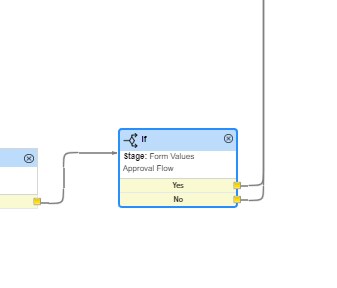
I am trying to make a validation with 5 conditions.
I tried using "If" block from the workflow tools.
it gives only two conditions to validate either yes or no.
My requirement is, i need to validate 5 conditions.

My sample code
answer = check();
function check(){
if(workflow.scratchpad.groupNo==1)
return 1;
else if (workflow.scratchpad.groupNo==2)
return 2;
else if (workflow.scratchpad.groupNo==3)
return 3;
else if (workflow.scratchpad.groupNo==4)
return 4;
else if (workflow.scratchpad.groupNo==5)
return 5;
}
please let me know which workflow tool to be used to make multiple validations.
-------------------
To make more clear....
if blockhas only 2 conditions to check
yes
no
i need 5 conditions to be validated...and a flow need to be generated after each condition...
1
2
3
4
5
If you need more details, please let me know
Solved! Go to Solution.
- Labels:
-
Request Management
-
Service Catalog
- Mark as New
- Bookmark
- Subscribe
- Mute
- Subscribe to RSS Feed
- Permalink
- Report Inappropriate Content
05-19-2022 10:11 AM
Thanks for the reply Musab.
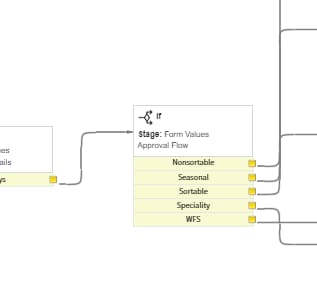
I managed to apply multiple condition through IF block itself

I applied the following code and it worked fine
answer = check();
function check()
{
current.comments = "group is -"+ workflow.scratchpad.groupName;
if (workflow.scratchpad.groupName == 'Nonsortable')
{
current.comments = "group is -"+ workflow.scratchpad.groupName;
return 'Nonsortable';
}
if (workflow.scratchpad.groupName == 'Seasonal')
{
current.comments = "group is -"+ workflow.scratchpad.groupName;
return 'Seasonal';
}
if (workflow.scratchpad.groupName == 'Sortable')
{
current.comments = "group is -"+ workflow.scratchpad.groupName;
return 'Sortable';
}
if (workflow.scratchpad.groupName == 'Specialty')
{
current.comments = "group is -"+ workflow.scratchpad.groupName;
return 'Specialty';
}
if (workflow.scratchpad.groupName == 'WFS')
{
current.comments = "group is -"+ workflow.scratchpad.groupName;
return 'WFS';
}
}

- Mark as New
- Bookmark
- Subscribe
- Mute
- Subscribe to RSS Feed
- Permalink
- Report Inappropriate Content
05-12-2022 10:23 PM
Hi Raffi,
Try 'Switch' activity in that case. Mark my answer as correct if that helps.
Regards
- Mark as New
- Bookmark
- Subscribe
- Mute
- Subscribe to RSS Feed
- Permalink
- Report Inappropriate Content
05-19-2022 10:11 AM
Thanks for the reply Musab.
I managed to apply multiple condition through IF block itself
I applied the following code and it worked fine
answer = check();
function check()
{
current.comments = "group is -"+ workflow.scratchpad.groupName;
if (workflow.scratchpad.groupName == 'Nonsortable')
{
current.comments = "group is -"+ workflow.scratchpad.groupName;
return 'Nonsortable';
}
if (workflow.scratchpad.groupName == 'Seasonal')
{
current.comments = "group is -"+ workflow.scratchpad.groupName;
return 'Seasonal';
}
if (workflow.scratchpad.groupName == 'Sortable')
{
current.comments = "group is -"+ workflow.scratchpad.groupName;
return 'Sortable';
}
if (workflow.scratchpad.groupName == 'Specialty')
{
current.comments = "group is -"+ workflow.scratchpad.groupName;
return 'Specialty';
}
if (workflow.scratchpad.groupName == 'WFS')
{
current.comments = "group is -"+ workflow.scratchpad.groupName;
return 'WFS';
}
}
