Make Risk field read only in change request form

- Mark as New
- Bookmark
- Subscribe
- Mute
- Subscribe to RSS Feed
- Permalink
- Report Inappropriate Content
03-06-2025 11:02 PM
Hi , I am currently working on few use cases where I am facing a challenge on one of the use cases, which is described below.
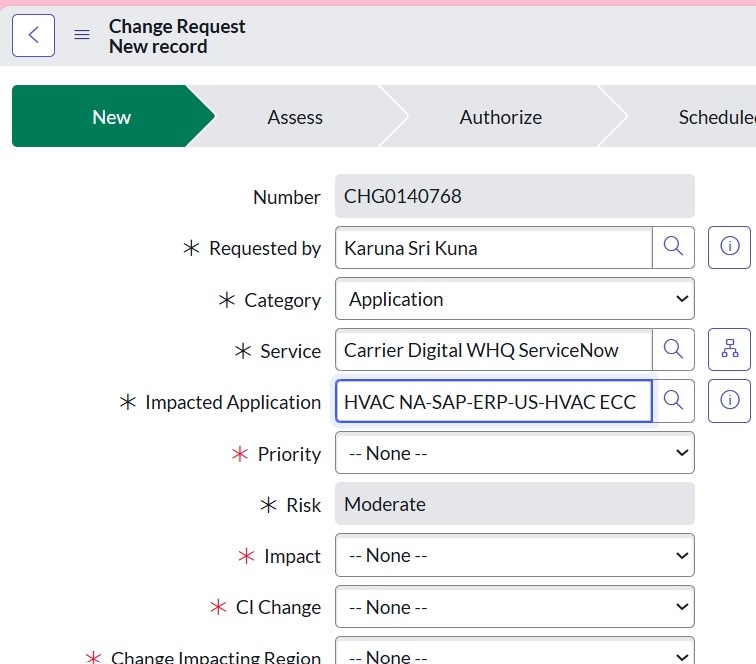
In the change request form, when we select "Impacted application" as "xyz" or " Affected CI" as "123" or "Service Related CIs" as "abc" then "Risk" field should be default to "moderate" and read only. To achieve this, I have used below client script:

- Mark as New
- Bookmark
- Subscribe
- Mute
- Subscribe to RSS Feed
- Permalink
- Report Inappropriate Content
03-06-2025 11:24 PM
Hi @karunasrikuna ,
You can try this
1. Fix the Client Script (onChange Event):
function onChange(control, oldValue, newValue, isLoading) {
if (isLoading || newValue == '') {
return;
}

var impApp = g_form.getValue('u_impacted_application');
var ci = g_form.getValue('u_related_ci_list');
var affci = g_form.getValue('ci_item');

if (impApp == 'xyz' || ci == 'abc' || affci == '123') {
g_form.setValue('risk', 3);
g_form.setReadOnly('risk', true);
}
}
2. Add an onLoad Client Script to Maintain Read-Only Property After Submission:
function onLoad() {
var impApp = g_form.getValue('u_impacted_application');
var ci = g_form.getValue('u_related_ci_list');
var affci = g_form.getValue('ci_item');

if (impApp == 'xyz' || ci == 'abc' || affci == '123') {
g_form.setValue('risk', 3);
g_form.setReadOnly('risk', true);
}
}
If this helps resolve your query, please accept the answer and mark it as helpful.
Best Regards,
Siddhesh Jadhav


- Mark as New
- Bookmark
- Subscribe
- Mute
- Subscribe to RSS Feed
- Permalink
- Report Inappropriate Content
03-06-2025 11:35 PM
ensure your onChange runs onLoad as well
function onChange(control, oldValue, newValue, isLoading) {
    if (isLoading) {

        // your here
        var impApp = g_form.getValue('u_impacted_application');
        var ci = g_form.getValue('u_related_ci_list');
        var affci = g_form.getValue('ci_item');
        if (impApp == 'xyz'); {
            g_form.setValue('risk', 3);
            g_form.setReadOnly('risk', true);

        }
        if (ci == 'abc'); {
            g_form.setValue('risk', 3);
            g_form.setReadOnly('risk', true);

        }
        if (affci == '123'); {
            g_form.setValue('risk', 3);
            g_form.setReadOnly('risk', true);
        }

        return;
    }

   // your further logic here


}
If my response helped please mark it correct and close the thread so that it benefits future readers.
Ankur
✨ Certified Technical Architect || ✨ 10x ServiceNow MVP || ✨ ServiceNow Community Leader

- Mark as New
- Bookmark
- Subscribe
- Mute
- Subscribe to RSS Feed
- Permalink
- Report Inappropriate Content
03-06-2025 11:43 PM
Please add an onLoad script as well
function onLoad() {
var impApp = g_form.getValue('u_impacted_application');
var ci = g_form.getValue('u_related_ci_list');
var affci = g_form.getValue('ci_item');

if (impApp == 'xyz' || ci == 'abc' || affci == '123') {
g_form.setValue('risk', 3);
g_form.setReadOnly('risk', true);
}
}
Thanks & Best regards,
Medi

- Mark as New
- Bookmark
- Subscribe
- Mute
- Subscribe to RSS Feed
- Permalink
- Report Inappropriate Content
03-06-2025 11:57 PM
The experts have already answered, but when you run the risk assessment, the outcome may change based on the findings from the assessment.
Regards
Dr Atul G. - Learn N Grow Together ServiceNow Techno - Functional Trainer
LinkedIn: https://www.linkedin.com/in/dratulgrover
YouTube: https://www.youtube.com/@LearnNGrowTogetherwithAtulG
******************************************************************************************