- Mark as New
- Bookmark
- Subscribe
- Mute
- Subscribe to RSS Feed
- Permalink
- Report Inappropriate Content
11-18-2025 09:25 AM
We increased the container size using page css. This is working fine.
.myHeight{
height: 550px
}
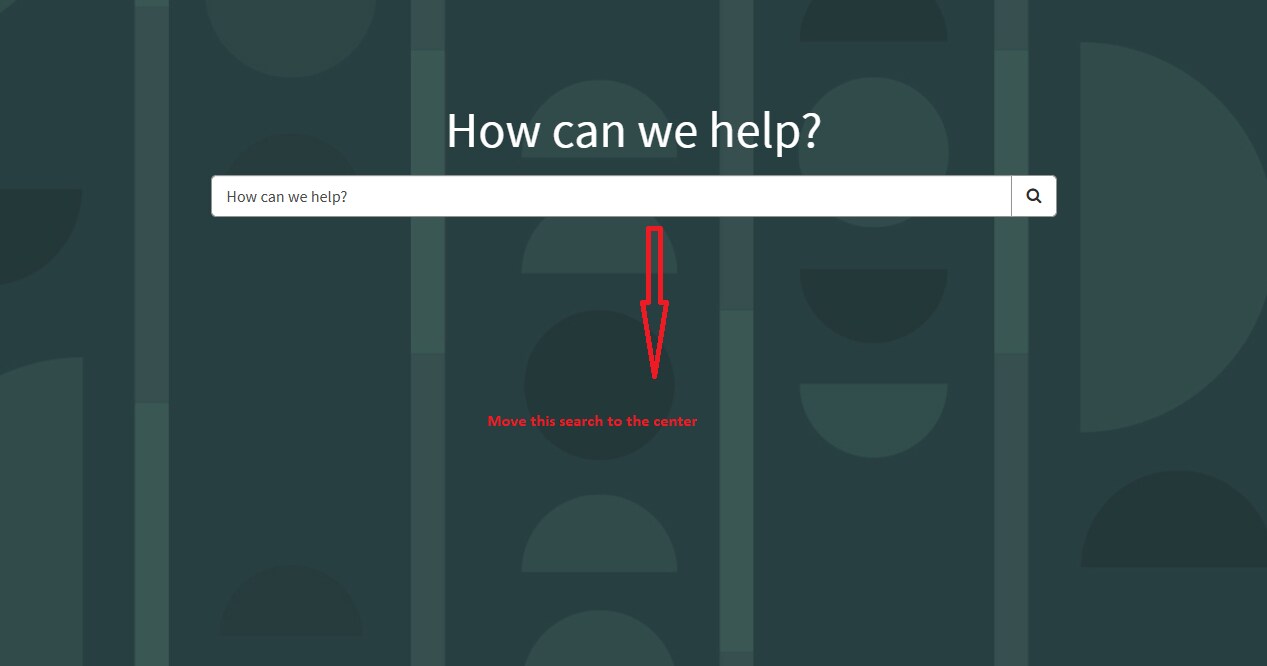
Now the search widget is tucked on the top - how can I move the search widget to the center of the container. Please see the image. TIA
Solved! Go to Solution.

- Mark as New
- Bookmark
- Subscribe
- Mute
- Subscribe to RSS Feed
- Permalink
- Report Inappropriate Content
11-19-2025 02:13 AM
Hello @snowcone ,
You can also add css like following
display: flex;
justify-content : center ;
align-items : center ;
which will automatically brings your content to the center of the container in which you are using the homesearch widget.
Mark it as correct and helpful if it helps you and solve your requirnment .
Regards,
Aditya

- Mark as New
- Bookmark
- Subscribe
- Mute
- Subscribe to RSS Feed
- Permalink
- Report Inappropriate Content
11-18-2025 10:56 AM
Hi @snowcone ,
Please try with below CSS
position: relative;
top: 150px;
Please mark my answer correct and helpful if this works for you
Thanks and Regards,
Sarthak
- Mark as New
- Bookmark
- Subscribe
- Mute
- Subscribe to RSS Feed
- Permalink
- Report Inappropriate Content
11-19-2025 09:45 AM
Thank you Mega Sage for your reply. I tried the following, it is removing my 550px. I want to keep the height: 550px and then center the widgets
.myHeight{
height: 550px
position: relative;
top: 150px
}
- Mark as New
- Bookmark
- Subscribe
- Mute
- Subscribe to RSS Feed
- Permalink
- Report Inappropriate Content
11-19-2025 02:13 AM
Hello @snowcone ,
You can also add css like following
display: flex;
justify-content : center ;
align-items : center ;
which will automatically brings your content to the center of the container in which you are using the homesearch widget.
Mark it as correct and helpful if it helps you and solve your requirnment .
Regards,
Aditya
- Mark as New
- Bookmark
- Subscribe
- Mute
- Subscribe to RSS Feed
- Permalink
- Report Inappropriate Content
11-19-2025 09:55 AM
This is the final CSS
.myHeight{
height: 850px;
position: relative;
top: 150px
}