- Mark as New
- Bookmark
- Subscribe
- Mute
- Subscribe to RSS Feed
- Permalink
- Report Inappropriate Content
04-05-2022 05:23 AM
First attempt at creating a Process automation. Inbound e-mail to create an incident, set the categories, and assign to level 1 help desk group. I can trigger on subject Ok but would rather trigger on the sending address of the e-mail.
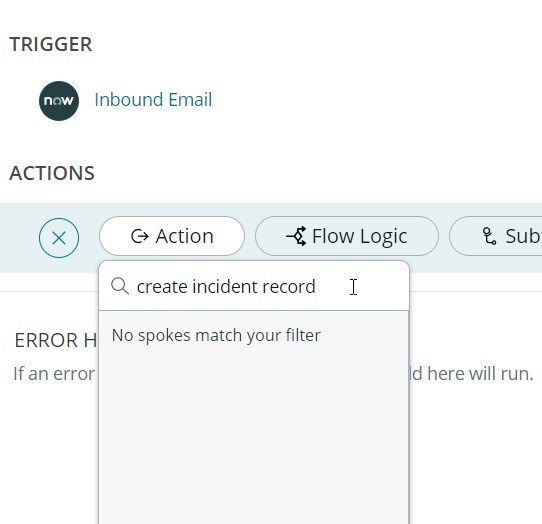
I cannot seem to find the action to set the category selection.
And I get an error attempting to set the assignment group - Value of field record is not a GlideRecord Any detailed guide to assist on this new adventure?
Solved! Go to Solution.
- Labels:
-
Continual Improvement (CIM)

- Mark as New
- Bookmark
- Subscribe
- Mute
- Subscribe to RSS Feed
- Permalink
- Report Inappropriate Content
04-05-2022 09:23 PM
You will find "Create Record" action under "ServiceNow Core" spoke. Please refer to the screenshot below

Thanks & Regards,
Vasanth
- Mark as New
- Bookmark
- Subscribe
- Mute
- Subscribe to RSS Feed
- Permalink
- Report Inappropriate Content
04-05-2022 05:27 AM
Are you trying it from Flow Designer?
Thanks & Regards,
Vasanth
- Mark as New
- Bookmark
- Subscribe
- Mute
- Subscribe to RSS Feed
- Permalink
- Report Inappropriate Content
04-05-2022 05:37 AM
Yes - First attempt so very new to the tools
- Mark as New
- Bookmark
- Subscribe
- Mute
- Subscribe to RSS Feed
- Permalink
- Report Inappropriate Content
04-05-2022 05:45 AM

- Mark as New
- Bookmark
- Subscribe
- Mute
- Subscribe to RSS Feed
- Permalink
- Report Inappropriate Content
04-05-2022 05:54 AM