- Mark as New
- Bookmark
- Subscribe
- Mute
- Subscribe to RSS Feed
- Permalink
- Report Inappropriate Content
09-16-2022 03:08 AM
Hi Experts ,
Have a requirement when the tags are added to the change request, those added tags should get populate in the cab_agenda_item table for the associated change request,
Similarly when the tags are removed from change in change_request table those should get removed in cab_agenda_item table records as well.


Kindly help me on achieving this with script (Business rule) .
Thanks,
Chaithanya
Solved! Go to Solution.
- Labels:
-
Change Management

- Mark as New
- Bookmark
- Subscribe
- Mute
- Subscribe to RSS Feed
- Permalink
- Report Inappropriate Content
09-16-2022 03:51 AM
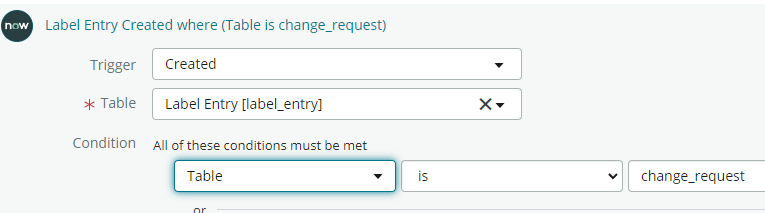
Why bother with a BR when you can build it in Flow Designer with zero code?
TRIGGER:

STEPS
1. Look up ALL CAB Agenda Item Records where Task = Trigger Record's Table Key

2. For each item in 1

3. Create Record in the Label Entry table
- Label = Trigger Record's Label
- Table = Trigger Record's Table (ALTERNATIVELY the Table entry from 1)
- Table Key = 2.Sys_id


- Mark as New
- Bookmark
- Subscribe
- Mute
- Subscribe to RSS Feed
- Permalink
- Report Inappropriate Content
09-16-2022 03:39 AM
HI
Just now I have tried you have achieve by gliding to label_entry and label table.
Sample logic below:
var labelEntry=new GlideRecord("label_entry");
labelEntry.initialize();
labelEntry.title = 'Change Agenda SCript';
labelEntry.table = 'cab_agenda_item';
labelEntry.label = "abad36141b02d110558d639bbc4bcbb0";  //sys_id of the label
labelEntry.url = 'cab_agenda_item.do?sys_id=016e243e1bd71010a77c877ddc4bcb08&sysparm_view=';
labelEntry.table_key = "016e243e1bd71010a77c877ddc4bcb08";
labelEntry.read = 'yes';
labelEntry.insert();
You can implement the above logic in your BR
Thanks,
Murthy
Murthy
- Mark as New
- Bookmark
- Subscribe
- Mute
- Subscribe to RSS Feed
- Permalink
- Report Inappropriate Content
09-16-2022 07:35 AM
Hi
Could you please provide the script in more detail.
Thanks
- Mark as New
- Bookmark
- Subscribe
- Mute
- Subscribe to RSS Feed
- Permalink
- Report Inappropriate Content
09-16-2022 03:51 AM
Why bother with a BR when you can build it in Flow Designer with zero code?
TRIGGER:
STEPS
1. Look up ALL CAB Agenda Item Records where Task = Trigger Record's Table Key
2. For each item in 1
3. Create Record in the Label Entry table
- Label = Trigger Record's Label
- Table = Trigger Record's Table (ALTERNATIVELY the Table entry from 1)
- Table Key = 2.Sys_id
- Mark as New
- Bookmark
- Subscribe
- Mute
- Subscribe to RSS Feed
- Permalink
- Report Inappropriate Content
09-16-2022 07:35 AM
Hi
I have tried it , But It is not working.
Thanks