- Mark as New
- Bookmark
- Subscribe
- Mute
- Subscribe to RSS Feed
- Permalink
- Report Inappropriate Content
07-24-2018 01:58 AM
Hi Experts,
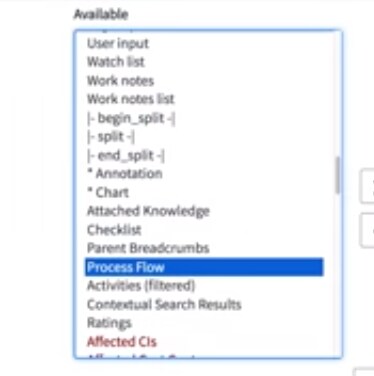
I have created new process flows entries for my Incident table:

but when I access my Incident form cannot see Process Flow in the list.

Based on the training video: https://www.youtube.com/watch?v=ve52RRXjAbs&t=127s
it should look like this:

any idea, why it is not working for me?
Regards,
Marcin
Solved! Go to Solution.
- Labels:
-
Incident Management

- Mark as New
- Bookmark
- Subscribe
- Mute
- Subscribe to RSS Feed
- Permalink
- Report Inappropriate Content
07-24-2018 02:07 AM
Hi Marcin,
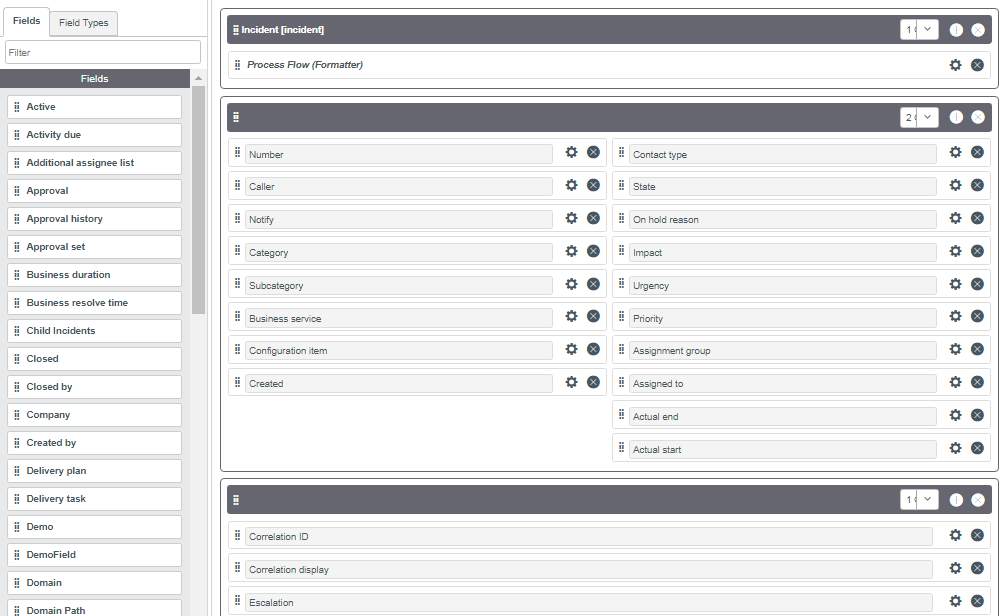
Go to form design > create a new section > give it a name (say, Incident) > drag that section at the top > save
Check the Screenshot Attached
Mark if Correct/Helpful
Thanks
Ajay
- Mark as New
- Bookmark
- Subscribe
- Mute
- Subscribe to RSS Feed
- Permalink
- Report Inappropriate Content
07-24-2018 02:07 AM
- Mark as New
- Bookmark
- Subscribe
- Mute
- Subscribe to RSS Feed
- Permalink
- Report Inappropriate Content
07-24-2018 02:39 AM
Thank you Ajay, that worked like a charm!