Display custom label in Report

- Mark as New
- Bookmark
- Subscribe
- Mute
- Subscribe to RSS Feed
- Permalink
- Report Inappropriate Content
10-27-2020 09:38 AM
Hi,
I have created a report on task_sla table and grouped by Has Breached(it contains True and False values) , In the report it is displaying 'true' or 'false ' is there any possiblity to modify this text
Like replacing True- with Breached Ticket and
False - with Not Breached Ticket

- Labels:
-
Reporting


- Mark as New
- Bookmark
- Subscribe
- Mute
- Subscribe to RSS Feed
- Permalink
- Report Inappropriate Content
10-27-2020 09:49 AM
Hi Gowtham,
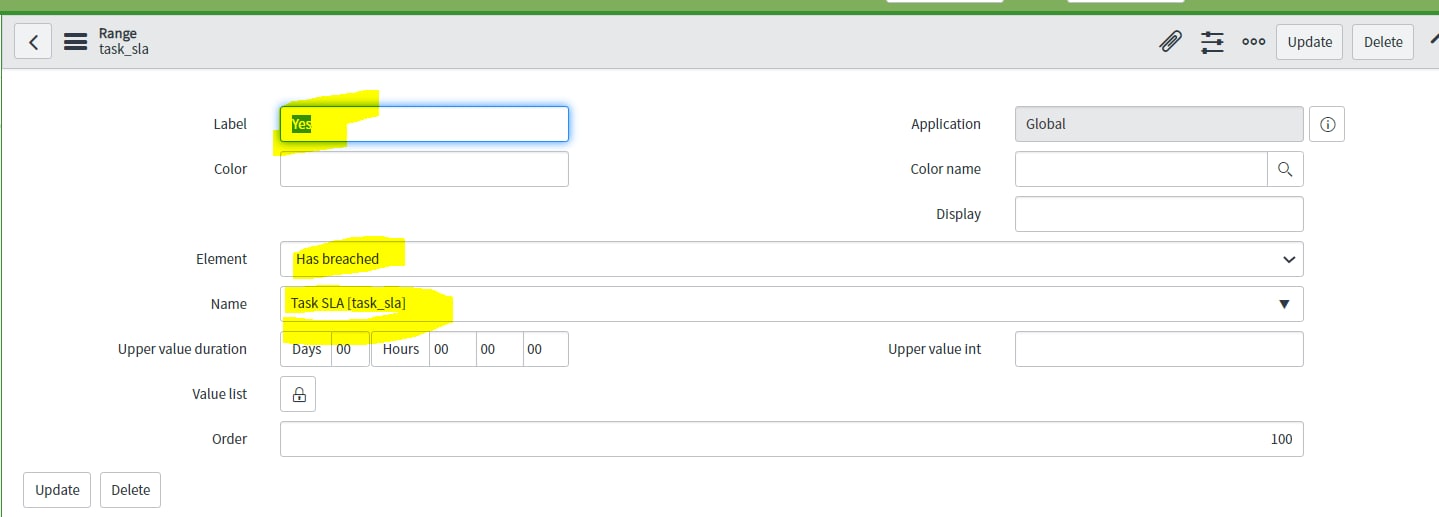
Can you do below.
1. Report >> Administration >> Report Ranges
2. Create 2 new entries as below.

3. Additionally, you can refer link for a check.

- Mark as New
- Bookmark
- Subscribe
- Mute
- Subscribe to RSS Feed
- Permalink
- Report Inappropriate Content
10-29-2020 08:38 AM
Hi,
1) I created a new choice field with two choices (values 1 and 0). You can choose the label name that you need for your report.
2) I wrote a Fix script to populate my new field with the values of the has-breached field.
3) I wrote a scheduled script using the same code as I used in the fix script, so that that my new field is daily populated with the current state of the has-breached field.
4) I used the new field to run the report and it works.
--> I'm sure this is not the best-practice approach, but it works. I couldn't find out yet where the has-breached field is being populated. If this were clear, I guess you could also populate your new field directly there. But then again, maybe this is not best-practice either.
- Mark as New
- Bookmark
- Subscribe
- Mute
- Subscribe to RSS Feed
- Permalink
- Report Inappropriate Content
03-16-2022 05:38 AM
In step 3, instead of using a Scheduled Script, maybe it would be better to use a Business Rule on update/insert, with the condition that has-breached changes, that updates your field value accordingly. This has the upside of always having the value of your field up-to-date.


- Mark as New
- Bookmark
- Subscribe
- Mute
- Subscribe to RSS Feed
- Permalink
- Report Inappropriate Content
10-30-2020 10:15 AM
You might be able to do this with multiple data sets each with its own label. This is not ideal, but you would easy to do.