- Mark as New
- Bookmark
- Subscribe
- Mute
- Subscribe to RSS Feed
- Permalink
- Report Inappropriate Content
05-19-2022 09:06 AM
Hello, I am trying to create a PA widget that has a dynamic filter (show cumulative costs of a single project). Then I want to add this PA widget to a Service Portal page with the "Performance Analytics" widget. However, there does not seem to be any way how I can pass information from the Service Portal widget to the PA report. When adding a widget of type "Performance Analytics" to a Service Portal page I can only select a PA widget and that's it. How would I restrict the data being shown in the PA report to only include costs related to the current project/record? I have the sys_id of the current project in the URL, I just need to find a ways to actually pass this information to the PA widget.
My exact use case:
In the Service Portal page for PPM status reports, I want to add new PA report. Adding the PA widget to the page with the "Performance Analytics" widget is not a problem. However, I somehow have to filter the data shown in the PA widget, as obviously the cost report should only contain costs of the current project the status report is about, not of all projects. I guess I would need some scripting, like reading the current project sys_id from the URL and then pass this to the PA widget. However, I cannot find any approaches how this could be done.
Anyone has experience restricting data that is being shown in a PA widget with a parameter that gets read out from the URL? Or any other ideas how I could solve my problem?
Solved! Go to Solution.
- Mark as New
- Bookmark
- Subscribe
- Mute
- Subscribe to RSS Feed
- Permalink
- Report Inappropriate Content
05-23-2022 12:16 AM
I actually did some more digging and found a solution to my problem. The short answer is: For a time PA widget, the whole logic from extracting breakdown source and element from the URL is already implemented (just not easily visible and hidden in JS includes). You can just add the following parameters to your URL:
- jvar_breakdown_source: sys_id of breakdown source
- jvar_breakdown_element: sys_id of element
Those values will automatically be passed over when loading the widget and what you will get is a prefiltered PA widget in your Service Portal.
For those interested in more detail:
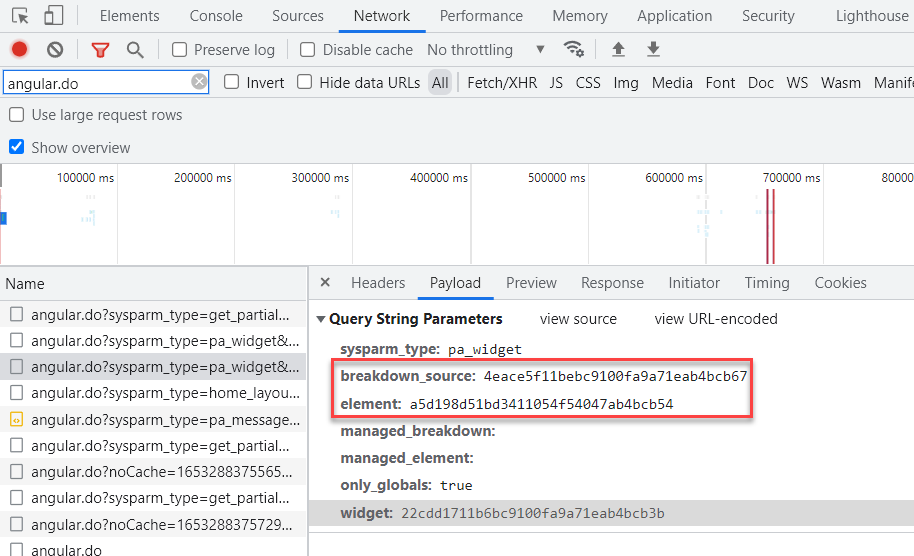
If you look at the call made when you select a breakdown in a dashboard, you can see there will be an "angular.do" call where the following two parameters are passed:

If you have a look at the "Performance Analytics" widget, you will see that you could just pass those parameters into the "angular.do" call yourself (e.g. read it from the URL and then set it in the "params" object). However, you have to be aware that the "httpOptions" below actually only seem to be used if it is a react widget (see "isReactWidget" function to check which widgets are react widgets).

In our case, the PA widget we want to show is of type time, and this is (currently?) not a react widget. Therefore the widget seems to get loaded with another mechanism. I did further digging and found that the actual loading of the widget for this case is done with a JS include "paWidgetTime":

If you set breakpoints, you will see in a time report, the data gets loaded in the function "fetchIndicator", and this function already seems to try to get breakdown parameters:

If you do further digging into the "getCurrentBreakdownParams", you will see the code will actually already read the parameters for "breakdown_source" and "element" from the URL by looking for the following URL parameters: jvar_breakdown_source and jvar_breakdown_element.
- Mark as New
- Bookmark
- Subscribe
- Mute
- Subscribe to RSS Feed
- Permalink
- Report Inappropriate Content
05-23-2022 12:16 AM
I actually did some more digging and found a solution to my problem. The short answer is: For a time PA widget, the whole logic from extracting breakdown source and element from the URL is already implemented (just not easily visible and hidden in JS includes). You can just add the following parameters to your URL:
- jvar_breakdown_source: sys_id of breakdown source
- jvar_breakdown_element: sys_id of element
Those values will automatically be passed over when loading the widget and what you will get is a prefiltered PA widget in your Service Portal.
For those interested in more detail:
If you look at the call made when you select a breakdown in a dashboard, you can see there will be an "angular.do" call where the following two parameters are passed:
If you have a look at the "Performance Analytics" widget, you will see that you could just pass those parameters into the "angular.do" call yourself (e.g. read it from the URL and then set it in the "params" object). However, you have to be aware that the "httpOptions" below actually only seem to be used if it is a react widget (see "isReactWidget" function to check which widgets are react widgets).
In our case, the PA widget we want to show is of type time, and this is (currently?) not a react widget. Therefore the widget seems to get loaded with another mechanism. I did further digging and found that the actual loading of the widget for this case is done with a JS include "paWidgetTime":
If you set breakpoints, you will see in a time report, the data gets loaded in the function "fetchIndicator", and this function already seems to try to get breakdown parameters:
If you do further digging into the "getCurrentBreakdownParams", you will see the code will actually already read the parameters for "breakdown_source" and "element" from the URL by looking for the following URL parameters: jvar_breakdown_source and jvar_breakdown_element.


- Mark as New
- Bookmark
- Subscribe
- Mute
- Subscribe to RSS Feed
- Permalink
- Report Inappropriate Content
02-20-2025 03:34 PM
I am trying to do this exact same thing but with a Type = Text widget and when I pass the parameters: jvar_breakdown_source and jvar_breakdown_element via the URL I am not successful. Are these parameters not available when then Type = Text? Are there any parameters like this when Type = Text?