- Mark as New
- Bookmark
- Subscribe
- Mute
- Subscribe to RSS Feed
- Permalink
- Report Inappropriate Content
02-05-2026 03:51 PM
After spending quite a bit of time searching the forum for answers, I’m reaching out for help.
I installed a Yokohama PDI, activated SAM Pro with demo data, and then upgraded the instance to Zurich. After the upgrade, I attempted to install the “Software Asset Management Playbooks and Guided Setups” plugin, but it does not appear under System Applications.
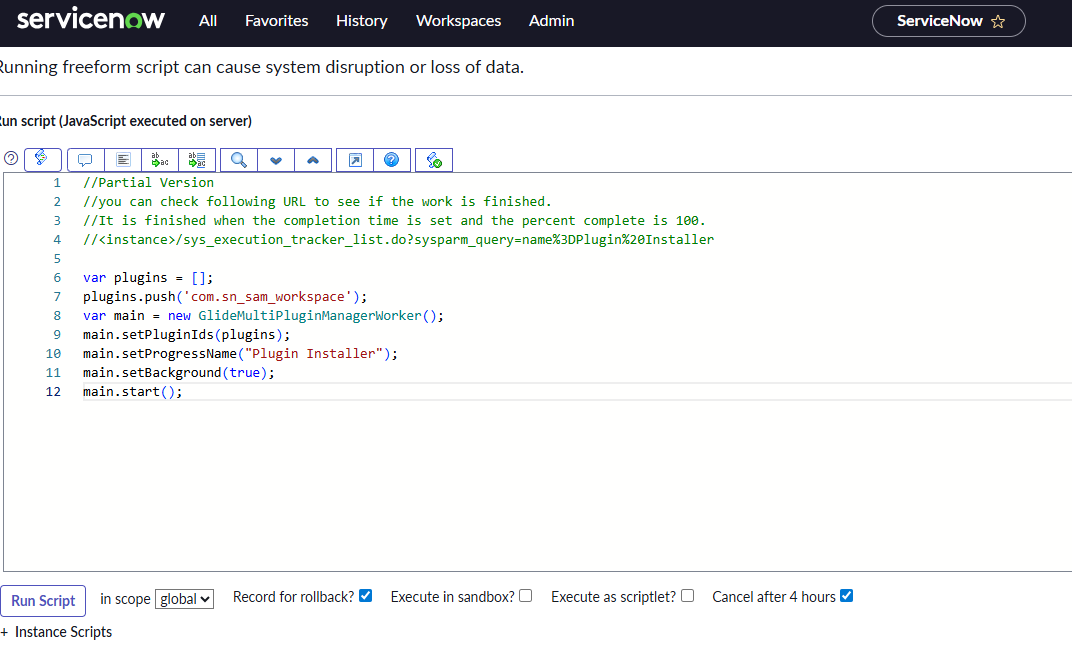
I found a community post where a script helped others install the missing SAM Workspace, but unfortunately the script did not work for me. (screenshot attached)
Solved: Re: Missing SAM Workspace Plugin in PDI: Xanadu Re... - ServiceNow Community
At this point, I’m looking for guidance on how to successfully install or enable the Software Asset Workspace in my PDI.
Thank you in advance for any help!
Solved! Go to Solution.
- Mark as New
- Bookmark
- Subscribe
- Mute
- Subscribe to RSS Feed
- Permalink
- Report Inappropriate Content
08-10-2026 08:22 PM
same, after installing the sn_sam_workspace , it didnt appear
i ran a repair and itworks

- Mark as New
- Bookmark
- Subscribe
- Mute
- Subscribe to RSS Feed
- Permalink
- Report Inappropriate Content
03-05-2026 02:23 PM - edited 03-07-2026 09:06 AM
Hi @LygiaF, @Anshul Dewan
I installed the plugin with demo data from the PDI management page on a Zurich instance, and the Software Asset Workspace was missing for me as well. After repairing the plugin, the workspace was there and fully functional.
Hope this helps!
- Mark as New
- Bookmark
- Subscribe
- Mute
- Subscribe to RSS Feed
- Permalink
- Report Inappropriate Content
04-08-2026 05:17 AM - edited 04-08-2026 05:20 AM
1. Go to Plug-Ins from your application navigator
2. Post selecting Plug-In, search for sn_sam_workspace -> Install.
3. Post installation, on the right hand side, also select Load Demo Data.
Once it's done, SAM Workspace will be visible in PDI.
- Mark as New
- Bookmark
- Subscribe
- Mute
- Subscribe to RSS Feed
- Permalink
- Report Inappropriate Content
08-10-2026 08:22 PM
same, after installing the sn_sam_workspace , it didnt appear
i ran a repair and itworks