- Mark as New
- Bookmark
- Subscribe
- Mute
- Subscribe to RSS Feed
- Permalink
- Report Inappropriate Content
08-23-2018 02:33 AM
Hi
Out sys_user table is populated from AD , however there are a lot of system accounts.
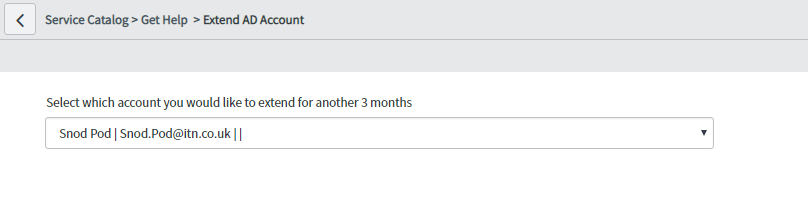
I want to hide these as I am creating a lookup select box available on the service catalogue for managers to select a user and automatically have their accounts in AD extended (this I can do in orchestration and powershell).
The problem I am having is that even though I put a tick next to hidden (a field on the user form) the system accounts are still showing. It used to work - any suggestion how I can filter these out?
have shown a demo with test user I have marked as hidden but they still show in the lookup list


thanks
Suzi
Solved! Go to Solution.

- Mark as New
- Bookmark
- Subscribe
- Mute
- Subscribe to RSS Feed
- Permalink
- Report Inappropriate Content
08-23-2018 03:10 AM
To get help making a reference qualifier for this, you could go to the sys_user table, filter as required, right-click on filter and choose "copy query". Then paste in the reference qualifier field.
- Mark as New
- Bookmark
- Subscribe
- Mute
- Subscribe to RSS Feed
- Permalink
- Report Inappropriate Content
08-23-2018 03:36 AM
I ended up changing it to a reference instead of lookup and entered in the qualify conditions, I changed it back to a lookup box and it kept this in the reference qual
u_hidden=false^active=true^EQ
happy days.
many thanks for your help and time
- Mark as New
- Bookmark
- Subscribe
- Mute
- Subscribe to RSS Feed
- Permalink
- Report Inappropriate Content
08-23-2018 03:37 AM
thanks Kristin, I forgot that little gem