Brandon May

ServiceNow Employee
Options
- Subscribe to RSS Feed
- Mark as New
- Mark as Read
- Bookmark
- Subscribe
- Printer Friendly Page
- Report Inappropriate Content
03-31-2017
04:24 PM
Wouldn't it be nice if there were only two types of users and two points to direct traffic through your site? When dealing with redirection on an enterprise level, it's rare to just send 'A users' here, and 'B users' there. Usually, there is an A user, a B user, an A.b user, a B.a user, an A.b.c….you get where I'm going. I receive a lot of questions regarding how to set up login redirection with Service Portal.
Most of the content here can be found throughout the docs site (like the login security page and Service Portal Single Sign On, logins, and URL redirects), community, and external resources. This is meant to be a sort-of hub for that information as well as a place to provide ways of setting up your redirection in Service Portal, asking questions on setting it up, and where other members of the community can share their tips. I will provide links to sources where I can. This post is focused on login redirection, not UI Action or List redirection in Service Portal and mostly deals with the common uses for redirection after login.
I'll touch on some of the most popular Service Portal questions we get. Plus, questions we see customers asking on the community and on social media.
In this post, I will introduce you to:
- How to set up a portal for user redirection
- Enable user login directly on the Service Portal
- How to direct user traffic in the portal
- Only allow authenticated users to access portal content
- How to set up role-based user redirection in the Service Portal
- Single-Sign-on (SSO) and Service Portal
Setting Up Your Service Portal Redirection
I will provide you with a high-level overview and walk you through each process of Portal redirection. Hopefully, this will provide you with direction on how to set things up for yourself.
For the most part, Service Portal will function the same way as it does on the front-facing UI (UI16). You are probably used to Login Rules, the 'glide.entry.loggedin.page_ess' System Property and Installation Exits to decipher where a user should be redirected to. The primary source for setting up redirection in Service Portal is the SPEntryPage script include (System UI > Script Includes). The ScriptIncludes works in conjunction with two system properties that I will go over later. Service Portal used to utilize the SPLoginRedirect script in the early versions of Helsinki, but this is no longer used and was fully replaced by SPEntryPage. Think of the SPEntryPage script as the login handler of Service Portal. There is a lot of stuff going on in this script, and I won't cover all of it here, but this will be a general, high-level overview of it.
First, you will need to make sure that you are directing traffic to your preferred portal URL suffix. You can access your available URL suffixes by going to Service Portal > Portals. See script on line 22:
In a base instance, this script is set up to handle redirection to a single portal. Setting this script up to redirect to multiple portals based on roles will not be covered here
User login directly through Service Portal
The first thing the instance will do is check the 'glide.entry.page.script' system property, which calls a server script that will redirect users to a defined location to log in. On the base system, this is set to 'new CMSEntryPage().getEntryPage()' by default. This is checking the CMSEntryPage script include for its redirection source for specific users that need to be redirected to a specified content management site (typically users without a role).
In order to send users to the Service Portal to log in, we need to call the SPEntryPage script include and then get our login URL. We can do this by changing the value of this property to 'new SPEntryPage().getLoginURL()'.
The differences between the default and the new value of the 'glide.entry.page.script property'. Admins will often only change the first part of this value because they see the 'get' and ignore everything after it. This will cause the script to fail because getEntryPage does not exist in the SPEntryPage .
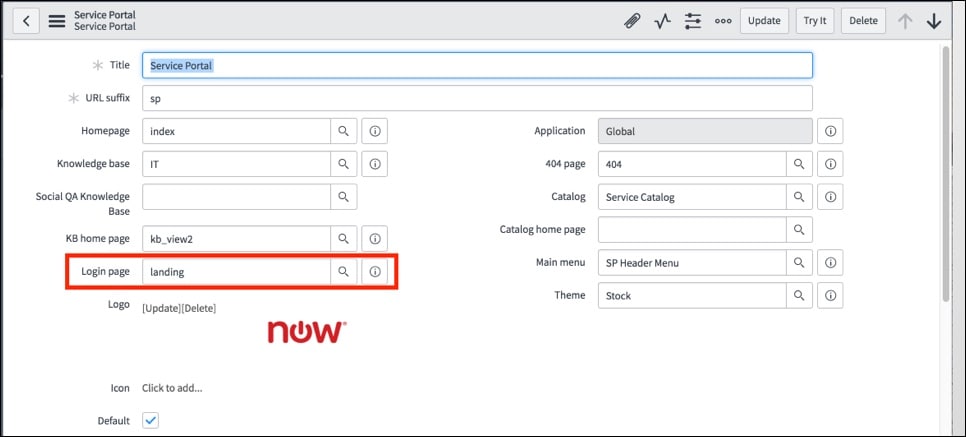
Once this value is set, your users will be sent to the default landing page. You can modify the page you want users to reach from the portal record page (see below).
Just because users are logging in through the Service Portal login page, does not mean they are going to be sent to the Service Portal. This is defined by a separate system property and will depend on the URL they are trying to go to. This aspect simply handles the login process.
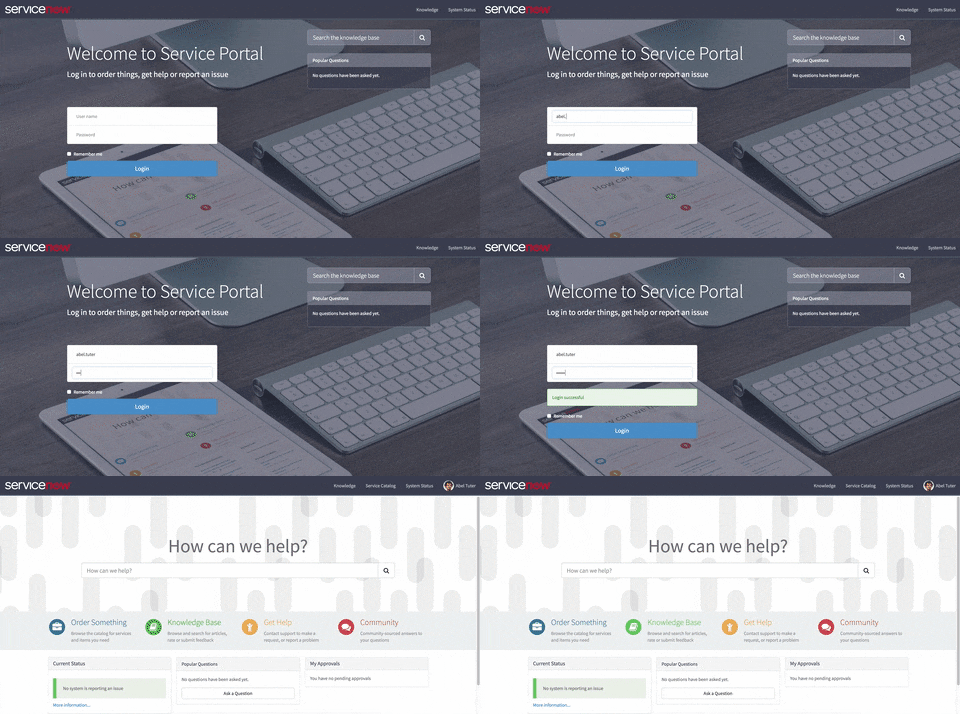
Below is an example of what an ESS user (no roles) would see on login if they were going directly to <instance_name>.service-now.com using Service Portal to login.
and here is what the same user would see if they went to <instance_name>.service-now.com/sp.
Directing user traffic in the Service Portal
Now that we have setup the login aspect, we can work on handling where users will go afterward. This will require a new system property called 'glide.entry.first.page.script' to be created. See creating system properties, for instructions on how to achieve this.
This property's value will need to be set to new SPEntryPage().getFirstPageURL(). Once this property is set, it will check against the users' roles and determine where the user will need to go next. In the base system, this is set to check if the user has any roles and is not trying to go the Service Portal directly. If both pass, then it will send them to value of the glide.login.home property or the page they were attempting to load prior to logging in. If the user does not have any roles, it will send them to the equivalent of that page in Service Portal.
For example:
https://<instance_name>.service-now.com/change_requests_list.do
will send non-role users to
https://<instance_name>.service-now.com/sp/?id=list&table=change_request
Setting up a role-based redirection
If you want to be specific with directing certain roles (not just users without any roles) you can modify the SPEntryPage script include to meet your needs. It would be worth your time to also check out kobby.adu-nti's blog on overcoming issues with role redirection with the SPEntryPage
Modifying the SPEntryPage script will set sys_customer_update to true and sys_replace_on_upgrade to false.
In the SPEntryPage script on lines 69-70, you will see where we check for any roles (not specific roles) and whether it's a redirect URL or if the user is trying to access the portal directly.
Here I have commented out these two lines (to keep the original code) and added a specific role(s) check by using hasRole()
This will allow users who have admin (because hasRole automatically passes admin as true) and snc_123 roles to go directly to UI16, all others will be reverted to the Service Portal. Again, this is just an example but provides you with a starting point to configuring your redirection.
SSO and Service Portal
Applying your SSO with Service Portal should be setup the same way as you had it with any prior implementations for your instance. Service Portal will redirect to your IdP the same way it does in UI16, and if you have multiple IdP's, you will see the same 'Use External Login' link under the username and password fields on the Service Portal login widget. The widget will check the value of the 'glide.authenticate.multisso.enabled' property and the default IdP through the 'glide.authenticate.sso.redirect.idp' property.
Helpful information for how to set up SSO in your Service Portal:
Deeplinking
As long as your IdP supports the RelayState URL parameter, deep linking will function for links to Service Portal. An authentication request will be sent to the IdP using this parameter to hold the original URL the user is wanting to access. Once the user is authenticated, it will then send the user to the URL with the appended RelayState value. You may also want to review our documentation on Email links with SSO.
Debugging SPEntry
To view debug output from SPEntryPage and see the session variables it redirects based on:
- Make sure the system property glide.entry.first.page.script has the value new SPEntryPage().getFirstPageURL().
- Open the SPEntryPage script include and find and set this.logVariables to true.
- In a different browser (or "incognito" or "inPrivate" session), log in.
- The log output can be viewed by navigating to System Logs > System Log > All or by going directly to:
/syslog_list.do?sysparm_query=level%3D0%5EORDERBYDESCsys_created_on&sysparm_first_row=1&sysparm_view=
--
I hope this helps with setting up your Service Portal redirection. As content can be updated, I will do so. Special thanks to jesseadams, Imran Ali, and Michael DiBlandia for their contributions. If you have any questions, comments, or ideas, let me know. If you have a case that is not mentioned here, please provide your comments so that other users who are looking to accomplish the same thing can use it as a reference.
Labels:
- 198,701 Views
70 Comments
You must be a registered user to add a comment. If you've already registered, sign in. Otherwise, register and sign in.