Gaurav Bajaj
Mega Sage
Options
- Subscribe to RSS Feed
- Mark as New
- Mark as Read
- Bookmark
- Subscribe
- Printer Friendly Page
- Report Inappropriate Content
09-13-2020
01:46 PM
Often I have seen this use case where service agent would want to restrict access for certain attachments on a record to themselves and not let end users have visibility on it. Well, we can restrict all of the attachment on a record/table based on certain conditions via ACLs but there is nothing OOTB which would let the service agent working on a ticket to choose specific files on a record to restrict.
So, I thought of creating a utility that would help the service agents have the liberty to decide and take control of the attachments on a record. Here is how it looks.
You can download it from the Share site.
Disclaimer: Before you read it further, I just want to call out that no OOTB scripts were harmed during the process of building this utility 😛
How It Works :
So behind the scene is pretty simple and I will walk you through the ingredients.
1) A new field called 'Internal' on the sys_attachment table.
2) A before query Business rule that looks up the internal flagged attachments and restricts them for end users.
3) A UI action which would show up once attachments are present on a ticket along with a link to mark them internal individually.
4) A UI page which opens up a list of attachments present on the record.
5) A UI macro which is kind of replica of attachment_enrtry macro.
6) Bit of logic to bind all of them together and have a little nice presentable User interface.
Logical Flow :
- Having a new field on the attachment table will help in identifying which record needs to be restricted and that restriction is placed in with the help of before query BR which will hide the attachment if the user does not have any roles associated.
- Then comes the part where the ability needs to be given to the agent to choose a specific attachment to be restricted. This part is accomplished by taking a deeper look at how the manage attachment link works. OOTB, there is an attachment UI page which shows you different options to remove or download an attachment. Since we would like to not touch anything OOTB, I copied down the UI page( called it attachment_internal) and made it to open in a GlideModal via UI action.
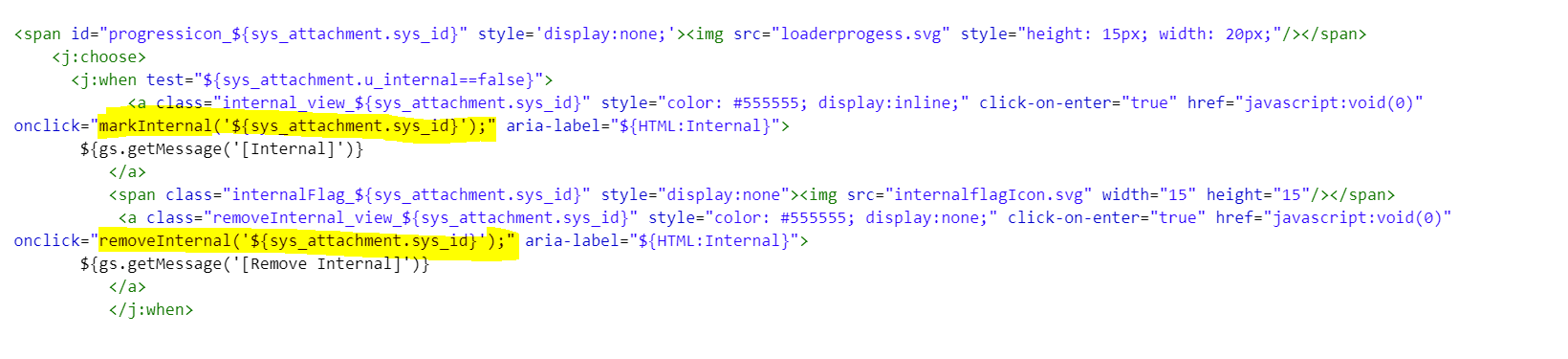
- Within the new attachment UI page, there is an inline OOTB UI macro 'attachment_enrtry' which runs in a loop for every attachment record and populates details of each attachment along with links to rename, download them. For our purpose, this UI macro is also replaced with its replica 'attachment_enrty_custom'. and this is where the code of having the internal and remove internal link is written.
- Purpose of mark Internal link is to pass the attachment sys_id to a function declared in attachment_internal UI page and mark that specific attachment as internal by Gliding the attachment table and showing the internal flag icon on the UI as well. I have manipulated DOM to have a mini progress bar, internal icon and remove internal link once the attachment has been marked internal (cant be avoided if not needed). Similar functions have been written for remove internal link.
function markInternal(attachId) {

	gel('progressicon_'+attachId).style.display='inline';
    var gInternal = new GlideAjax('InternalAttachments');
    gInternal.addParam('sysparm_name', 'markInternal');
    gInternal.addParam('sysparm_attachId', attachId);
    gInternal.getXMLAnswer(showInternalIcon);

}

/**
 * This showcase internal flag icon and remove internal link.
 * This also hides the internl button/link.
 * @param value
 */

function showInternalIcon(response) {
    var iconSpan = 'internalFlag_' + response;
    var internalLink = 'internal_view_' + response;
	var removeInternalLink ='removeInternal_view_'+response;
    var iconClass = document.getElementsByClassName(iconSpan);

    for (i = 0; i < iconClass.length; i++) {
        iconClass[i].style.display = "inline";
    }

	var removeInternalClass = document.getElementsByClassName(removeInternalLink);

    for (y = 0; y < removeInternalClass.length; y++) {
        removeInternalClass[y].style.display = "inline";
    }

    var internalClass = document.getElementsByClassName(internalLink);

    for (n = 0; n < internalClass.length; n++) {
        internalClass[n].style.display = "none";
    }

	gel('progressicon_'+response).style.display='none';
}
and that's it!! Once an attachment is marked internal, the end-user will not be able to see that one on the portal/self-service.
Note: This is only built as a POC which is currently running only for incident table. You can implement it in a similar way for other tables.
In the end, Thanks for giving it a read and I would love to hear the feedback/mistakes if any.
Thanks
Gaurav Bajaj
- 11,872 Views
5 Comments
You must be a registered user to add a comment. If you've already registered, sign in. Otherwise, register and sign in.