- Mark as New
- Bookmark
- Subscribe
- Mute
- Subscribe to RSS Feed
- Permalink
- Report Inappropriate Content
01-19-2021 10:29 AM
Hello,
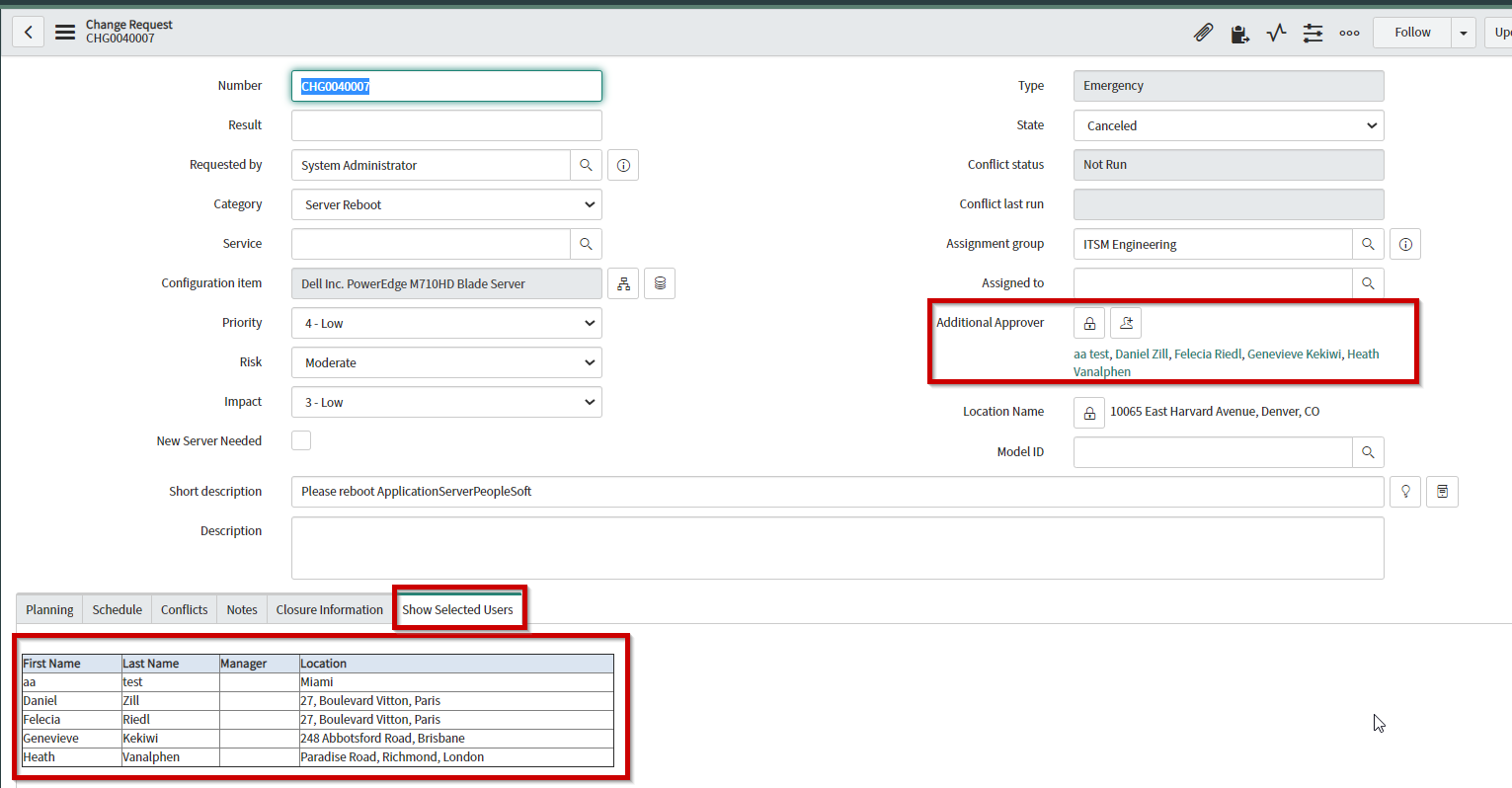
I have a UI Macro and a UI formatter that displays the selected items from my list and populates them in an html table. The list field I have references the user table. What I want to be able to do is create an icon next to the list field, and when selected, a pop-up will show with the selected items. The pop-up needs to display the First Name, Last Name, Manager, and Location of each selected user.
Below is my UI Macro. I need to rewrite this to show a pop-up with this content vs showing it in a list.
UI Macro:
<?xml version="1.0" encoding="utf-8" ?>
<j:jelly trim="false" xmlns:j="jelly:core" xmlns:g="glide" xmlns:j2="null" xmlns:g2="null">

	<g2:evaluate jelly="true" object="true" var="jvar_jsonObj">
		var arr = [];
		var user = new GlideRecord('sys_user');
		user.addEncodedQuery('sys_idIN' + current.watch_list.toString());
		user.orderBy('name');
		user.query();
		while(user.next()){
		var jsonObj = {};
		jsonObj["firstName"] = user.first_name.toString();
		jsonObj["lastName"] = user.last_name.toString();
		jsonObj["manager"] = user.manager.getDisplayValue();
		jsonObj["location"] = user.location.getDisplayValue();
		arr.push(jsonObj);
		}
		arr;
	</g2:evaluate>
	<table id="sTable"  border="1" align="left" style="width:600px">
		<tr bgcolor="#dbe5f1"><th><b>First Name</b></th><th><b>Last Name</b></th><th><b>Manager</b></th><th>Location</th></tr>
		<j2:forEach items="$[jvar_jsonObj]" var="jvar_json">
			<tr><td>$[jvar_json.firstName]</td><td>$[jvar_json.lastName]</td><td>$[jvar_json.manager]</td><td>$[jvar_json.location]</td></tr>
		</j2:forEach>
	</table>

</j:jelly>
List Field (Additional Approvers):

Example Output:

***EDIT***
Can this be done using a UI Page and a UI Action, if so how do I do it?
Thanks!
Solved! Go to Solution.


- Mark as New
- Bookmark
- Subscribe
- Mute
- Subscribe to RSS Feed
- Permalink
- Report Inappropriate Content
01-20-2021 06:30 AM
You can create UI Page and UI Action and show the details
UI Page:
HTML: use u_additional_approver field instead of watch_list
<?xml version="1.0" encoding="utf-8" ?>
<j:jelly trim="false" xmlns:j="jelly:core" xmlns:g="glide" xmlns:j2="null" xmlns:g2="null">

	<g:evaluate var="jvar_id" expression="RP.getWindowProperties().get('watch_list')"/>

	<g:evaluate var="jvar_user" object="true">
		var userRecord = new GlideRecord('sys_user');
		userRecord.addQuery('sys_id', 'IN', '${jvar_id}');
		userRecord.query();
		userRecord;
	</g:evaluate>

	<table id="sTable"  border="1" align="left" style="width:600px">
		<tr bgcolor="#dbe5f1"><th><b>First Name</b></th><th><b>Last Name</b></th><th><b>Manager</b></th><th>Location</th></tr>
		<j:while test="${jvar_user.next()}">
			<tr>
				<td>${jvar_user.getDisplayValue('first_name')}</td>
				<td>${jvar_user.getDisplayValue('last_name')}</td>
				<td>${jvar_user.getDisplayValue('manager')}</td>
				<td>${jvar_user.getDisplayValue('location')}</td>
			</tr>
		</j:while>
	</table>

</j:jelly>
UI Action:
function openUIPage(){
	var gDialog = new GlideDialogWindow('show_field_details');
	gDialog.setSize('600','600');
	gDialog.setTitle('Show User Details');
	gDialog.setPreference('watch_list', g_form.getValue('watch_list'));

        // you can use u_additional_approver field here
	gDialog.render();
}
Output:

Regards
Ankur
Ankur
✨ Certified Technical Architect || ✨ 10x ServiceNow MVP || ✨ ServiceNow Community Leader

- Mark as New
- Bookmark
- Subscribe
- Mute
- Subscribe to RSS Feed
- Permalink
- Report Inappropriate Content
01-19-2021 01:39 PM
Can you check this? If not working for you will check tommorow how to tackle this.
https://community.servicenow.com/community?id=community_article&sys_id=bb0e039fdb9b1054b1b102d5ca961942
- Mark as New
- Bookmark
- Subscribe
- Mute
- Subscribe to RSS Feed
- Permalink
- Report Inappropriate Content
01-20-2021 05:14 AM
How can I trigger a UI page from a UI action?
***EDIT***
I created a UI Action:
showNames();

function showNames() {
    //make the url to a new normal change
    var url = 'ui_page_test.do';
    //Redirecting the user to the new url
    action.setRedirectURL(url);
}
And then I copy and pasted my code from my Macro into my UI Page. I see only the headers and not the data.
- Mark as New
- Bookmark
- Subscribe
- Mute
- Subscribe to RSS Feed
- Permalink
- Report Inappropriate Content
01-20-2021 06:16 AM
Hi,
your UI action should be client side
Client checkbox - true
OnClick - openUIPage();
Script:
function openUIPage(){
var gDialog = new GlideDialogWindow('ui_page_test'); // name of the UI page
gDialog.setSize('600','600');
gDialog.setTitle('Show Details');
gDialog.render();
}
Regards
Ankur
Ankur
✨ Certified Technical Architect || ✨ 10x ServiceNow MVP || ✨ ServiceNow Community Leader
- Mark as New
- Bookmark
- Subscribe
- Mute
- Subscribe to RSS Feed
- Permalink
- Report Inappropriate Content
01-20-2021 06:30 AM
You can create UI Page and UI Action and show the details
UI Page:
HTML: use u_additional_approver field instead of watch_list
<?xml version="1.0" encoding="utf-8" ?>
<j:jelly trim="false" xmlns:j="jelly:core" xmlns:g="glide" xmlns:j2="null" xmlns:g2="null">

	<g:evaluate var="jvar_id" expression="RP.getWindowProperties().get('watch_list')"/>

	<g:evaluate var="jvar_user" object="true">
		var userRecord = new GlideRecord('sys_user');
		userRecord.addQuery('sys_id', 'IN', '${jvar_id}');
		userRecord.query();
		userRecord;
	</g:evaluate>

	<table id="sTable"  border="1" align="left" style="width:600px">
		<tr bgcolor="#dbe5f1"><th><b>First Name</b></th><th><b>Last Name</b></th><th><b>Manager</b></th><th>Location</th></tr>
		<j:while test="${jvar_user.next()}">
			<tr>
				<td>${jvar_user.getDisplayValue('first_name')}</td>
				<td>${jvar_user.getDisplayValue('last_name')}</td>
				<td>${jvar_user.getDisplayValue('manager')}</td>
				<td>${jvar_user.getDisplayValue('location')}</td>
			</tr>
		</j:while>
	</table>

</j:jelly>
UI Action:
function openUIPage(){
	var gDialog = new GlideDialogWindow('show_field_details');
	gDialog.setSize('600','600');
	gDialog.setTitle('Show User Details');
	gDialog.setPreference('watch_list', g_form.getValue('watch_list'));

        // you can use u_additional_approver field here
	gDialog.render();
}
Output:
Regards
Ankur
Ankur
✨ Certified Technical Architect || ✨ 10x ServiceNow MVP || ✨ ServiceNow Community Leader
- Mark as New
- Bookmark
- Subscribe
- Mute
- Subscribe to RSS Feed
- Permalink
- Report Inappropriate Content
01-20-2021 06:33 AM
This is exactly what I needed thanks!