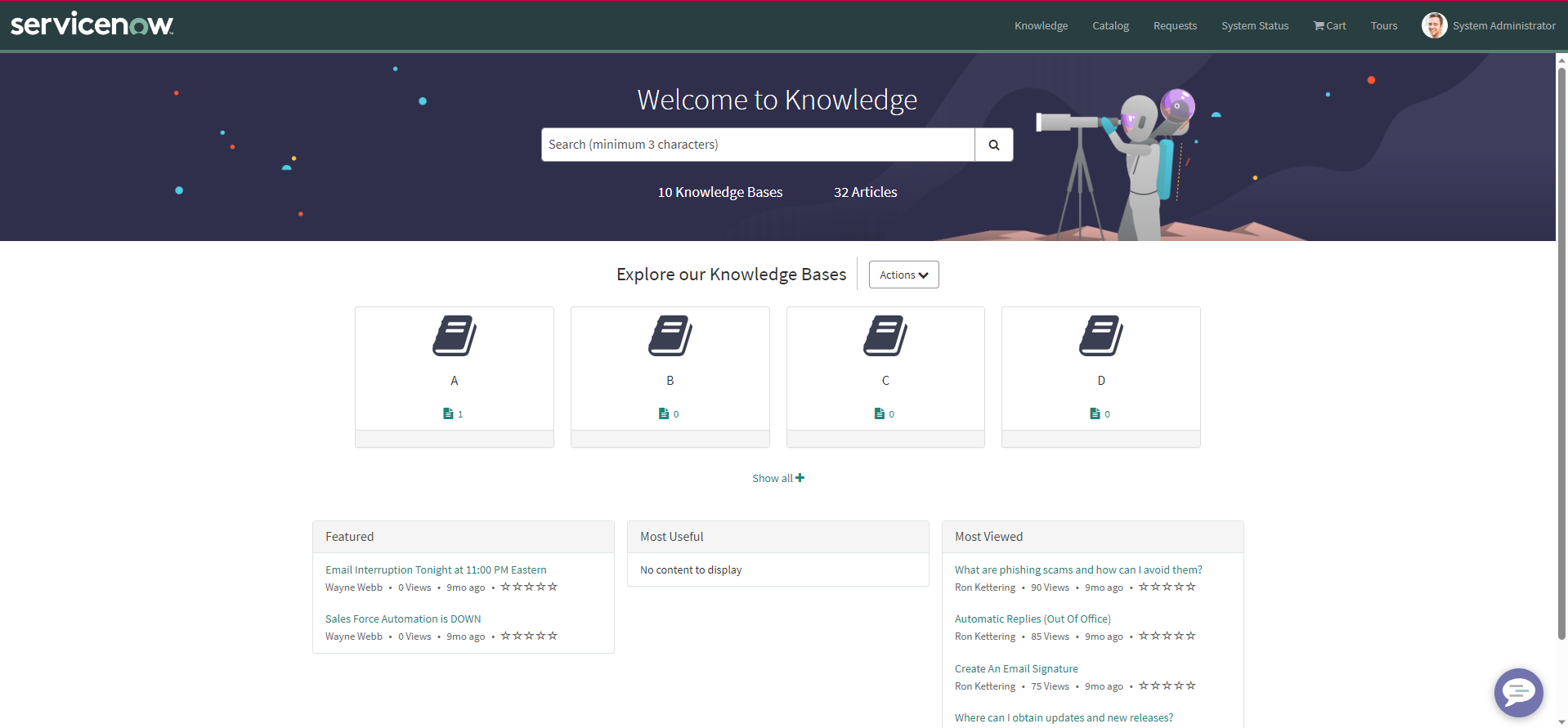
How to change the number of Knowledge Base displays in the Knowledge Home

- Mark as New
- Bookmark
- Subscribe
- Mute
- Subscribe to RSS Feed
- Permalink
- Report Inappropriate Content
09-11-2023 11:06 PM
- Mark as New
- Bookmark
- Subscribe
- Mute
- Subscribe to RSS Feed
- Permalink
- Report Inappropriate Content
09-11-2023 11:34 PM
Hello @Takumi Ando,
Can you confirm which widget are you referring to is it the 'Most Viewed' widget you want to modify.
Thank you!
- Mark as New
- Bookmark
- Subscribe
- Mute
- Subscribe to RSS Feed
- Permalink
- Report Inappropriate Content
09-11-2023 11:59 PM
Hello @Shruti Khaire ,
The original widget name is "Knowledge Bases Browse"(kb-bases-browse).
Thank you!
- Mark as New
- Bookmark
- Subscribe
- Mute
- Subscribe to RSS Feed
- Permalink
- Report Inappropriate Content
09-12-2023 03:40 AM - edited 09-12-2023 03:42 AM
Hello @Takumi Ando,
You can then edit the widget "Knowledge Bases Browse"(kb-bases-browse) on your instance by cloning the exisiting widget if it's an OOB one. As I have done on my PDI I will share snapshot of the same just chnage the HTML code and then the client script based on which data you want to populate on the widget.

Here the first one is OOB widget and below I have placed my customized widget.
This block of code handles the creation of new blocks on the knowledge base
<div class="kb-tile-block col-xs-6 col-sm-6 col-md-3" role="group" ng-class="{'kb-tile-block-more':c.data.result.length > 4,'kb-tile-block-4':c.data.result.length == 4,'kb-tile-block-3':c.data.result.length == 3,'kb-tile-block-2':c.data.result.length == 2,'kb-tile-block-1':c.data.result.length == 1,'kb-hidden-tile kb-hide-me':$index > 3}"
data-ng-repeat="item in c.getOrderedItems() track by item.sys_id" role="listitem">
<div class="kb-tile panel panel-{{::options.color}}">
<div class="kb-top kb-tile-link kb-center" >
<a href="?id=kb_search&kb_knowledge_base={{::item.sys_id}}" aria-label="${{{::c.getKBLabel(item.title,item.article_count,item.questions_count,item.enable_socialqa)}}}">
<div class="link-icon">
<img alt="" src="default_knowledge_base.svg" aria-hidden="true" data-ng-if="!item.icon"/>
<img alt="" data-ng-src="{{::item.icon}}.iix" aria-hidden="true" data-ng-if="item.icon"/>
</div>
<div ng-if="!c.isFirefox" class="link-text" title="${knowledge base}">
<h3 id="{{'kbTitle'+$index}}" ng-bind="::item.title"></h3>
</div>
<div ng-if="c.isFirefox" class="link-text" title="${knowledge base}">
<h3 ng-if="item.title.length < 27" ng-bind="::item.title"></h3>
<h3 ng-if="item.title.length > 26" class="big-title" ng-bind="::c.trimTitle(item.title)"></h3>
</div>
<div class="kb-details" ng-if="item.article_count || item.article_count == 0 || (item.enable_socialqa && (item.questions_count || item.questions_count == 0))">
<span class="kb-summary">
<i class="fa fa-file-text" aria-hidden="true"></i>
<span class="kb-count" ng-bind="::item.article_count"></span>
</span>
<span title="${Social Q&A}" ng-if="item.enable_socialqa && c.data.sqaUiActive">
<span class="kb-summary">
<i class="fa fa-question-circle" aria-hidden="true"></i>
<span class="kb-count" ng-bind="::item.questions_count"></span>
</span>
</span>
</div>
</a>
</div>
<div class="kb-bottom panel-footer" ng-class="{'kb-top-pad':!c.data.canSuscribe}">
<button ng-if="c.data.canSuscribe && !item.subscribed"
id="subscribeButton_{{::item.sys_id}}"
ng-click="::c.updateSubscription(item, $event)"
class="subscribe-link sublink_{{::item.sys_id}} btn btn-link kb-subscribe"
ng-focus="::c.updateSubText(item,0)"
ng-blur="::c.updateSubText(item,1)"
>
<span class="sub-icon">
<i class="fa fa-circle-o" aria-hidden="true"></i>
<span class="sub-text" aria-hidden="true">{{c.data.SUBSCRIBE_LABEL}}</span>
<span class="sr-only">{{c.getTranslatedText(c.data.subscribeText, item.title)}}</span>
</span>
</button>
<button ng-if="c.data.canSuscribe && item.subscribed"
id="subscribeButton_{{::item.sys_id}}"
ng-click="::c.updateSubscription(item, $event)"
class="subscribe-link sublink_{{::item.sys_id}} btn btn-link kb-subscribe"
ng-focus="::c.updateSubText(item,0)"
ng-mouseover="::c.updateSubText(item,0)"
ng-blur="::c.updateSubText(item,1)"
ng-mouseleave="c.updateSubText(item,1)">
<span class="unsub-icon">
<i class="fa fa-check-circle" aria-hidden="true"></i>
<span data-hover="${Unsubscribe}" class="unsub-text unsub_{{::item.sys_id}}">
<span aria-hidden="true">{{item.subscribedLabel?item.subscribedLabel:c.data.SUBSCRIBED_LABEL}}</span>
<span class="sr-only">{{c.getTranslatedText(c.data.unsubscribeText, item.title)}}</span>
</span>
</span>
</button>
</div>
</div>
I hope this helps. Thank you!