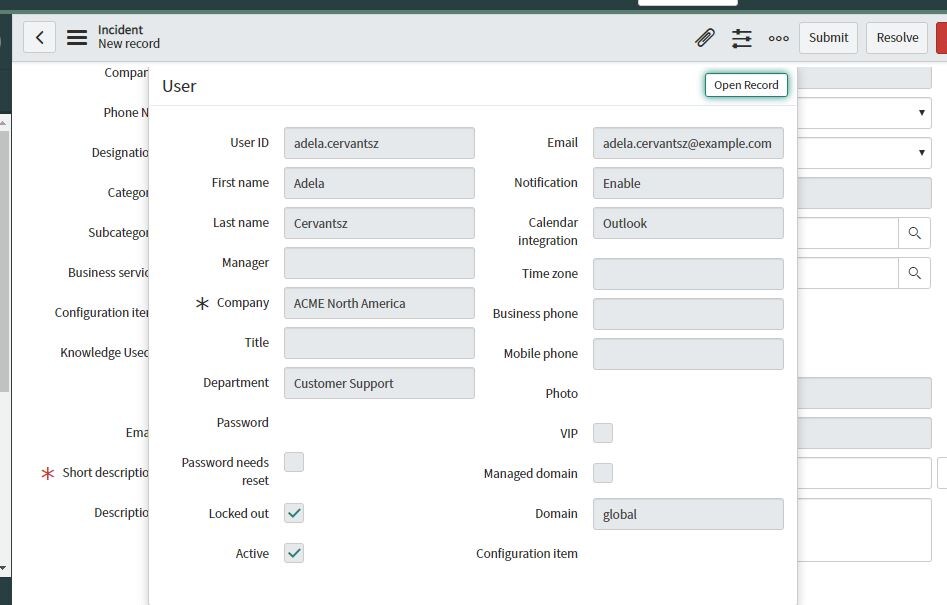
How to create an icon next to a caller field which displays caller information in incident form

- Mark as New
- Bookmark
- Subscribe
- Mute
- Subscribe to RSS Feed
- Permalink
- Report Inappropriate Content
10-21-2019 07:31 AM
- Mark as New
- Bookmark
- Subscribe
- Mute
- Subscribe to RSS Feed
- Permalink
- Report Inappropriate Content
10-21-2019 08:43 AM
Configure the reference icon view of fields
Use a table's sys_popup form view to configure the fields in the pop-up form that appear when pointing to a reference icon. If the table has no sys_popup view, the pop-up uses the default view.
Before you begin
Procedure
- To configure a reference field popup form for a table using the default sys_popup view, navigate to the following URL format, substituting the instance name and table name:
<your instance name>.service-now.com/<table name>.do?sysparm_view=sys_popup
Note: This URL format only shows a table and default sys_popup view. It does not work for records that use a different view.An example of an instance for Acme, the sys_user table, and the sys_popup default view:acme.service-now.com/sys_user.do?sysparm_view=sys_popup
- (Optional) To configure a reference field popup form for a table using a non-default sys_popup view, navigate to the following URL format, substituting the instance name, table name, and name of view:
<your instance name>.service-now.com/<table name>.do?sysparm_view=sys_popup,<name_of_view>
An example of an instance for Acme, the sys_user table, and the sys_popup ESS view:acme.service-now.com/sys_user.do?sysparm_view=sys_popup,ess
- Configure the form to add or remove fields as appropriate.
Configure pop-ups on read-only fields
Reference pop-ups and click-throughs are hidden by default when a client script, UI policy, variable, or ACL makes the field read-only. The ability to see or click through to the target record does not depend on whether the reference field is writable. You can change the read-only setting.
Before you begin
Procedure
- Navigate to System Properties > UI Properties.
- Change the value of the Enable click-through of a reference field when the reference field is read-only. (glide.ui.reference.readonly.clickthrough) property.
If set to true, the pop-up appears for read-only fields and for variables.
What to do next


- Mark as New
- Bookmark
- Subscribe
- Mute
- Subscribe to RSS Feed
- Permalink
- Report Inappropriate Content
10-21-2019 08:47 AM
that icon will visible automatically once you will select the user in caller field.
can you confirm on "caller" field , its not visible ? let me know if you have any further questions on it .
- Mark as New
- Bookmark
- Subscribe
- Mute
- Subscribe to RSS Feed
- Permalink
- Report Inappropriate Content
10-22-2019 12:05 AM
There is an icon already exist next to the caller field...I am practicing on my personal instance and am unable to create an icon which displays the caller information
- Mark as New
- Bookmark
- Subscribe
- Mute
- Subscribe to RSS Feed
- Permalink
- Report Inappropriate Content
10-22-2019 05:47 AM
can you add the screenshot ?
- Mark as New
- Bookmark
- Subscribe
- Mute
- Subscribe to RSS Feed
- Permalink
- Report Inappropriate Content
10-22-2019 05:55 AM