Remove the reference qualifier condition

- Mark as New
- Bookmark
- Subscribe
- Mute
- Subscribe to RSS Feed
- Permalink
- Report Inappropriate Content
07-03-2023 02:21 AM - edited 07-03-2023 02:22 AM
Hallo,
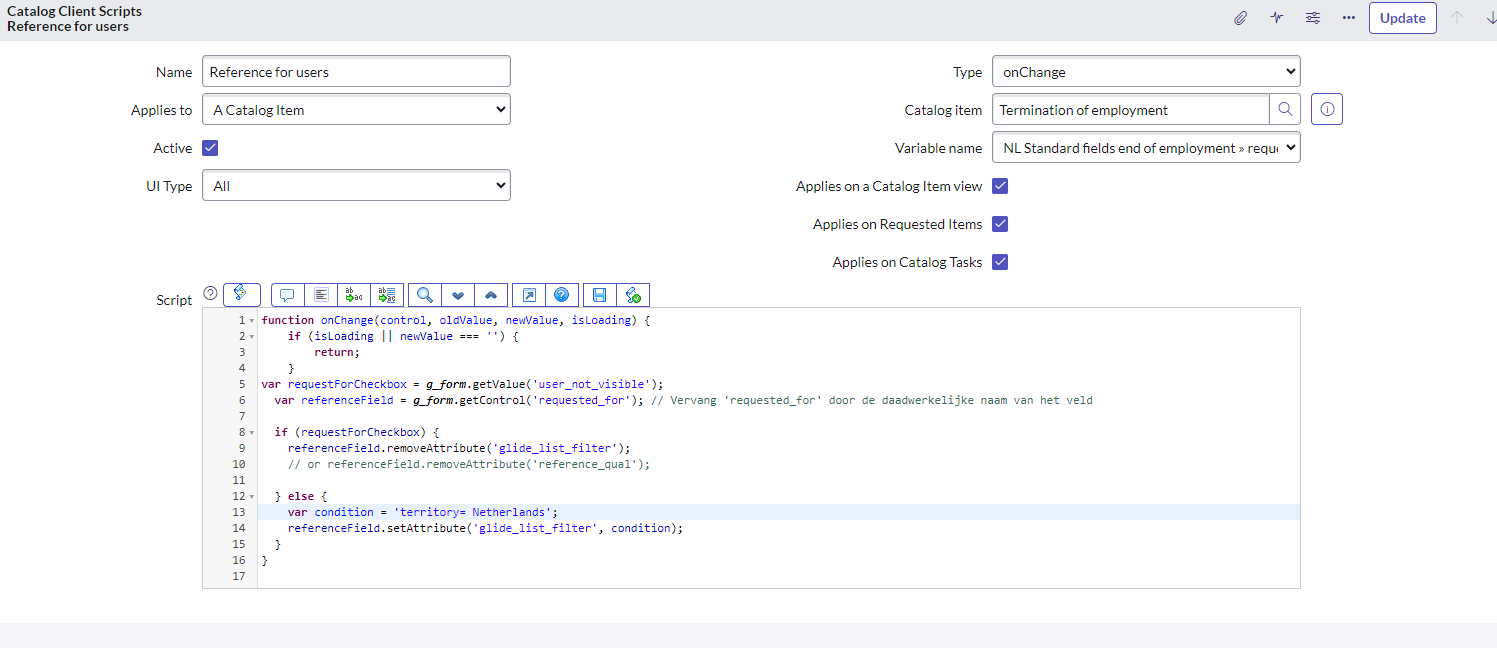
I am trying to create a catalog client script. I have a checkbox field called 'user_not_visible' and a reference field called 'requested_for'. The reference field has a reference qualifier condition based on a field called 'Territory' to filter users based on their territory. When the checkbox is checked, I want to remove the reference qualifier condition and show all users in the reference field. However, the current script I have tried is not working as expected.
See images please
---------------------


- Mark as New
- Bookmark
- Subscribe
- Mute
- Subscribe to RSS Feed
- Permalink
- Report Inappropriate Content
07-03-2023 06:06 AM
It should work fine.
Please share what advanced ref qualifier you used along with screenshots.
Ankur
✨ Certified Technical Architect || ✨ 10x ServiceNow MVP || ✨ ServiceNow Community Leader
- Mark as New
- Bookmark
- Subscribe
- Mute
- Subscribe to RSS Feed
- Permalink
- Report Inappropriate Content
07-03-2023 06:34 AM

- Mark as New
- Bookmark
- Subscribe
- Mute
- Subscribe to RSS Feed
- Permalink
- Report Inappropriate Content
07-03-2023 07:13 AM
you didn't replace the actual field name for territory which is on user table
please use that in your query. I just gave an example and mentioned you need to use correct field name
javascript: var query = ''; if(current.variables.user_not_visible.toString() == 'false') query = 'territoryField=sysId'; query;
If my response helped please mark it correct and close the thread so that it benefits future readers.
Ankur
✨ Certified Technical Architect || ✨ 10x ServiceNow MVP || ✨ ServiceNow Community Leader
- Mark as New
- Bookmark
- Subscribe
- Mute
- Subscribe to RSS Feed
- Permalink
- Report Inappropriate Content
07-03-2023 07:28 AM - edited 07-03-2023 07:30 AM
Hi Simo,
Check this out and customize it to suite your need. I hope it gives you an idea. Location in my case can be Territory in your case or something but this just illustrates the concept.
Variables on the Catalog item:

Script include:
function GetUsers(userLocation, usersNotVisible) {
    if (usersNotVisible == "false" && userLocation != "") {
        var userList = [];
        var userGr = new GlideRecord("sys_user");
        userGr.addQuery("location", userLocation);
        userGr.addActiveQuery();
        userGr.query();
        while (userGr.next()) {
            userList.push(userGr.sys_id.toString());
        }
        return 'sys_idIN' + userList;
    } else {
        return "active=true"; //or whatever condition you want to apply
    }
}
Advanced ref qualifier on the Users field:
javascript:GetUsers(current.variables.user_location, current.variables.user_not_visible);
If it helps, please mark as correct. Thanks
Regards,
N