- Mark as New
- Bookmark
- Subscribe
- Mute
- Subscribe to RSS Feed
- Permalink
- Report Inappropriate Content
02-17-2017 09:22 AM
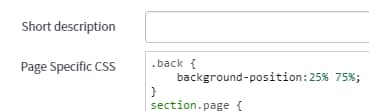
I am trying to style the background image position in a container but it's not working. I added a parent class to the container and added some page specific CSS. What the heck am I doing wrong?


Solved! Go to Solution.
- Labels:
-
Service Portal

- Mark as New
- Bookmark
- Subscribe
- Mute
- Subscribe to RSS Feed
- Permalink
- Report Inappropriate Content
02-20-2017 03:47 AM


- Mark as New
- Bookmark
- Subscribe
- Mute
- Subscribe to RSS Feed
- Permalink
- Report Inappropriate Content
02-17-2017 09:46 AM
It looks like the element itself has its own styling inline.
- Mark as New
- Bookmark
- Subscribe
- Mute
- Subscribe to RSS Feed
- Permalink
- Report Inappropriate Content
02-20-2017 03:47 AM
You can try adding !important property of CSS
- Mark as New
- Bookmark
- Subscribe
- Mute
- Subscribe to RSS Feed
- Permalink
- Report Inappropriate Content
02-21-2017 05:15 AM
Thanks to you both for providing this response. This is working as I intended now.
- Mark as New
- Bookmark
- Subscribe
- Mute
- Subscribe to RSS Feed
- Permalink
- Report Inappropriate Content
02-20-2017 04:03 AM
.back
{
background-position: 25% 75% !important;
}