- Mark as New
- Bookmark
- Subscribe
- Mute
- Subscribe to RSS Feed
- Permalink
- Report Inappropriate Content
02-10-2022 09:28 AM
HI All,
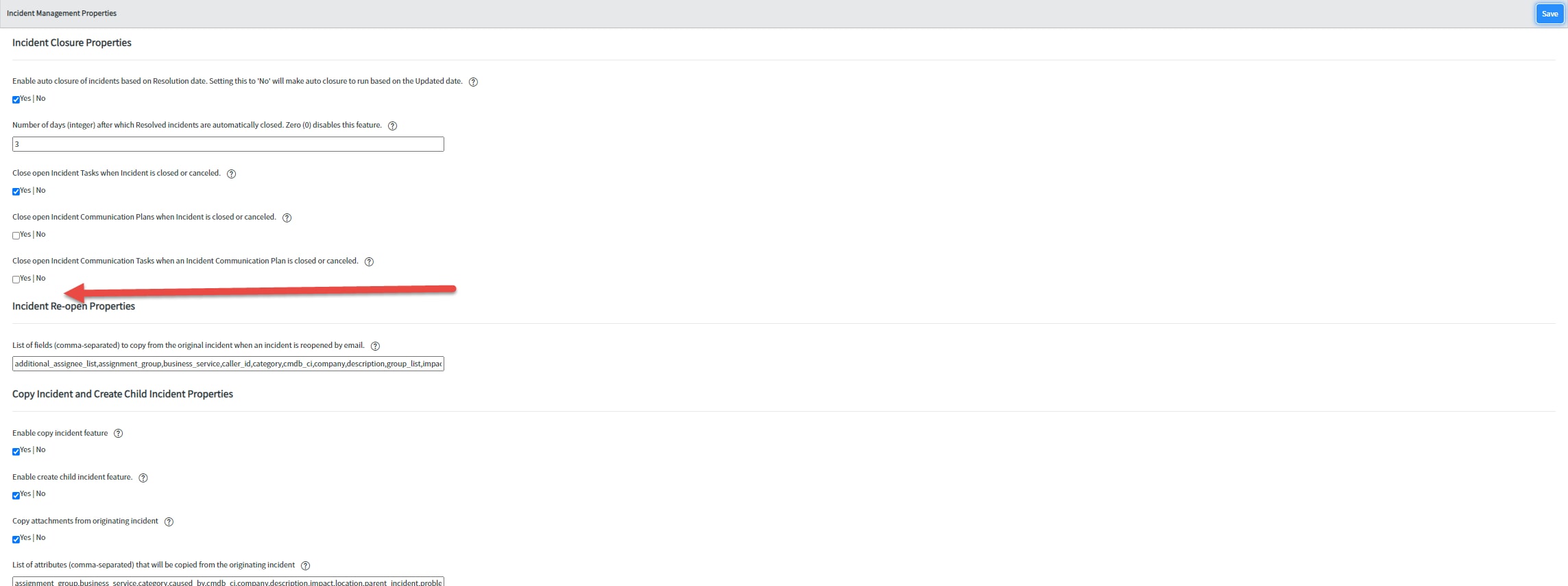
I am having issues getting a new System Property Category to display on the Incident Properties page.
I have set up the category with it's properties (below).

In the module Incident Properties I have it set up to link type URL (from arguments:) with the following string:
system_properties_ui.do?sysparm_title=Incident Management Properties&sysparm_category=Incident closure, Incident Followup, Incident Re-open, Copy Incident and Create Child Incident, Incident Form Fields Configuration, Incident Related List Properties, Incident VA Conversation

All items should line up and if I try the category to test it I get the expected result (below).

However when I go to the actual Incident property page the category does not show up (below).

I thought perhaps it was a caching issue, did all the normal troubleshooting (cleared cache, rebooted, and tried multiple browsers) still not showing up.
Any suggestions on what I may be missing would be welcome.
Thanks!
Solved! Go to Solution.
- Labels:
-
User Experience and Design

- Mark as New
- Bookmark
- Subscribe
- Mute
- Subscribe to RSS Feed
- Permalink
- Report Inappropriate Content
02-10-2022 09:40 AM
Hi,
So when you try adding the same URL manually on Browser what happens? Does it work?
I will suggest to build query in list and then use
Thank you
Prasad
- Mark as New
- Bookmark
- Subscribe
- Mute
- Subscribe to RSS Feed
- Permalink
- Report Inappropriate Content
02-10-2022 09:40 AM
Hi,
So when you try adding the same URL manually on Browser what happens? Does it work?
I will suggest to build query in list and then use
Thank you
Prasad
- Mark as New
- Bookmark
- Subscribe
- Mute
- Subscribe to RSS Feed
- Permalink
- Report Inappropriate Content
02-10-2022 09:55 AM
So your suggestion was very helpful and yes when I manually use the URL it shows up. I found the issue using this suggestion. Turns out I was using the link under my favorite which did not update when I updated the module. by removing Incident app from favorite and readding it the issue is now gone. A little frustrating that I would need to do this but something I can live with.
Thank you so much Prasad.