Writing list collector display values to text fields with flow designer

- Mark as New
- Bookmark
- Subscribe
- Mute
- Subscribe to RSS Feed
- Permalink
- Report Inappropriate Content
02-25-2020 09:58 AM
I need to write the display values from a list collector to a text field. The ultimate use case is to use the values through an integration using integration hub. I can get that to work once I'm able to write the data to a text field.
I'm trying to avoid the creation of a new action if at all possible. I'm hoping ServiceNow has a way of doing this that is simple that I am simply unaware of.
- Mark as New
- Bookmark
- Subscribe
- Mute
- Subscribe to RSS Feed
- Permalink
- Report Inappropriate Content
10-20-2020 12:29 AM
Just posted a reply with what worked for me. Hopefully it can help you too...
- Mark as New
- Bookmark
- Subscribe
- Mute
- Subscribe to RSS Feed
- Permalink
- Report Inappropriate Content
10-20-2020 12:28 AM
Here's what worked for me when using the Location [cmn_location] table and wanting to append the name value to the short description. If this was purely a data set contained within a variable table I think you'd need to use the Choice [sys_choice] or Question [question] table depending on the circumstance.
Note: I built mine in a Subflow, but the same steps apply as a Flow.
Flow Designer Step-by-Step
Step 1. Action > Look Up Records
Choose corresponding table
Conditions should be Sys ID > is one of > variable pill

Step 2. Flow Logic > For Each
Drop newly available pill created from previous step

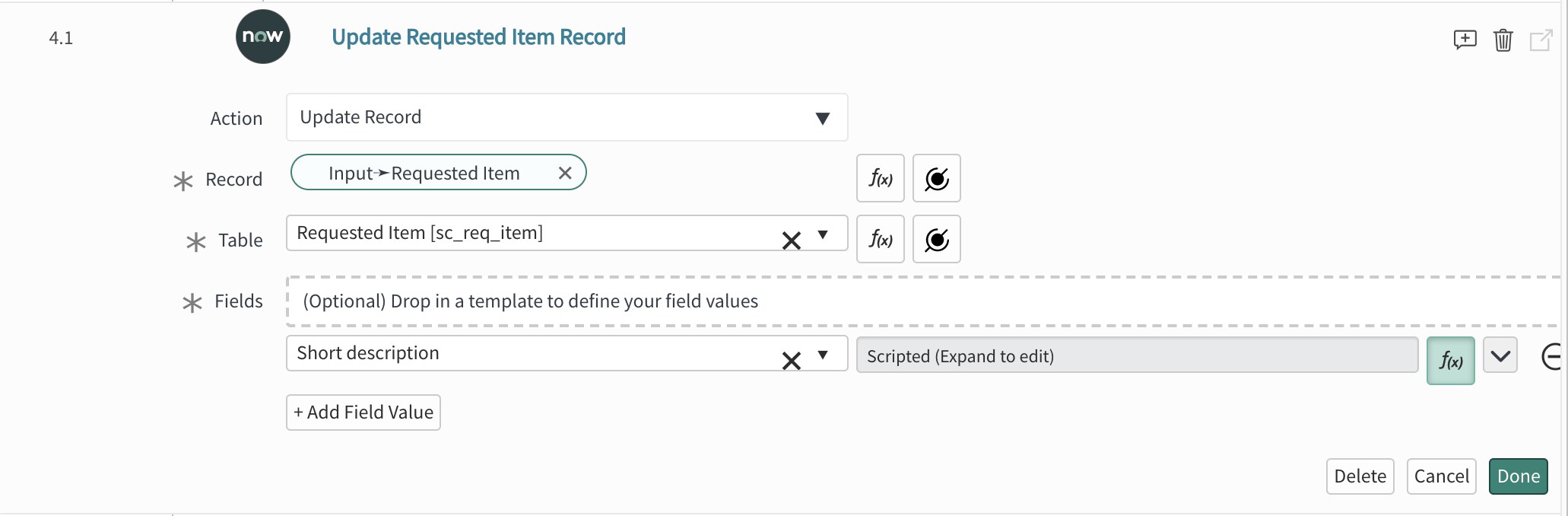
Step 3A. Action > Update Record
Use the trigger record pill in the Record spot - this will automatically update the table
Add the desired field to write the list collector results to

Step 3B. Click the f(x) button on the field you plan to update
Because I happened to want to update the short description, I used the suggested variable name and code below:

Subflow code:

- Mark as New
- Bookmark
- Subscribe
- Mute
- Subscribe to RSS Feed
- Permalink
- Report Inappropriate Content
10-21-2020 05:07 AM
Great wokraround! But I'm concerned on the hardcoded .name value. Would it be better if we just use .getDisplayValue() or something similar?
- Mark as New
- Bookmark
- Subscribe
- Mute
- Subscribe to RSS Feed
- Permalink
- Report Inappropriate Content
11-23-2020 04:22 PM
I supposed that might work, try it and let us know what happens!
The example method works by essentially dot-walking to whichever data point you'd like to use, which may not be the display value in every case.