Edit the layout of the Action Assignment "Edit" modal in the workspace

- Mark as New
- Bookmark
- Subscribe
- Mute
- Subscribe to RSS Feed
- Permalink
- Report Inappropriate Content
08-10-2025 12:45 PM
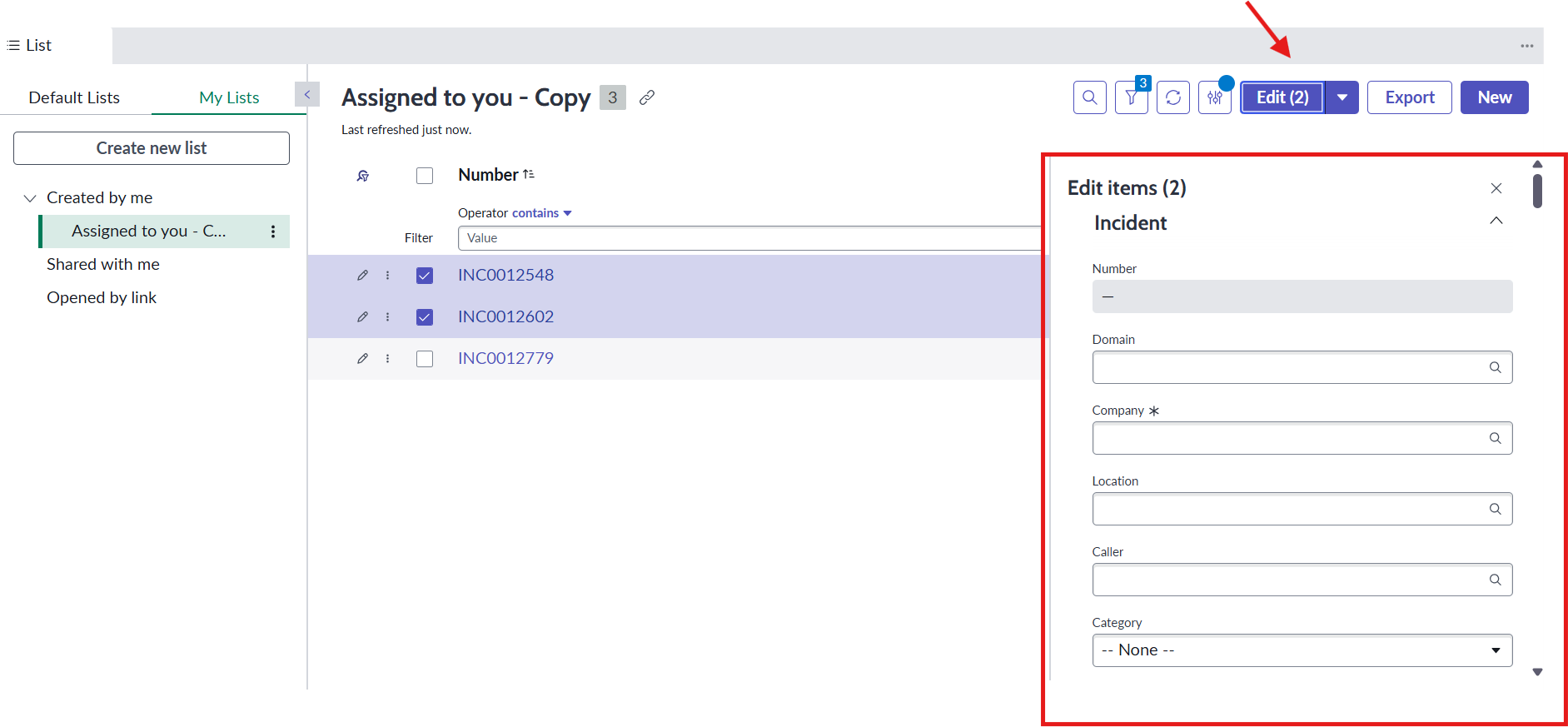
When I'm in the list view of my Service Operations Workspace and select more than one incident and click the Edit button, a modal opens with all the fields from my incident table. What I want to do is change the layout of this modal and remove some fields I don't want to appear so the end user doesn't get confused when filling out the fields they want to edit.
I created an Action Assignment Edit ({{count}}) for the Incident table, and it already appears in my workspace because I can validate it through the Tooltip, but I can't edit the modal view.
When I try to add a view to Action Assignment, this button disappears from my workspace. So, I don't know how else to change this modal layout.
Another way I tried was to create a new Action Payload Definition and pass the fields via payload, but that didn't work either.
Does anyone know if it is possible to edit the modal layout?
- Mark as New
- Bookmark
- Subscribe
- Mute
- Subscribe to RSS Feed
- Permalink
- Report Inappropriate Content
01-19-2026 01:16 AM
did you find anything on this?
- Mark as New
- Bookmark
- Subscribe
- Mute
- Subscribe to RSS Feed
- Permalink
- Report Inappropriate Content
01-19-2026 01:55 AM
I didn't find any information about that.