- Mark as New
- Bookmark
- Subscribe
- Mute
- Subscribe to RSS Feed
- Permalink
- Report Inappropriate Content
07-27-2016 01:34 AM
When I try a create a new workflow I am now receiving the error Action not authorized

The table I am trying to create a workflow from is the ast_contract
I am an Admin and have never seen this before
Any ideas?
Thanks,
Riaz
Solved! Go to Solution.
- Mark as New
- Bookmark
- Subscribe
- Mute
- Subscribe to RSS Feed
- Permalink
- Report Inappropriate Content
07-29-2016 06:54 AM
I have received the solution from Service Now and it is now working well.
I had a UI action which worked before but when the system upgraded from Geneva Patch 1 HF 5 to Geneva Patch 3 HF 2, on June 9th it broke.
The current release, it shows the UI Action, even if the condition is false. Then when trying to Submit the form, the issues occurs.
UI Action name is Submit
The last valid version, applied contained the following condition: current.canCreate() && !current.getTableName()=='change_request' The exclamation mark at this position is evaluated before the comparison (==) and therefore, it fails, returning false. The correct condition, which was applied in both instances, should be like this: current.canCreate() && current.getTableName() != 'change_request' Now the != is evaluated correctly comparing the return or getTableName method and comparing it with the string 'change_request'.
The issue is resolved.
Thanks,
Riaz

- Mark as New
- Bookmark
- Subscribe
- Mute
- Subscribe to RSS Feed
- Permalink
- Report Inappropriate Content
07-27-2016 02:07 AM
Could you describe step by step what you did to land on the workflow editor page and the context, which release...?
I assume:
* no Scoped application
* no delegated admin
- Mark as New
- Bookmark
- Subscribe
- Mute
- Subscribe to RSS Feed
- Permalink
- Report Inappropriate Content
07-27-2016 02:13 AM

- Mark as New
- Bookmark
- Subscribe
- Mute
- Subscribe to RSS Feed
- Permalink
- Report Inappropriate Content
07-27-2016 04:24 AM
As an admin (just in case, make sure you log out and log in without any impersonation)
1) type "Workflow editor" in the left menu
2) click on the "+" icon in the workflow editor to create a new workflow
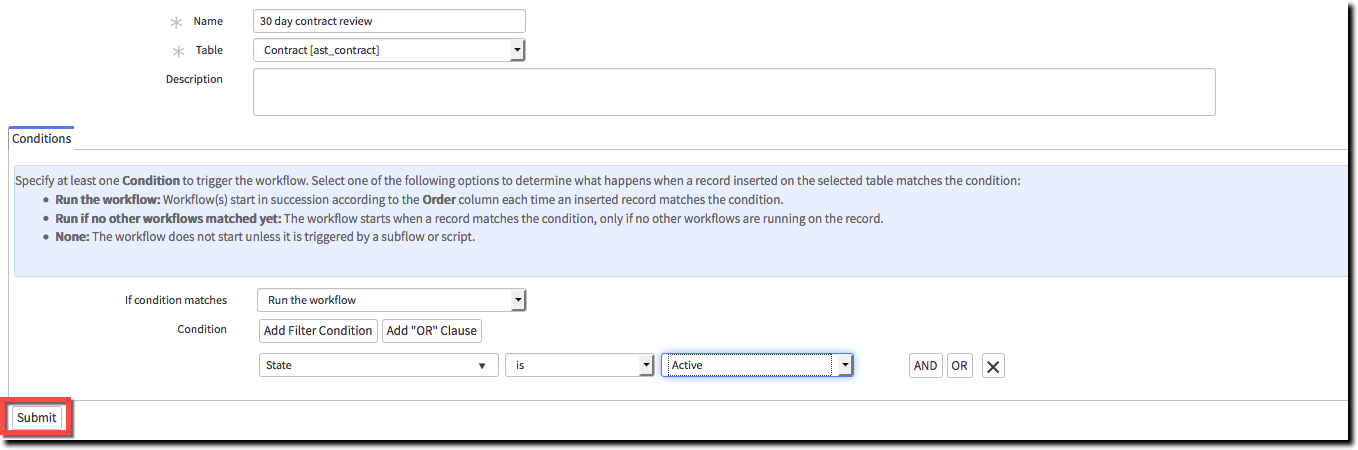
3) fulfill the name, table and condition and click on submit
4) error : "Action not authorized"
Could you perform the following tests:
1) Open any existing workflow (normal change for example), can you see it?
2) Edit any existing workflow (normal change for example), can you see it?
cc: ctomasi, apart "impersonation" or specific (and weird) ACL, I don't see what could cause this issue, do you have ideas?
- Mark as New
- Bookmark
- Subscribe
- Mute
- Subscribe to RSS Feed
- Permalink
- Report Inappropriate Content
07-27-2016 04:37 AM
Hi David,
Your steps 1-4 are correct.
I can open, checkout and Publish existing workflows.
Very confused, I have always been able to create workflows.
Riaz

- Mark as New
- Bookmark
- Subscribe
- Mute
- Subscribe to RSS Feed
- Permalink
- Report Inappropriate Content
07-27-2016 07:12 AM
The fact that it says (workflow name) just under the error message is suspicious to me. I've never seen this before. If it were a scope related issue, it would simply create the new workflow in the new scope.
You might have to go to customer support with this one. Let us know what they come up with