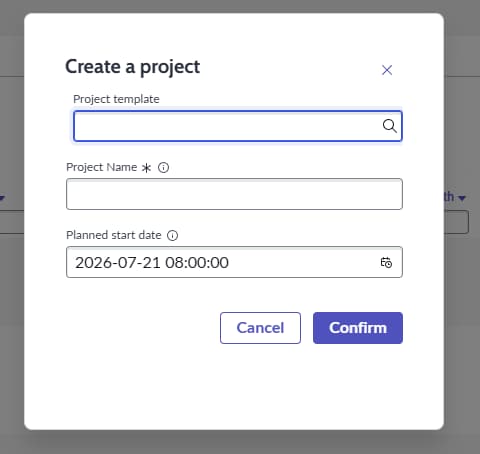
Project template is missing in project workspace

- Mark as New
- Bookmark
- Subscribe
- Mute
- Subscribe to RSS Feed
- Permalink
- Report Inappropriate Content
07-20-2026 03:17 AM
Hi,
I'm facing an issue in our TEST ServiceNow instance related to Project Workspace.
When creating a new project from Project Workspace, we do not see the "Project Template" field in the "Create Project" dialog in test instance and it is working in production

- Mark as New
- Bookmark
- Subscribe
- Mute
- Subscribe to RSS Feed
- Permalink
- Report Inappropriate Content
07-20-2026 03:25 AM
Hi @MandalaS
- Ensure SPM/PPM plugins have active with demo data by searching System Definition > Plugins and locating Project Portfolio Management
- Navigate to Project Administration > Settings > Template Config to check if your template elements and mapping tables are correctly configured.
Ensure users or impersonators have the pps_admin or project_manager roles to use these template forms in your TEST instance
Refer: Project Templates are empty in Dev Instance
Configuring Project Templates to capture custom fields
Regards
Tanushree Maiti
ServiceNow Technical Architect
LinkedIn: https://www.linkedin.com/in/tanushreemaiti
- Mark as New
- Bookmark
- Subscribe
- Mute
- Subscribe to RSS Feed
- Permalink
- Report Inappropriate Content
07-20-2026 06:53 AM
Hi @MandalaS ,
Assuming your Sub-Prod and Prod instances are running different versions, the behaviour you're seeing is expected.
Starting with later Zurich patches, the New Project option has been split into two separate actions:
New Project
New Project from Template

The latter screenshot you shared is for New Project, which is used to create a project manually. Compared to earlier versions, this dialog includes a few additional fields.
When you choose Create Project from Template, a separate dialog is displayed where the Project Template field is mandatory. In previous versions, both scenarios were handled through a single dialog. If a template was selected, the project was created from that template; if no template was selected, a new project was created with only the project name and start date populated.
I hope this helps! If this resolves your issue, please consider marking this reply as Helpful or Accept as Solution.
Regards,
Harish