Unable to solve Missing module id / Invalid module id! in idea portal App


- Mark as New
- Bookmark
- Subscribe
- Mute
- Subscribe to RSS Feed
- Permalink
- Report Inappropriate Content
04-20-2020 01:30 AM
Hi,
I have enabled plugin "Id: com.snc.ppm_innovation_management" to get the Idea Portal App in Orlando
Idea Portal got activated and able to see in side bar/navigation pane
However my users are getting error "Missing module id / Invalid module id!" when they login to https://instancename.service-now.com/idea
I browsed related posts but none of the solutions worked. Please help.
- Labels:
-
Project Portfolio Management

- Mark as New
- Bookmark
- Subscribe
- Mute
- Subscribe to RSS Feed
- Permalink
- Report Inappropriate Content
04-20-2020 02:10 AM

- Mark as New
- Bookmark
- Subscribe
- Mute
- Subscribe to RSS Feed
- Permalink
- Report Inappropriate Content
04-20-2020 02:22 AM


- Mark as New
- Bookmark
- Subscribe
- Mute
- Subscribe to RSS Feed
- Permalink
- Report Inappropriate Content
04-20-2020 02:14 AM
Hi Prasad,
Is this happening for admins as well?
Did you try to clear instance cache and logout and login again?
Regards
Ankur
Ankur
✨ Certified Technical Architect || ✨ 10x ServiceNow MVP || ✨ ServiceNow Community Leader
- Mark as New
- Bookmark
- Subscribe
- Mute
- Subscribe to RSS Feed
- Permalink
- Report Inappropriate Content
04-20-2020 02:40 AM
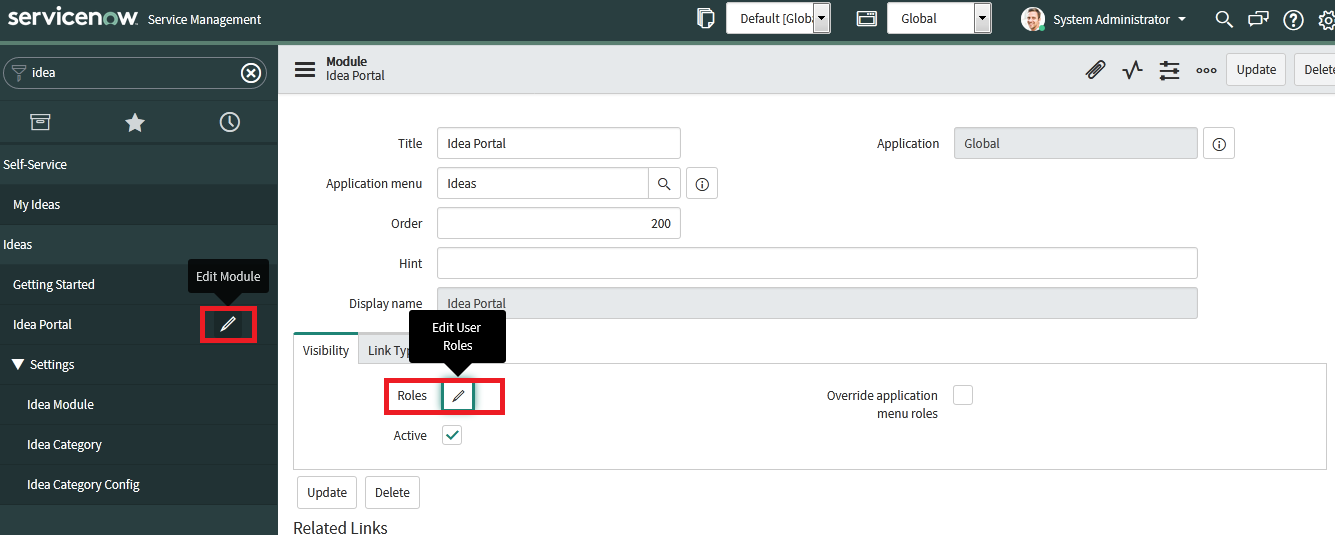
Actually solution is different which I found during my troubleshooting.
We just need to remove all the roles from Idea Category Module as by default they include idea_admin, idea_manager roles which stops normal users from access.