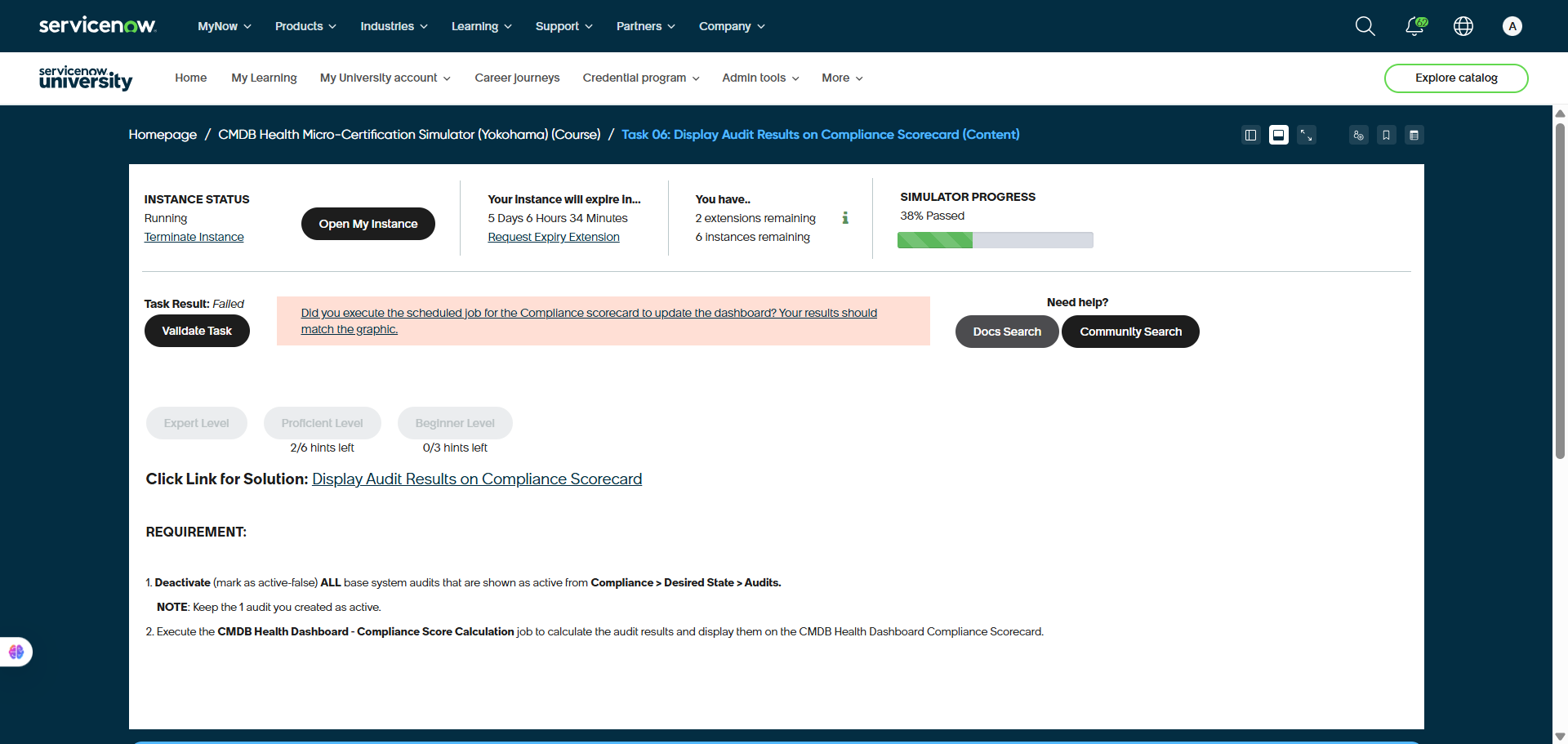
Failed validation on Simulator Task 06: Display Audit Results on Compliance Scorecard (Content)

- Mark as New
- Bookmark
- Subscribe
- Mute
- Subscribe to RSS Feed
- Permalink
- Report Inappropriate Content
01-22-2026 02:54 AM
Hi Everyone,
Kindly help on my issue, which I've followed the instructions to configure the CMDB Compliance, set the Audit as active and set others default Desired State-Audit as 'false'. And execute the Compliance Score Calculation. But the validation task was failed.
Also, I had activete the 'Biginer level' option and follow the instruction. But still failed the validation task.
Please help me to complete this task.
- Mark as New
- Bookmark
- Subscribe
- Mute
- Subscribe to RSS Feed
- Permalink
- Report Inappropriate Content
01-22-2026 03:36 AM
Hi @aldo rinaldo ,
Based on the requirements in your screenshot and common pitfalls for this specific micro-certification, here is a checklist to troubleshoot and fix the issue:
1. Verify the "Active" Status of Audits
The simulator is very strict about which audits are active.
Navigate to Configuration > CMDB Dashboard > Desired State > Audits.
The "All" Rule: Ensure every single "base system" audit (the ones that came with the instance) has Active = false.
The "One" Rule: Ensure only the 1 audit you created in the previous task is set to Active = true.
Tip: Sometimes a second page of audits exists. Make sure you’ve deactivated audits on all pages of the list view.
2. Check the Audit Execution
The Compliance Scorecard won't update if the audit itself hasn't run to produce results.
Open the specific Audit record you created.
Click the Run Audit button manually to ensure it generates "Audit Results."
Check the Audit Results related list at the bottom of the record. If it is empty, the calculation job will have nothing to count, resulting in a 0% or failing score.
3. The "Compliance Score Calculation" Job
The simulator message specifically asks: "Did you execute the scheduled job...?"
Navigate to System Scheduler > Scheduled Jobs > Scheduled Jobs.
Search for: CMDB Health Dashboard - Compliance Score Calculation.
Click Execute Now.
Crucial Step: Wait about 30–60 seconds. This job runs in the background. If you click "Validate Task" too quickly, the dashboard hasn't updated in the database yet.
4. Common Troubleshooting "Gotchas"
Browser Cache: Sometimes the Dashboard UI doesn't refresh automatically. After running the job, go to the CMDB View dashboard and manually refresh the page to see if the Compliance gauge has moved.
The "Beginner" Hint: Since you activated the beginner level, double-check if it asked you to name your audit something specific. If the simulator is looking for an audit named "Hardware Audit" and you named it "My Test Audit," the validation script might fail.
Instance Lag: If the instance is slow, the "Validate Task" button might timeout before the background job finishes. Try running the calculation job one more time, wait a full minute, and then click Validate.
Suggested Next Step
Could you check the Audit Results list for the audit you created and tell me if there are records appearing there? If that list is empty, we may need to look at your Audit filters.
If this is useful and please mark it as helpful and Accept my Solution please....
- Mark as New
- Bookmark
- Subscribe
- Mute
- Subscribe to RSS Feed
- Permalink
- Report Inappropriate Content
05-06-2026 12:32 PM

Hi @sivasankaris
I am trying to work on Task 06 and according to my validate task, I can't seem to find this portion since I am a novice on this lab and I do not have beginner level hints any more so it is very tricky to process each task as it is written from requirement. Luckily I found your information under Community search but still not quite sure where to go and how to do it. The "All" Rule and "One" Rule have to adjust the filter shown below?
1. Verify the "Active" Status of Audits
The simulator is very strict about which audits are active.
Navigate to Configuration > CMDB Dashboard > Desired State > Audits.
The "All" Rule: Ensure every single "base system" audit (the ones that came with the instance) has Active = false.
The "One" Rule: Ensure only the 1 audit you created in the previous task is set to Active = true.
Tip: Sometimes a second page of audits exists. Make sure you’ve deactivated audits on all pages of the list view.

Please understand if I sounded unclear to explain the situation.
Thanks for your help.
Kind Regards,
Chihyong Kim
- Mark as New
- Bookmark
- Subscribe
- Mute
- Subscribe to RSS Feed
- Permalink
- Report Inappropriate Content
05-08-2026 01:52 AM
Hi @sivasankaris
I completed Task06 and your guidance was very helpful.
I would like to choose yours as the solution but I do not see the button available.
Please let me know.
Thanks.
- Mark as New
- Bookmark
- Subscribe
- Mute
- Subscribe to RSS Feed
- Permalink
- Report Inappropriate Content
05-08-2026 02:35 AM
Hi @jihyungkim ..,
Good to know that as my answer helped you 😇..
In my reply.. you will see an down arrow in the top right.. If you click there.. You can able to see Accept as Solution..

Best Regards,
SIVASANKARI S