List and Filter Task

- Mark as New
- Bookmark
- Subscribe
- Mute
- Subscribe to RSS Feed
- Permalink
- Report Inappropriate Content
11-13-2025 07:44 AM
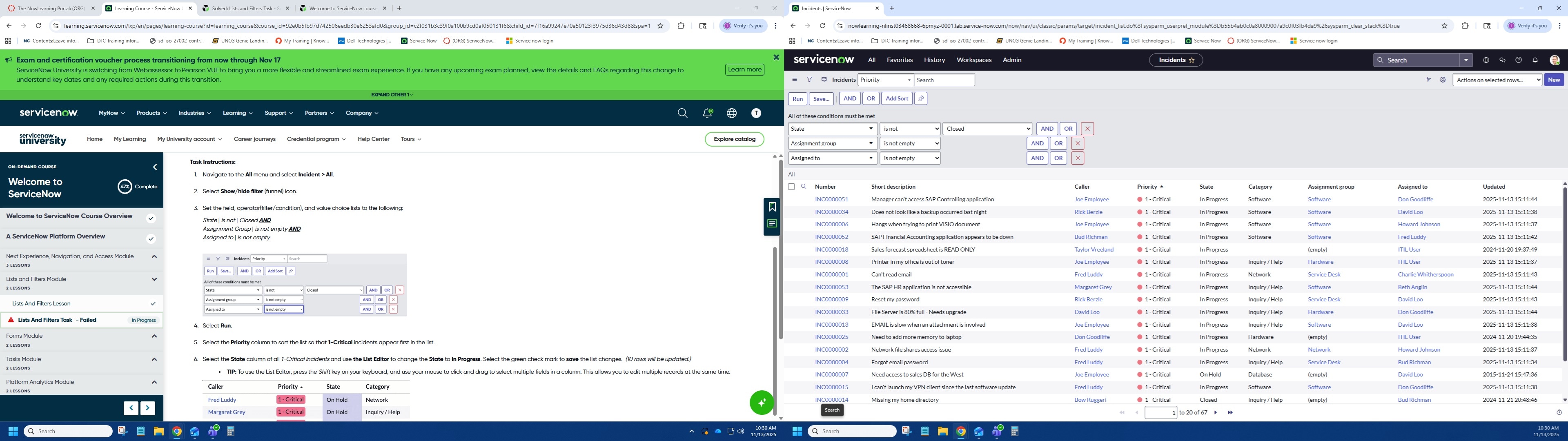
I am having the same issue as others not getting the task to validate. I have completed it several times and my boss did it once and we still get this error. I have attached screen shots showing each step. I used the List Editor to make all changes.

- Mark as New
- Bookmark
- Subscribe
- Mute
- Subscribe to RSS Feed
- Permalink
- Report Inappropriate Content
11-13-2025 09:18 AM - edited 11-13-2025 09:20 AM
Hi @thmccray,
your filter has a condition "State != Closed" but it shall rather be "Active == true" ;))
Because incident is active unless it is Closed or Cancelled. And the validation message says "only display active incidents" and with your current filter it can display cancelled incidents that are not active.
Replace the query from State IS NOT Closed to Active IS true. And let me know
Let me know if this helped
EDIT: I can see that your screenshot has a profile picture of System admin, but shall it not be under Platform user instead?
✂-----Cutting-out-the---✦AI-noise✦---All-replies-written-and-vouched-for-by-GlideFather---
- Mark as New
- Bookmark
- Subscribe
- Mute
- Subscribe to RSS Feed
- Permalink
- Report Inappropriate Content
11-13-2025 09:36 AM
The directions state to
Set the field, operator(filter/condition), and value choice lists to the following:
State | is not | Closed AND
Assignment Group | is not empty AND
Assigned to | is not empty

- Mark as New
- Bookmark
- Subscribe
- Mute
- Subscribe to RSS Feed
- Permalink
- Report Inappropriate Content
11-13-2025 09:44 AM
- Mark as New
- Bookmark
- Subscribe
- Mute
- Subscribe to RSS Feed
- Permalink
- Report Inappropriate Content
11-14-2025 08:03 AM
I have done it with both users neither seems to work. I'm trying to see if I can just get the instance rebooted to the beginning, so I can do it all over again. I have finished all the other tasks but this one