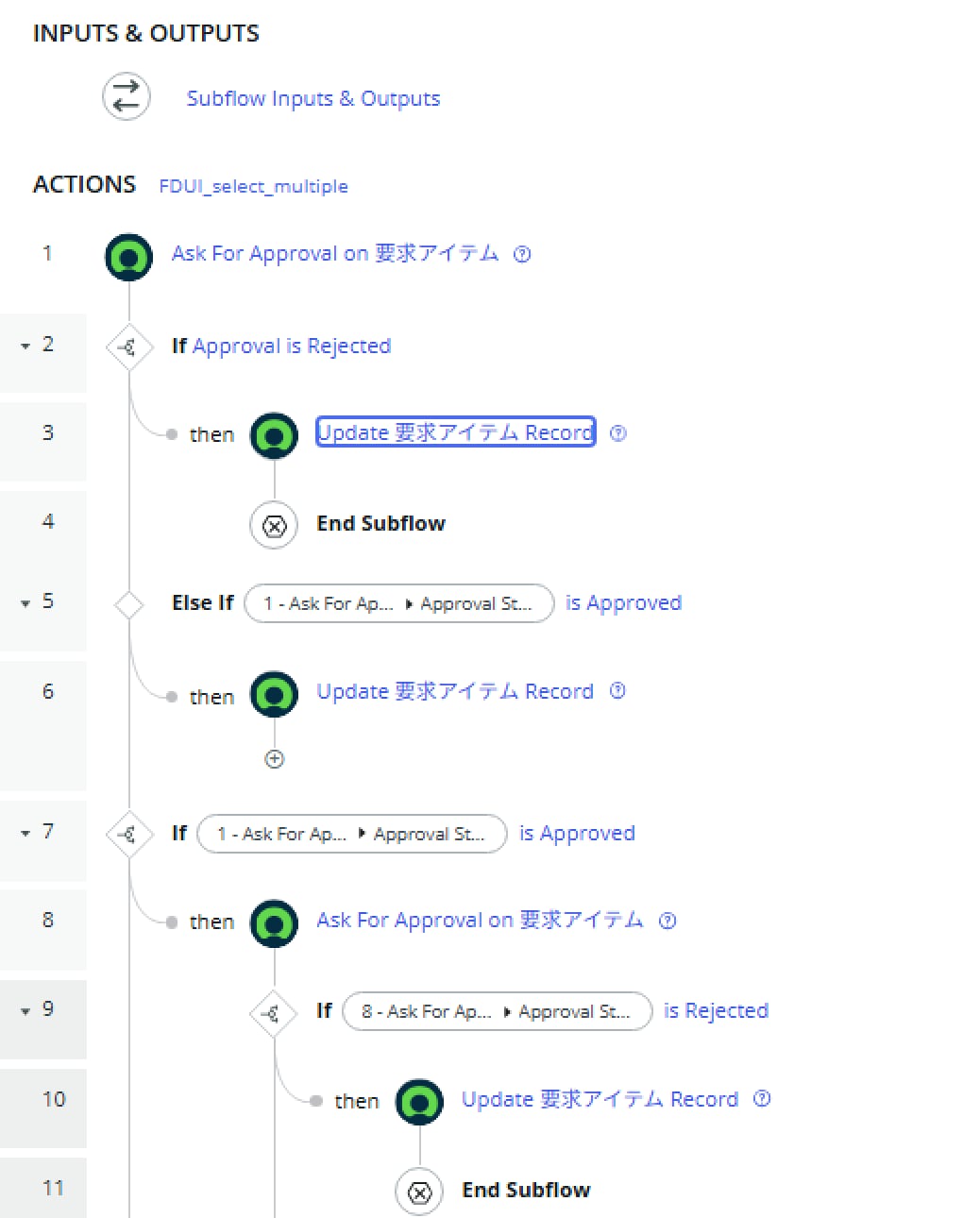
How can I implement a 3-stage approval for RITMs?

- Mark as New
- Bookmark
- Subscribe
- Mute
- Subscribe to RSS Feed
- Permalink
- Report Inappropriate Content
04-02-2026 07:37 AM - edited 04-02-2026 07:38 AM

- Mark as New
- Bookmark
- Subscribe
- Mute
- Subscribe to RSS Feed
- Permalink
- Report Inappropriate Content
04-02-2026 10:48 AM
you may try this
Instead of chaining multiple "Ask For Approval" actions in the flow, configure multi-stage approval directly on the Catalog Item using approval rules or policies with different order values:
- Stage 1 → Order 100
- Stage 2 → Order 200
- Stage 3 → Order 300
The platform will automatically wait for all approvers at Order 100 to approve before moving to Order 200, and so on. You only need a single "Ask For Approval" action in your flow, and the engine handles sequencing natively. This completely avoids the reset problem.
- Mark as New
- Bookmark
- Subscribe
- Mute
- Subscribe to RSS Feed
- Permalink
- Report Inappropriate Content
04-02-2026 04:07 PM
Hi @Naveen20 ,

- Mark as New
- Bookmark
- Subscribe
- Mute
- Subscribe to RSS Feed
- Permalink
- Report Inappropriate Content
04-02-2026 06:39 PM
Try this.
all 3 approvers are created simultaneously in Requested state. They need to be sequenced so Stage 2 only activates after Stage 1 is approved.
Setup
1. Catalog Item → Approval Rules (3 rules):
| Rule | Approver | Order |
|---|---|---|
| Stage 1 | Natasha Ingram | 100 |
| Stage 2 | Change Manager | 200 |
| Stage 3 | Chuck Tomasi | 300 |
The Order field is the key — the platform will only request Order 200 after all Order 100 approvals are complete.
2. Flow (simplified):
Trigger: RITM Created
  ↓
Wait For Condition → sc_req_item.approval = "approved"
  ↓
Fulfillment steps...
Add a parallel branch with Wait For Condition → approval = "rejected" for the rejection path.
3. Remove all "Ask For Approval" actions from the flow entirely.
- Mark as New
- Bookmark
- Subscribe
- Mute
- Subscribe to RSS Feed
- Permalink
- Report Inappropriate Content
04-02-2026 06:47 PM
However, I noticed that when we apply approval rules to a group, the approval request is sent to all group members and waits until everyone approves. Is it possible to configure this so that approval from only one member is required instead of all members?