How to display an image in a ServiceNow form field when the field stores an image URL

- Mark as New
- Bookmark
- Subscribe
- Mute
- Subscribe to RSS Feed
- Permalink
- Report Inappropriate Content
12-29-2025 11:16 PM
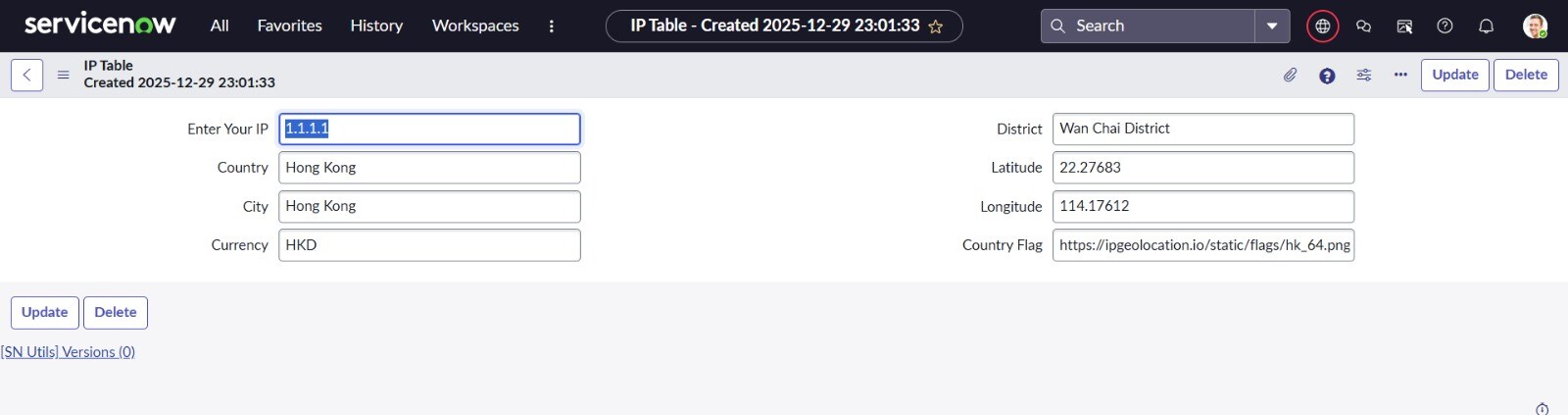
I am working on a custom scoped application in ServiceNow and trying to display a country flag image on a form.
The image URL is retrieved from an external REST API (ipgeolocation.io) and is successfully stored in a String field (country_flag).
However, instead of rendering the image, the form displays only the image URL as plain text.
I also tried using the Image field type, but in that case the field shows “Click to add photo” and does not render the external image URL.
My goal is to display the actual image on the form using the stored URL, not the URL text itself.

- Mark as New
- Bookmark
- Subscribe
- Mute
- Subscribe to RSS Feed
- Permalink
- Report Inappropriate Content
12-30-2025 11:03 PM
Hi @VamsiK144833510 ,
You can achieve this by using a UI Macro and the field attribute ref_contributions
Steps:
-
Create a UI Macro (for example: country_flag)
-
Open the Dictionary entry of the field where you want the image to appear.
-
In Attributes, add:
-
Save the record and refresh the form.
-
The image will now be displayed next to the field instead of showing the URL text.


Thanks,
Siddhesh Jadhav
If this answers your question, please mark this response as Helpful and Accepted.
- Mark as New
- Bookmark
- Subscribe
- Mute
- Subscribe to RSS Feed
- Permalink
- Report Inappropriate Content
12-30-2025 11:31 PM
Hi @VamsiK144833510 ,
Dynamic Image Rendering on Form Load using UI Macro + Client Script
You can dynamically render an image on a ServiceNow form using a UI Macro and Client Script, where the image URL is stored in a field.
This approach works on form load and on field change, exactly like the example you referenced.
🔹 Solution Overview
-
Store the image URL in a String field (example: description)
-
Use a UI Macro to render the image and expose a global JS function
-
Use a client Script to pass the URL dynamically
-
Attach the macro to the field using ref_contrubutions
1️⃣ UI Macro (country_flag)
This macro renders the image and exposes a global function (setFlag) that can be called from Client Scripts.
<?xml version="1.0" encoding="utf-8" ?>
<j:jelly trim="false" xmlns:j="jelly:core" xmlns:g="glide" xmlns:j2="null" xmlns:g2="null">
	<img id="country_flag_img" style="max-height:40px; max-width:60px;" />
	<script>
		function setFlag(url) {
        if (url) {
            $j("#country_flag_img").attr("src", url);
        }
    }
	</script>
</j:jelly>
✔ The function is loaded into the global namespace
✔ The image element is always present
2️⃣ Client Script (onChange)
onChange Client Script
If the URL can change dynamically:
function onChange(control, oldValue, newValue, isLoading) {

// comment this then it will work onload also
/* if (isLoading || !newValue) {
        return;
    }
*/

    if (typeof setFlag === 'function') {
        setFlag(newValue);
    }
}
3️⃣ Dictionary Entry Configuration
Attach the UI Macro next to the field.
-
Open Dictionary Entry of the field
-
Add this to Attributes:
ref_contributions=country_flag
✔ The image will appear next to the field
✔ No form layout changes required
✅ Final Result
-
When the form loads, the stored image URL is passed to the UI Macro
-
The image renders automatically
-
Client Script passes values dynamically
-
Rendering happens without saving the record


Thanks, and regards
Siddhesh Jadav
Please mark this response as Helpful and Accepted if it resolves your query.