- Mark as New
- Bookmark
- Subscribe
- Mute
- Subscribe to RSS Feed
- Permalink
- Report Inappropriate Content
05-13-2021 09:34 AM
I've enabled the Virtual Agent plugins and tested VA via the Service Portal (using a configuration in "Service Portal > Agent Chat"), however I now want to test out an Agent Chat session going straight to a Live Agent, bypassing Virtual Agent. (This is so that we can start with live Agent Chat and introduce Virtual Agent later).
I can't find a way of doing this, can anyone advise specifically what I need to do to configure my instance to allow a Live Agent chat (via the Service Portal) by default?
Thanks,
Declan
Solved! Go to Solution.
- Labels:
-
Virtual Agent


- Mark as New
- Bookmark
- Subscribe
- Mute
- Subscribe to RSS Feed
- Permalink
- Report Inappropriate Content
05-13-2021 09:56 AM
Hi Declan,
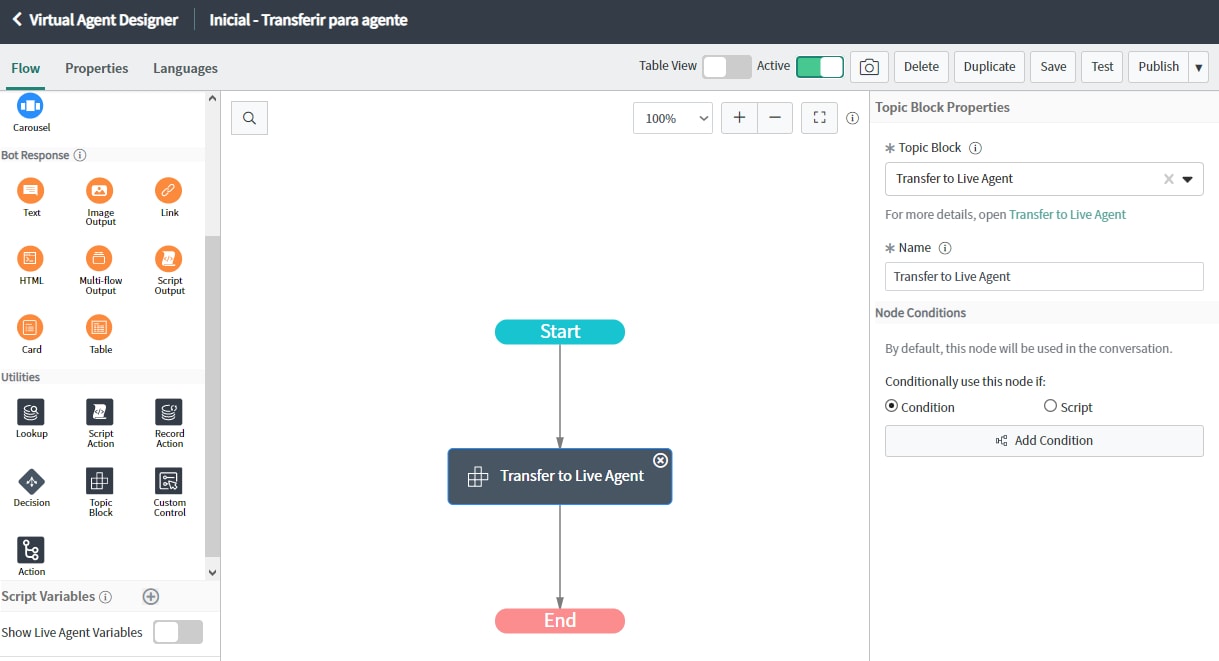
Create your own Setup Topic like this:

Then go to:
Custom Greetings and Setups -> Default chat experience
In the Greeting type topic, link the Setup Topic that you created
MVP 2025 ✨

- Mark as New
- Bookmark
- Subscribe
- Mute
- Subscribe to RSS Feed
- Permalink
- Report Inappropriate Content
06-16-2022 10:37 AM
Hi Hardit, I'm trying to get this working but one thing I notice is every time a conversation ends, the option to start a new one is greyed out until the entire page is refreshed. I also noticed you had this issue in your video (around 4:31). Did you ever find a fix for this issue?


- Mark as New
- Bookmark
- Subscribe
- Mute
- Subscribe to RSS Feed
- Permalink
- Report Inappropriate Content
08-25-2022 10:31 AM
In Service Portal > Agent Chat, you can select the [sp_agent_chat_config] Record relevant to your portal. This record has a server script field wherein you can set 'configObj.live_agent_only' to true/false. (default value is set to evaluate !isVAActive)
I believe this is starting from Rome release onwards.