Financial planning for planning items
Plan, re-forecast, track the financials, and create baselines for all of your planning items.
You can work on financial planning supported on low level planning items like demands, projects, epics, features, capabilities, and so on.
The financials view provides a streamlined perspective, showcasing the actual and planned expenses for the entire fiscal period. You can view the latest estimated cost of completion by viewing the Actual costs for the past fiscal
periods, planned costs for the current and future fiscal periods, and the total by quarter, year, or for the full scope of the item.
注:
- Currently, Financials is not yet supported for high level entities like Initiatives, Strategic programs, Product ideas, and so on.
- Labor costs generation is not supported at planning item level.
Interface of the financials record page gives you the ability to create cost plans, expense lines, and baselines. As a financial user, you can: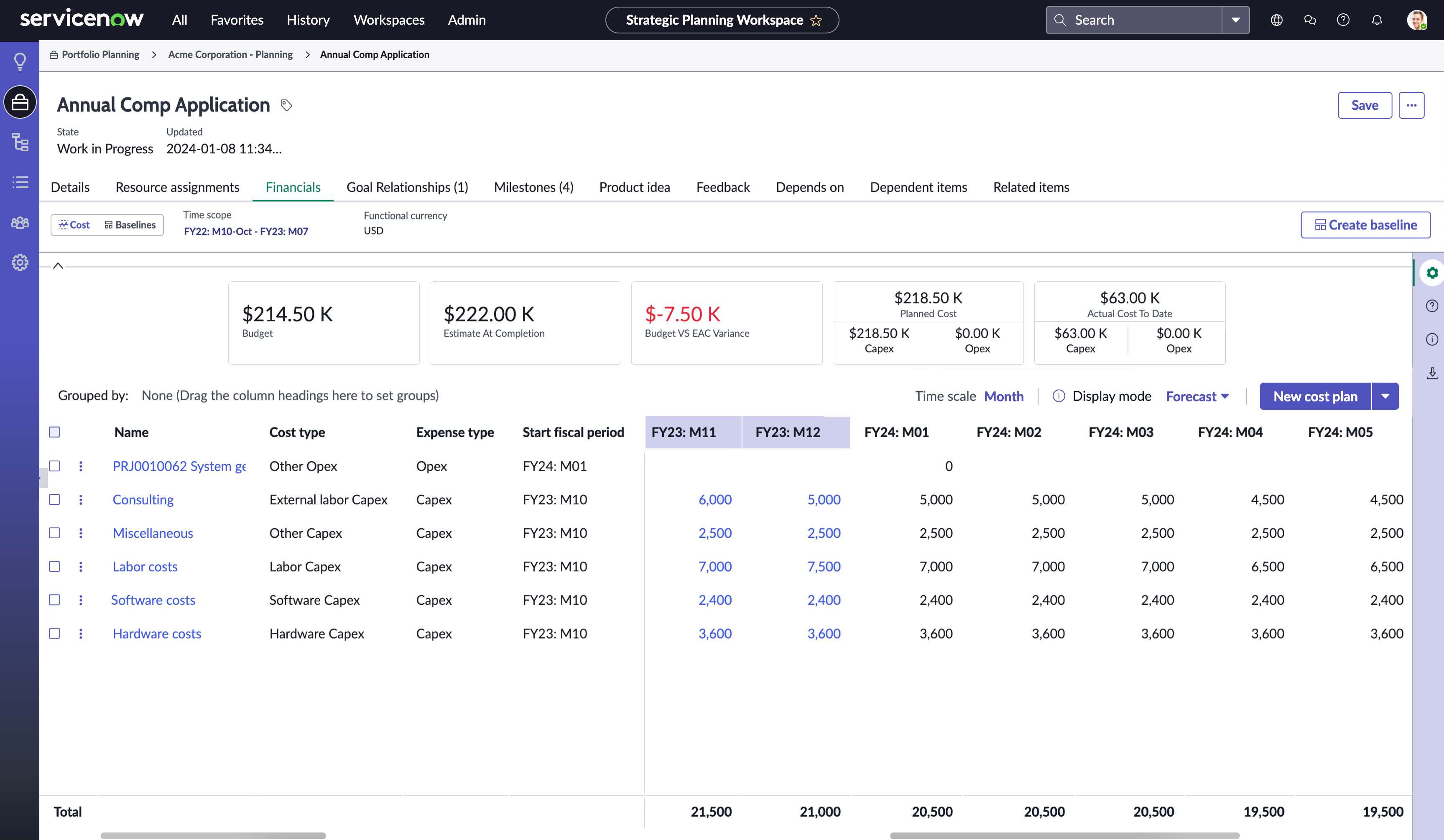
- Enter high-level financial forecasts for planning items using the simple financials section in the Details tab.
- Work on high-level estimating for Planned opEx and Planned capEx.
- Create a detailed breakdown of the planned costs using the financials tab.
- View the rollups of Planned costs, Actuals costs, and Planned benefits for all of your planning items in the Prioritization grid.
- Add, edit, or delete cost plans effortlessly from the Cost screen.
- Re-forecast your planned expenses using the in-line editing feature.
- View a streamlined perspective, showcasing your actual costs for the past and planned expenses for the future, for the entire time scope of the planning item.
- Get a better comprehensive solution by viewing the Forecast (previously EAC - Estimate at Completion), Remaining Estimates (previously ETC - Estimate to Completion), and Actuals of each cost plan for the total time scope and the yearly breakdowns.
- Re-forecast the planned cost for future fiscal periods by directly updating the quarterly and yearly totals using the in-line editing capability of the grid.
- Generate labor costs depending on the resource assignments for the entire scope of the planning item broken down by the financial attributes configured for your organization. For more information on the planning attributes for attribute-based mapping, see Using the Planning attributes.
- Add or edit expense lines against the cost plans easily from the side panel with the associated cost plan details pre-populated.
- Record unplanned expenses using the New expense line side panel.
- Create and compare financial baseline to track the financials of your planning items.
- Compare the latest costs (actual expenses for past fiscal periods and planned costs for current and future fiscal periods) with the initial forecasted planned costs by creating financial baseline and using the compare baselines capability.
- Analyze the cause of variance in costs and when did this occur over time by capturing the financial baselines manually or automatically.
- Switch between different display modes to get a focused view of the financial records.
You can view the following information on the financials screen.
- Time scope: duration of the planning item or a cost plan, whichever has a larger fiscal period range.
- Functional currency: currency defined and used to calculate the financials.
- Customizable widgets showing different financial information such as allocated budget, Forecast (previously EAC - Estimate at Completion), Variance (the difference between budget and Forecast), breakdown
of planned costs, and actuals by cost type.注:Budget and Budget vs EAC Variance widgets are available for Demands and Projects only.
- Time scale: time period breakdowns to view the financials. Default value is set to Month/Period, depending on the fiscal calendar type.
- Display mode: list options to switch between different modes to get a focused view of financials.
- Generate labor costs: one-click solution to generate or refresh the planned labor costs for the planning item depending on resource assignments.注:This option is enabled for the projects with resource assignments only.
- The left pane gives you a tabulated view of the cost plan attributes displaying the Name, Cost type, Expense type, Stat fiscal period, End fiscal period, Total planned cost, Employee type, and Role. You can customize these fields. For more information, see Customize the left pane view for financials.
- In the right pane, you can view the total Actuals, Forecast, and Remaining Estimates for the selected Time scope duration. Actual expenses against a cost plan for the past fiscal periods, Actuals, Forecast, and Remaining
Estimates for the current fiscal year, and planned costs for the current and future fiscal periods.注:The header rows of actuals and planned are color-coded differently to help you easily identify and differentiate between the expense types.
- New cost plan: opens a simplified side-panel to create a new cost plan for the entity.
- Personalize option to customize the columns in the left pane of the table.
- Export option to download Cost or Baselines comparison as Microsoft Excel or CSV file.