Follow these steps to add a product picker aggregate using API calls.
Before you begin
Role required: Admin
Procedure
-
Using Postman or another API tool, set the authorization mode to "Bearer token", and provide the token of the environment where you want to create the aggregate.
In the product picker aggregates area, two endpoints are available in the admin APIs:

The GET endpoint gets the list of all the aggregates that are already available on a product picker. The parameter is the variable name of the product picker field that is passed in the URL in Postman.
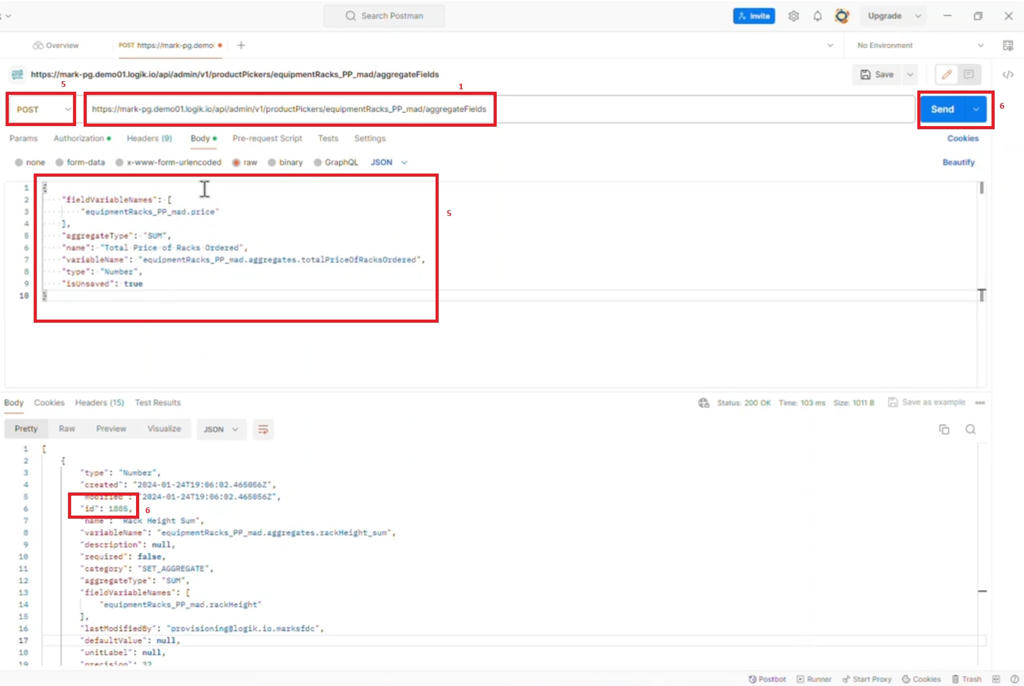
The POST endpoint creates a new aggregate on the product picker. The parameters are the variable name of the product picker field and the request body or payload that gives the details of the aggregates to create.
Examples of product picker endpoints:

-
Set the following URL as the URL of the Postman API call.
(This is the URL from the image just above.)
https://<tenant>.<sector>.logik.io/api/Admin/v1/productPickers/<productPickerName>/aggregateFields
Replace the URL with the parameters that
apply to your environment, including the sector name and the variable name of the product picker from the UI.
-
Send the call.
This returns a list of aggregates already applied in the UI. You can copy any of the responses for a particular aggregate entry to set the request body for the post method in the next step meant to create a new
aggregate. If there are no preconfigured aggregates, you can take the sample request code directly from the API documentation.
-
Change GET to POST, copy the body of the request from the previous steps, and replace the body with the new aggregate details, including the field variable name and the aggregate type.
You can add only one field per API call.
-
Send the call.
The response includes an aggregate ID that indicates that the aggregate is successfully created.
Result
In the UI, refresh the page to see the added aggregate.