Can a file uploaded through an RITM Attachment Variable be included with a Scheduled Report?

- Mark as New
- Bookmark
- Subscribe
- Mute
- Subscribe to RSS Feed
- Permalink
- Report Inappropriate Content
Thursday
Hi Experts,
I have a requirement where users submit a Catalog Item and upload a file using an Attachment Variable on the RITM.
I also have a Scheduled Report that generates and emails an Excel file.
What I would like to achieve is:
Read the attachment uploaded through the RITM attachment variable.
Generate the scheduled Excel report.
Include the user-uploaded attachment along with the generated Excel file in the email (or attach it to the generated report record/process).
My questions are:
1. Is there an out-of-the-box way to include an attachment from an RITM attachment variable in a Scheduled Report email?
2. If not, what is the recommended approach?
3. Has anyone implemented this using a Scheduled Script, Notification Email Script, Flow Designer, or GlideSysAttachment?
4. If the attachment variable stores only a reference, how can I retrieve the corresponding sys_attachment record and attach it to the outgoing email/report?
Any sample code or best practices would be greatly appreciated.
Thanks in advance!
- Labels:
-
Architect
- Mark as New
- Bookmark
- Subscribe
- Mute
- Subscribe to RSS Feed
- Permalink
- Report Inappropriate Content
Friday
Hello Saint
This is really a tricky question, I spent some time to replicate this in my PDI.
Firstly, i would like to let you know that there's no OOB solution for this requirement. We need to build a custom solution.
Step 1: I built a catalog item with a attachment Variable which accepts excel files. Refer Screenshot 1
Step2: once you select the desired excel file and click on submit. you will see that attachment on the variable context on the RITM - Refer Screenshot 2
Step3: Now got sys_atytachment.LIST table and notice that the attachment is stored with Table name = ZZ_YYsc_req_item and Table sys Id is the RITM sys_id. Please refer screenshoot3
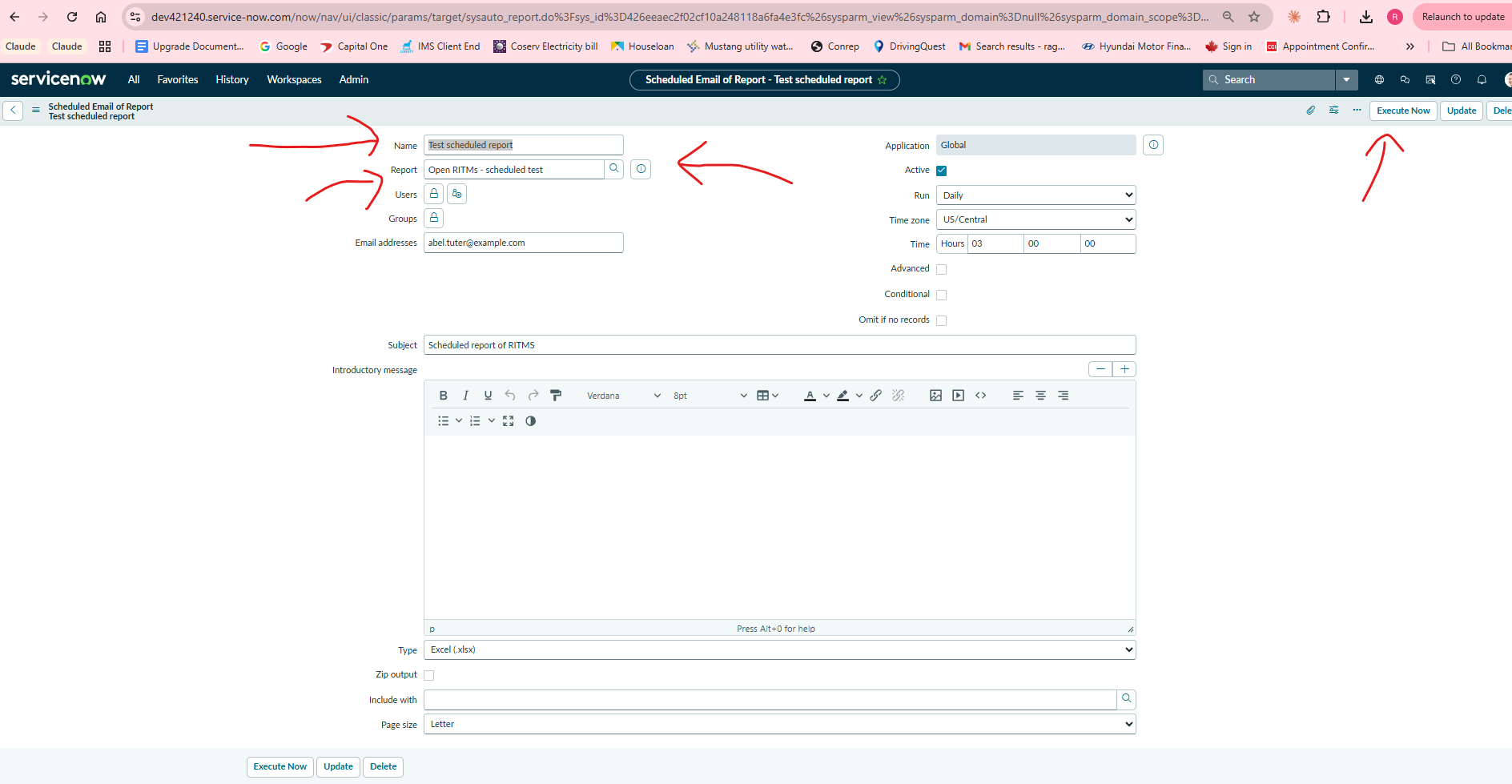
Step4: I created a Report and created a scheduled email of report - please refer screenshot4
Step5: Once I click on Execute, Scheduled report runs, File B lands as sys_m2m_email_report_attachment. Refer screenshot 5
Step 6: The Bridge script: Both files now exist, one when submitted through catalog and other with the scheduled email of report. But these two files/attachments live in different tables. To get them into one email, both must become real record attachments on the RITM (clean table_name = sc_req_item), so a notification will carry them. I ran this in Background Scripts: Refer Screenshot 6
Step7: when you run the Background script, this is the result, you see the two attachments on the RITM.
The script I Used is:
var ritmSysId = '19bea0412f4e4350a248118a6fa4e349'; // RITM0010005 (PDI Test.xlsx)
// --- get the newest report Excel to copy from ---
var rep = new GlideRecord('sys_attachment');
rep.addQuery('file_name', 'CONTAINS', 'scheduled test');
rep.addQuery('table_name', 'sys_m2m_email_report_attachment');
rep.orderByDesc('sys_created_on');
rep.setLimit(1);
rep.query();
var reportSrcId = rep.next() ? rep.getValue('table_sys_id') : '';
gs.print('report source: ' + reportSrcId);
// --- 1) promote the variable file (PDI Test.xlsx) to a record attachment ---
var src=new GlideRecord('sys_attachment');
src.addQuery('table_name', 'ZZ_YYsc_req_item');
src.addQuery('table_sys_id', ritmSysId);
src.query();
while (src.next()) {
new GlideSysAttachment().copy('ZZ_YYsc_req_item', ritmSysId, 'sc_req_item', ritmSysId);
gs.print('copied variable file: ' + src.getValue('file_name'));
}
var fix = new GlideRecord('sys_attachment');
fix.addQuery('table_name', 'ZZ_YYsc_req_item');
fix.addQuery('table_sys_id', ritmSysId);
fix.orderByDesc('sys_created_on');
fix.query();
if (fix.next()) { fix.setValue('table_name', 'sc_req_item'); fix.update(); gs.print('promoted variable copy -> sc_req_item'); }
// --- 2) copy the report Excel onto the RITM (once) ---
if (reportSrcId) {
new GlideSysAttachment().copy('sys_m2m_email_report_attachment', reportSrcId, 'sc_req_item', ritmSysId);
gs.print('copied report Excel');
}
// --- 3) verify ---
var v = new GlideRecord('sys_attachment');
v.addQuery('table_name', 'sc_req_item');
v.addQuery('table_sys_id', ritmSysId);
v.query();
gs.print('paperclip files: ' + v.getRowCount());
while (v.next()) gs.print(' - ' + v.getValue('file_name'));
You write this code in Business Rule/Scheduled Job or trigger a notification on this RITM by checking include Attachments, so that both Attachments on RITM are included.
If my analysis helped, please mark helpful and solution accepted. It really helps other developers in the future