How to use Region/Country attribute in Interactive Filter for dashboard?

- Mark as New
- Bookmark
- Subscribe
- Mute
- Subscribe to RSS Feed
- Permalink
- Report Inappropriate Content
12-24-2025 05:39 AM
Hello All,
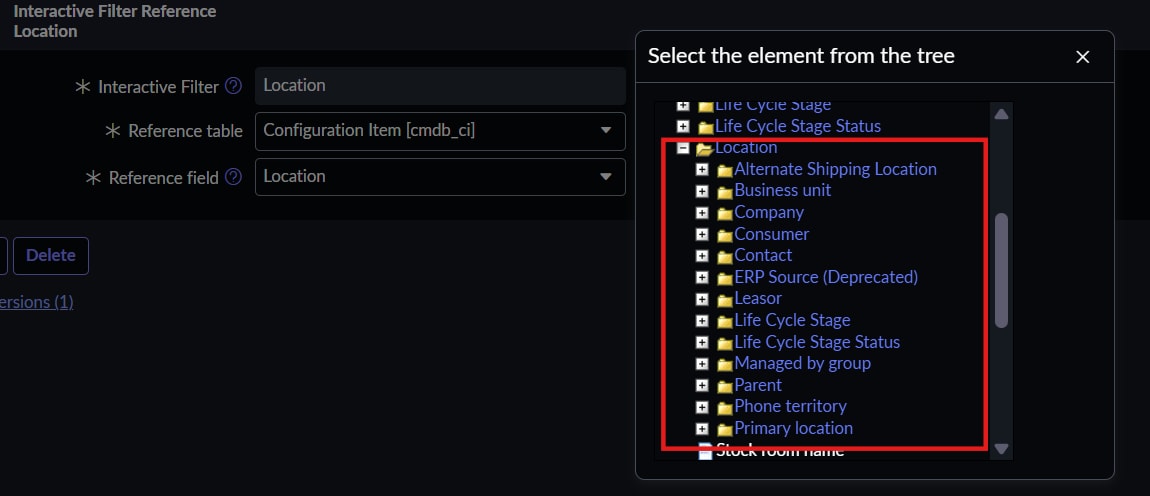
I'm currently using the Location ID/Name as the reference field in an interactive filter(Dashboard) that is built on the cmn_location table. I would like to use the Region/Country attributes from the cmn_location table as reference fields instead. However, ServiceNow does not display these attributes as available options in the interactive filter. Could someone advise on how to enable or configure this?"


- Mark as New
- Bookmark
- Subscribe
- Mute
- Subscribe to RSS Feed
- Permalink
- Report Inappropriate Content
12-24-2025 06:24 AM
I checked your issue, and I think this is expected behavior for the Location table. You cannot get the country directly here. To achieve that, you need to either build a filter on the Country table or use Location Type as a filter.

Regards
Dr Atul G. - Learn N Grow Together ServiceNow Techno - Functional Trainer
LinkedIn: https://www.linkedin.com/in/dratulgrover
YouTube: https://www.youtube.com/@LearnNGrowTogetherwithAtulG
******************************************************************************************
- Mark as New
- Bookmark
- Subscribe
- Mute
- Subscribe to RSS Feed
- Permalink
- Report Inappropriate Content
07-16-2026 08:28 AM
Hello... I am working on the same above request for an interactive filter on Regions for a global dashboard.
Can you please elaborate on how to build a filter on the Country table or use Location Type as a filter.
Thank you.
- Mark as New
- Bookmark
- Subscribe
- Mute
- Subscribe to RSS Feed
- Permalink
- Report Inappropriate Content
12-24-2025 06:35 AM
Hi @Durgaprasad Joi , Yes it is possibe.
1. Go to the Dashboard properties. Check on the related links -> Breakdown Source

2. Open the breakdown source and add the table, select the field you want to filter with and save .

If my response has helped you ,kindly mark it as helpful and accept the solution.
Regards,
Nayan