List Preview Configuration

Options
- Mark as New
- Bookmark
- Subscribe
- Mute
- Subscribe to RSS Feed
- Permalink
- Report Inappropriate Content
01-30-2025 06:55 AM
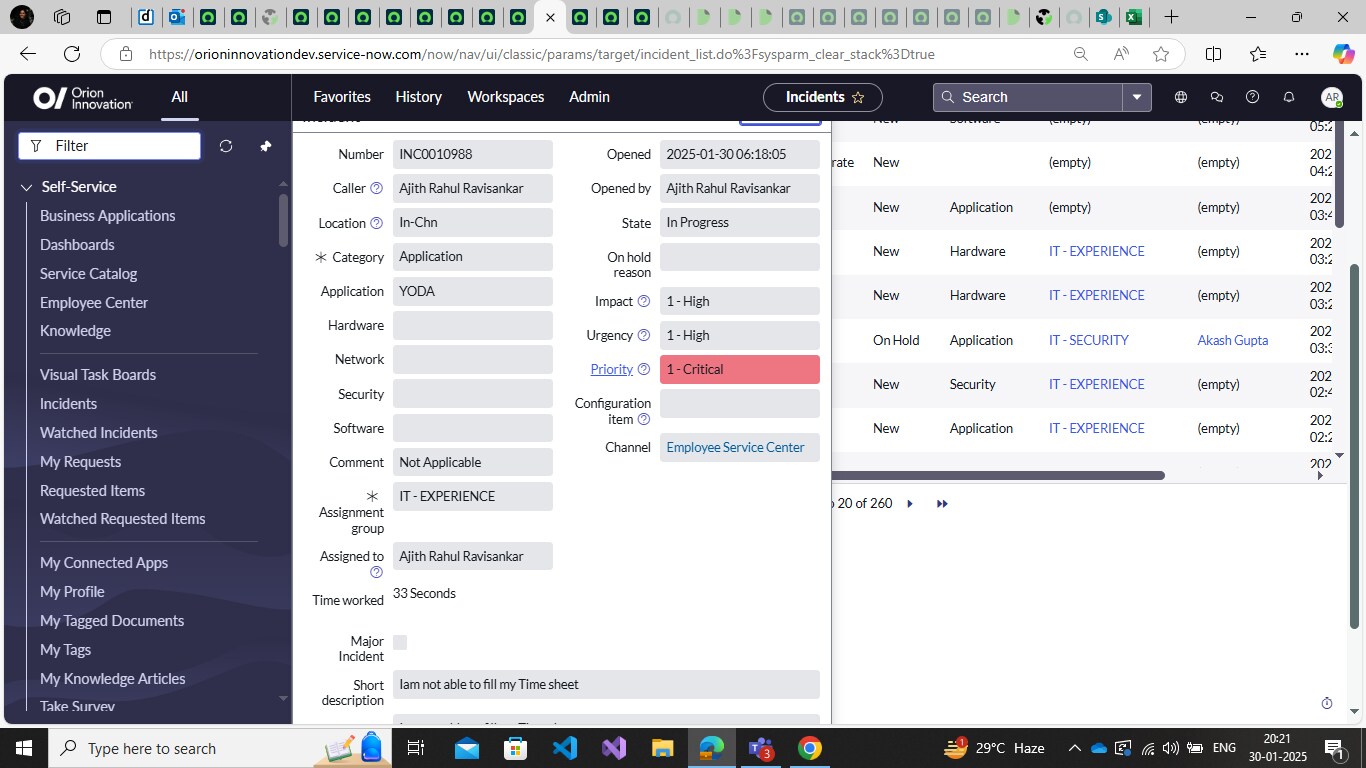
I need help with two things related to the Incident form in ServiceNow:
Configuring the Preview List View:
- When I click the preview icon in the Incident list view, it opens a preview window displaying certain fields.
- I want to configure which fields appear in this preview.
- How can I customize the preview list view for incidents? Is this controlled by a specific form view (e.g., SOW - Incident Overview) or is there a separate configuration?
Preventing Changes from Affecting Default View:
- I made changes in SOW - Incident Overview using Form Designer, but they also reflected in the Default View.
- I expected these changes to be isolated to SOW - Incident Overview only.
- Why did this happen, and how can I ensure that modifications in SOW - Incident Overview do not impact the Default View?
1 REPLY 1

Options
- Mark as New
- Bookmark
- Subscribe
- Mute
- Subscribe to RSS Feed
- Permalink
- Report Inappropriate Content
01-30-2025 07:21 AM
1. It will show you the same view of the record that the view of the list you are currently. So you will need to change that same view, or provide a different view on the list.
2. Are you sure you were in the correct scope while changing the form?
