Ankur Bawiskar

Tera Patron
Options
- Subscribe to RSS Feed
- Mark as New
- Mark as Read
- Bookmark
- Subscribe
- Printer Friendly Page
- Report Inappropriate Content
05-01-2020
11:29 PM
Many a times there could be a requirement to load and transform data into target table via catalog Item when user submits request..
Example: End user submits an excel or csv file with some data which he/she wants to get loaded into target table.
Approach: For my example I have taken file as csv, you can use file as xls or xlsx.
1) Create a data source of type File, File retrieval method as Attachment, Type as File and Format as CSV. Ensure transform map and field map are created as usual with the coalesce field etc
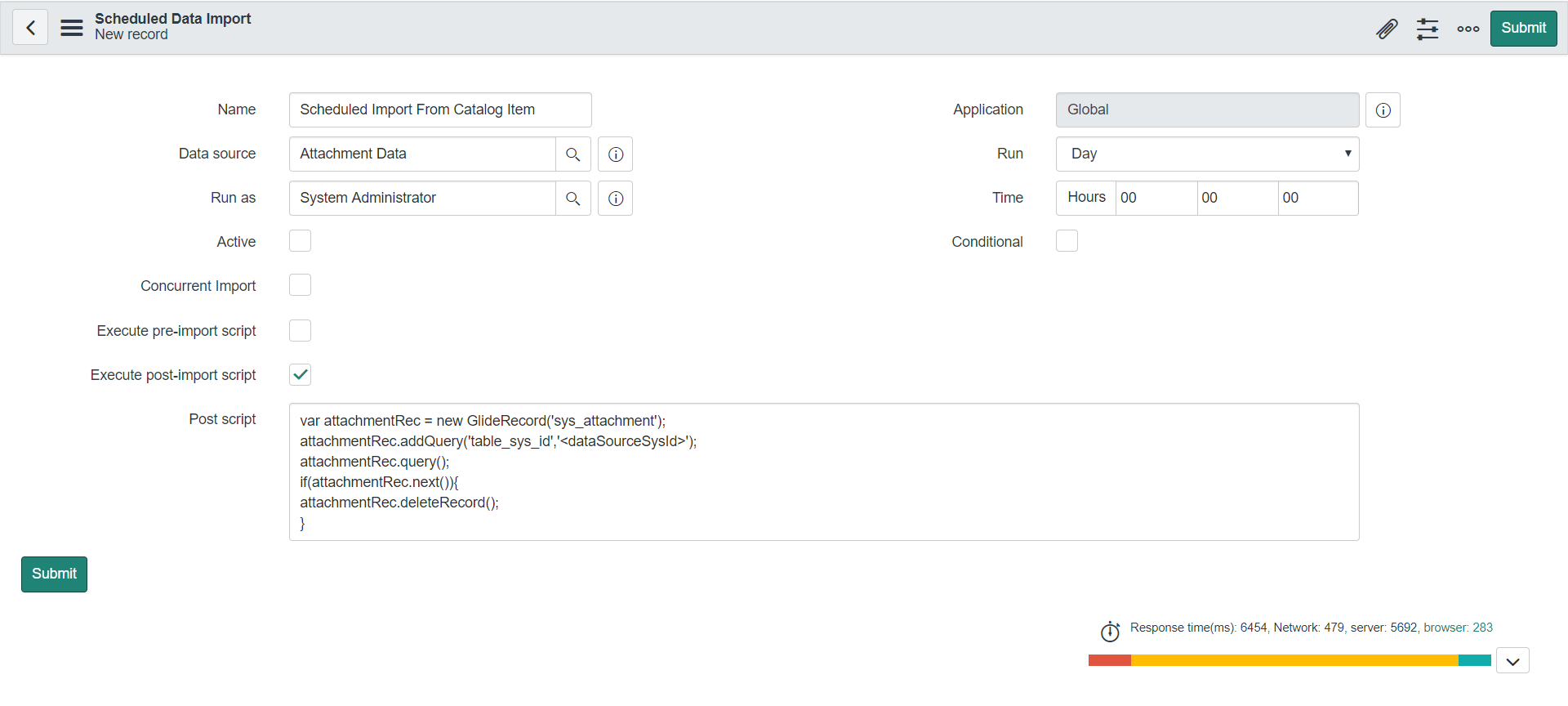
2) Create a record in scheduled imports for the above Data Source and keep it as active false as we will be triggering it via script and we don't want it to run daily/
3) Create a catalog item which would have attachment as mandatory of type csv. Only 1 attachment should be present.
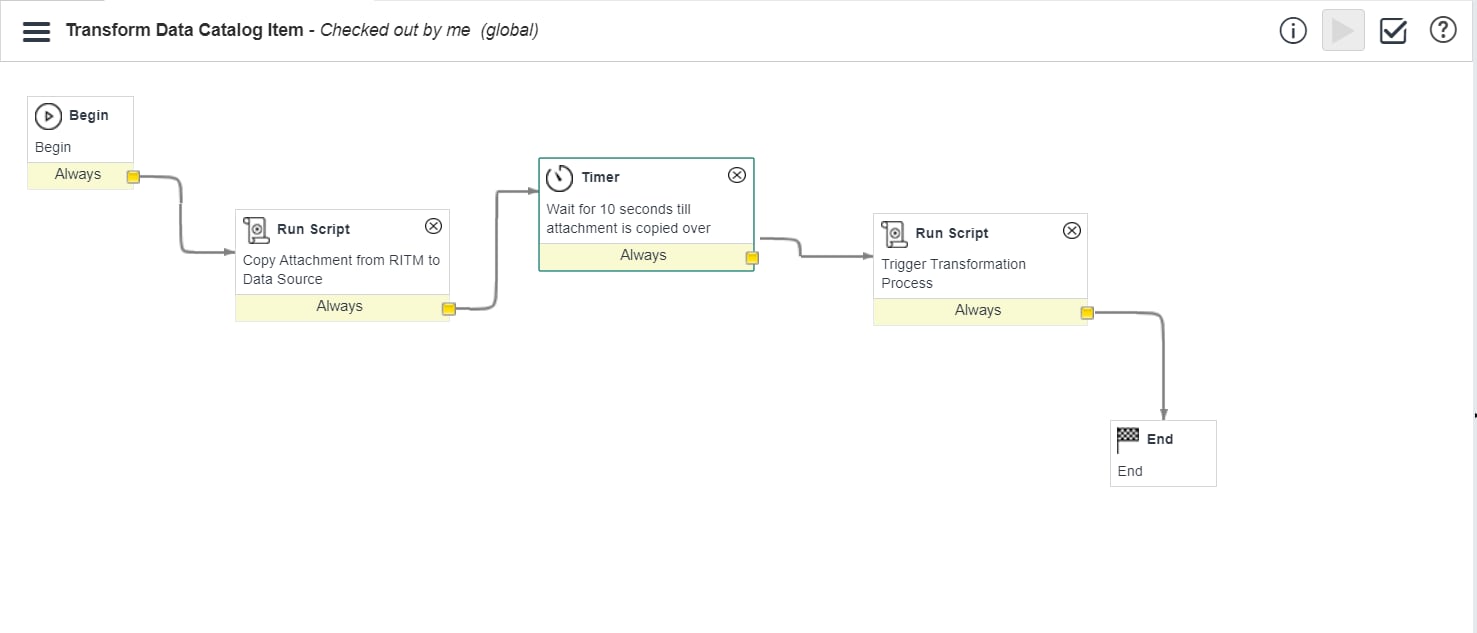
4) Ensure you have a workflow on the catalog item which would copy the attachment from RITM to Data Source; Also have a timer activity of around 5/10 seconds.
5) Trigger the scheduled import from workflow script and it should start the transformation process.
6) Ensure in the post-import script of Scheduled Import you delete the attachment present on the Data Source
so that the next time when the catalog item is submitted the data load happens with the latest attachment file.
Steps: I assume here below points:
1) you will be having data source, transform map and field map as well.
2) I also assume you are aware of creating catalog item and how to make attachment as mandatory and check for only 1 attachment during submission.
I will mention other scripts required as part of the approach:
a) Create record in scheduled imports; specify the data source name already created; give values as per screenshot below
b) Workflow run script to copy attachment to Data Source; ensure you give data source sys_id here;
I assume here you will have a workflow on the Catalog Item; In Run Script activity you can use below line which copies the attachment
GlideSysAttachment.copy('sc_req_item', current.sys_id, 'sys_data_source', '<dataSourceSysId>');
c) Workflow run script to trigger transformation process; Have one more Run Script activity in workflow after the Run Script to Copy attachment; script mentioned below
Note: Ensure you give sys_id of the scheduled import created in step (a)
	var exportGr = new GlideRecord("scheduled_import_set");
	exportGr.addQuery("sys_id", "<RecordSysId>"); // sys_id of the record which you will be creating for scheduled import in step (a)
	exportGr.query();
	if (exportGr.next()) {
		gs.executeNow(exportGr); // this is for scoped app
		// SncTriggerSynchronizer.executeNow(schImp_GR); // this is for non scoped app
	}
d) Post-import script to delete attachment
var attachmentRec = new GlideRecord('sys_attachment');
attachmentRec.addQuery('table_sys_id','<dataSourceSysId>');
attachmentRec.query();
if(attachmentRec.next()){

attachmentRec.deleteRecord();

}
Also ensure you add a timer of around 5/10 seconds after 1st Run Script of copy attachment so that by the time the workflow run script which triggers the transformation finds the attachment on data source.
Workflow Screenshot:
Note: This approach would be able to handle 1 request submission at a time; If there are multiple users who raise the catalog request this approach would lead to issue as there is only 1 data source to handle the transformation. In that case some extra enhancements would be required.
Thanks for reading the blog and do provide your inputs/suggestions if any.
Hope you find this article helpful. Don’t forget to Mark it Helpful, Bookmark.
Thanks,
Ankur Bawiskar
ServiceNow MVP 2021,2020,2019,2018
Developer MVP 2021
- 59,342 Views
61 Comments
You must be a registered user to add a comment. If you've already registered, sign in. Otherwise, register and sign in.