sabell2012

Mega Sage
Options
- Subscribe to RSS Feed
- Mark as New
- Mark as Read
- Bookmark
- Subscribe
- Printer Friendly Page
- Report Inappropriate Content
02-03-2016
06:19 AM
Since workflows execute on the server there are a couple of questions that often arise from my clients:
- How do I control the features I want the workflow to execute?
- How do I do this without having to modify the workflow?
- Or better: From a ServiceNow Admin: How do I give the user control of the workflow without giving them Admin rights?
These workflow requirements arise so often that I have created patterns to describe them.
What are patterns? These are software development descriptions that quantify often repeated designs, and are a software engineering best practice.
The Patterns
1. Workflow Control Via Variable Input
This pattern describes control via a Service Catalog variable or variables. The User Interface (UI) would consist of choices presented to the user in a Service Catalog Request, or UI Page. These choices would represent variable values that configure how the workflow will react.
The choices could be:
- Added at a later time to activate portions of the workflow.
- Removed at a later time to de-activate portions of the workflow.
The down-side to this pattern is that the Application Owner must request addition or removal of variable values from the ServiceNow Admin team. However, how often would the App Owner actually want to turn things on or off? Not often I should imagine.
Here is a visual diagram of the pattern:
Now to demonstrate how this works consider the following diagram:
Let us suppose that a State field in a Service Catalog form had several values. Two of these values: Active and New would be used to trigger special behavior in a workflow.
If we remove the Active value from the State field choice list we will be effectively deactivating the section of the workflow that would be normally available. No code was changed, and if the Application Owner ever wanted to reactivate that feature then they would simply request re-adding it to the dropdown. On or off. Simple.
So that is the first of the two patterns. I almost never use this myself, but I present it here as a form of "building-block" for the next pattern.
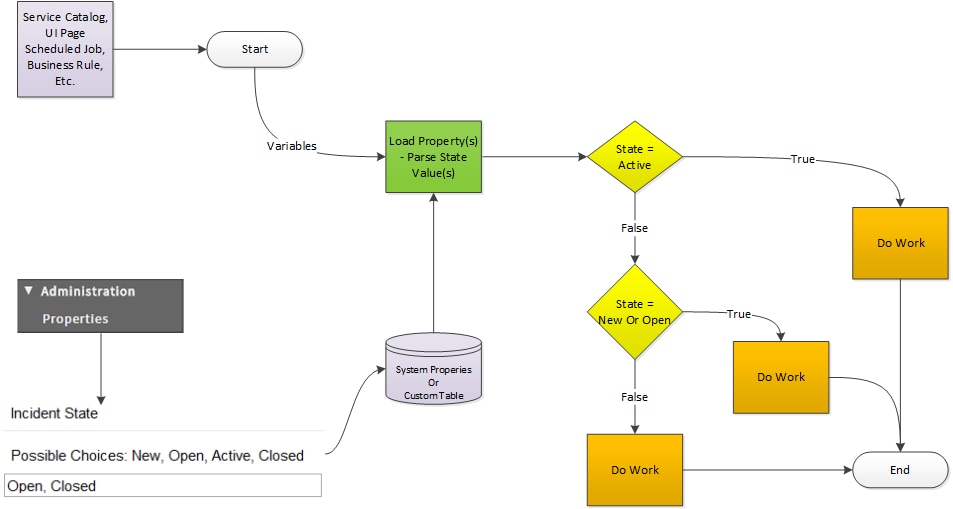
2. Workflow Control Via Property Input
This pattern provides control through a configuration property. This property could be administrator accessible only, but more likely it would be available to the Application Owner through a Module and a Properties Page (user interface). This would allow for security to be easily implemented. The Application Owner could then make features available/unavailable
Here is a visual diagram of the pattern:
Because of the ability to easily create property UI this provides a slick way to integrate this method into the SeviceNow application. You could create an "Admin" module for the Application Owner that would be visible only to them.
Another nice feature is that the properties are not limited to "on/off". They can also be string or number values.
The following diagram describes a possible use-case:
As a ServiceNow Administrator I prefer this pattern. Since it puts control into the Application Owner's hands. I don't have to maintain that portion of it through requests. One less thing on my massive to-do list to schedule into my busy day!
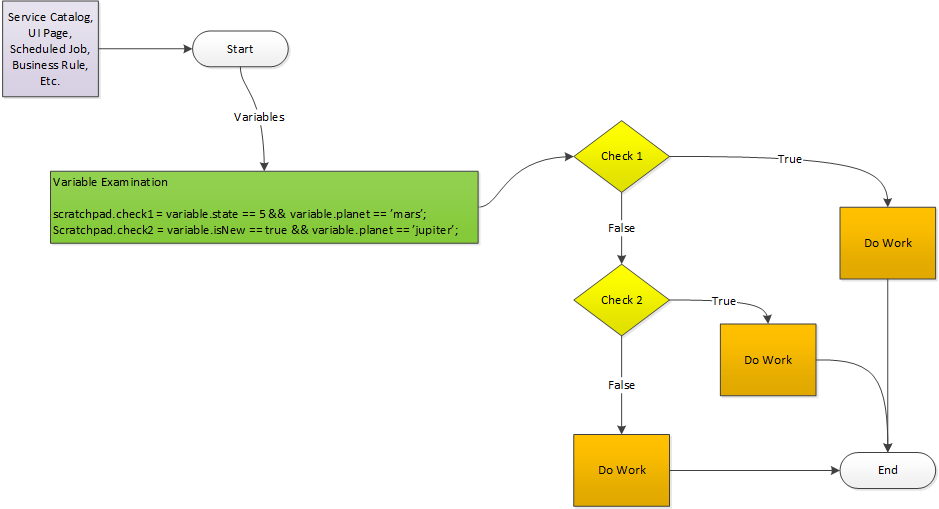
3. Workflow Control Via Variable Examination
The final pattern, I want to show, provides control through a set of coded rules that examine the inbound variables and trigger flags according to what is found.
With this pattern the control would be in the rules. This could be a check for a value or combination of values which would then set a Workflow Scratchpad variable that in-turn would be used in determining the flow.
The following diagram presents a possible use-case:
To make this work you would have to use my enhanced If Activity, but you get the idea. The "rules" are in the code, and develop true/false values based on the inbound variable combinations. This is a bit of a twist on the first pattern, and can be combined with the second to provide some flexibility.
Obviously you can mix and match all three patterns, but I wanted to show them in their simplest form. Patterns provide a reusable and thoughtful approach to architecting a solution to fit your needs. Remember: reusability and maintainability should be primary best practices!
In my next couple of articles I will be giving working examples of these patterns.
Steven Bell
If you find this article helps you, don't forget to log in and "like" it!
Also, if you are not already, I would like to encourage you to become a member of our blog!
2 Comments
You must be a registered user to add a comment. If you've already registered, sign in. Otherwise, register and sign in.