treycarroll
Giga Guru
Options
- Subscribe to RSS Feed
- Mark as New
- Mark as Read
- Bookmark
- Subscribe
- Printer Friendly Page
- Report Inappropriate Content
07-25-2022
12:52 PM
I have seen a number of people posting error messages of this type to the community, but none of the answers seemed teach to the heart of the issue. In the spirit of sharing, I want to give one tangible situation which can trigger this error message, and then talk about these types of errors in general.
Here is a typical example of a situation where this error can arise. This type of code shows up time and time again in the community, as a way to get the display value of a variable, whether on the portal or on a UI 16 catalog item:
If this type of code is running on a catalog task.
And if the user in this example happens to be viewing in UI 16, and the "og_smb_or_dl" variable is not present on the task, then the code with fail with the error. The value property is not available, because getDisplayBox failed to find the element.
This is just one of a myriad of ways that this error can happen, but if we look at what's going on we can understand the nature of the problem and learn to read error messages well.
Rember our original error message?
What this is saying is that the problem is in a piece of code that is trying to use code like this:
But that "something" has a null value. In this particular case, the failure of the dev to add the catalog variable meant that
g_form.getDisplayBox('og_smb_or_dl')was null. But it could be any construct. The moment we try to pick a property off of something that does not exist we are going to get an error like the one above. In short - if you get a can't read properties of null error, start debugging by inspecting to ensure that your objects are actually set.
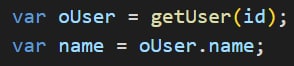
What about this example?
What if no user with that id was found? What's going to happen when we try to pull the name attribute from a null object?
So, what is the solution?
Here is a typical piece of code that you will see in JS:
It's testing to ensure that oUser is not null or undefined. Some will criticize that syntax, but it's ubiquitous. If you are working on the server in global scope you can always take advantage of:
(If working on the server side in a scoped app you can also update the properties of the JSUtil script include to make it accessible from all scopes.)
Basically, utilizing these constructs are part of furthering our skills as developers. "Noobs" assume that everything will always go well - they design only for the happy path. Experienced developers think about what could go wrong and they write robust code that fails gracefully, sets error messages, logs, notifications, possibly incidents, in order to call attention to failures as appropriate.
Wrapping our code in try/catch blocks is another stellar practice, and something that any code reviewer should be looking for. And we should explain any error paths / behaviors in our documentation.... because we're all being excellent developers and writing clear comments and KB articles for all of the code that we release - right?
I hope that this little article proves helpful and sheds some light for some of the newer community members.
Cheers,
Trey
Labels:
- 11,958 Views
1 Comment
You must be a registered user to add a comment. If you've already registered, sign in. Otherwise, register and sign in.