- Mark as New
- Bookmark
- Subscribe
- Mute
- Subscribe to RSS Feed
- Permalink
- Report Inappropriate Content
01-29-2019 06:29 AM
Hi guys. I've found another post that suggests this isn't possible via an ACL but it's 4 years old now and I'm hoping another solution might be out there.
I want to give users with a specific role access to edit the members of specific groups.
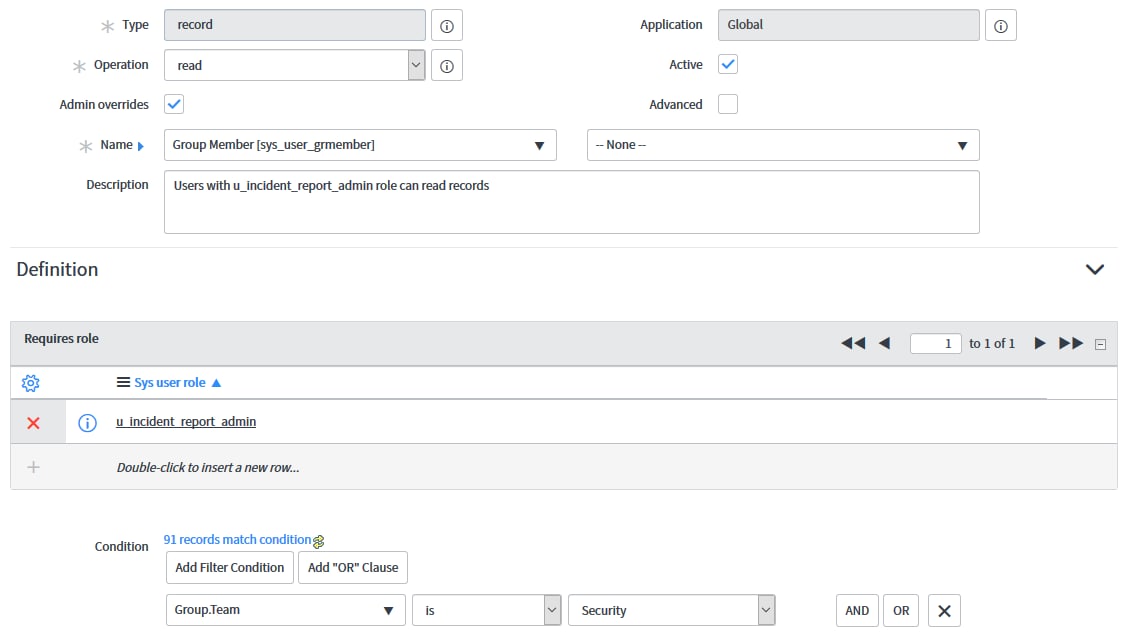
The role is called u_incident_report_admin. The condition for the groups is a field on the Group [sys_user_group] table called Team [u_team]. The Team must be 'Security'. My ACL (read,write, create and delete):

However, the user with the role cannot see the Edit button on the related list view:

Any ideas? Do I need to do something more clever?
Aforementioned post: https://community.servicenow.com/community?id=community_question&sys_id=90598b25db5cdbc01dcaf3231f96...
Solved! Go to Solution.


- Mark as New
- Bookmark
- Subscribe
- Mute
- Subscribe to RSS Feed
- Permalink
- Report Inappropriate Content
01-29-2019 04:37 PM
Yes, you need to do another clever step.
You need a combination of ACL and UI Action condition modifications.
- Ensure there is a create ACL for Group Membership table for the u_incident_report role, with no condition. This is because at the time of creating a record, there is no populated group, and there is a canCreate() evaluation on the UI Action. If you have a condition on the group field, it will always evaluate to false and you will see no Edit button.
- Find the OOTB Global UI Action 'Edit...' with action name 'sysverb_edit_m2m'
- Change table name to 'Group Membership' and select "Insert and Stay"
- Add the following condition
parent.u_team == "Security"Parent is the Group record from the context of the UI Action on the related list.
You should end up with:(new GlideRecord(current.getTableName())).canCreate() && RP.isManyToMany() && !RP.getListControl().isOmitEditButton() && parent.u_team == "Security"Please note I am assuming your field name is 'u_team' and it is a string field. you will need to change this for your solution.
ServiceNow Nerd
ServiceNow Developer MVP 2020-2022
ServiceNow Community MVP 2019-2022

- Mark as New
- Bookmark
- Subscribe
- Mute
- Subscribe to RSS Feed
- Permalink
- Report Inappropriate Content
01-29-2019 02:47 PM
Can you check if removing condition is displaying the edit button
- Mark as New
- Bookmark
- Subscribe
- Mute
- Subscribe to RSS Feed
- Permalink
- Report Inappropriate Content
01-29-2019 04:37 PM
Yes, you need to do another clever step.
You need a combination of ACL and UI Action condition modifications.
- Ensure there is a create ACL for Group Membership table for the u_incident_report role, with no condition. This is because at the time of creating a record, there is no populated group, and there is a canCreate() evaluation on the UI Action. If you have a condition on the group field, it will always evaluate to false and you will see no Edit button.
- Find the OOTB Global UI Action 'Edit...' with action name 'sysverb_edit_m2m'
- Change table name to 'Group Membership' and select "Insert and Stay"
- Add the following condition
parent.u_team == "Security"Parent is the Group record from the context of the UI Action on the related list.
You should end up with:(new GlideRecord(current.getTableName())).canCreate() && RP.isManyToMany() && !RP.getListControl().isOmitEditButton() && parent.u_team == "Security"Please note I am assuming your field name is 'u_team' and it is a string field. you will need to change this for your solution.
ServiceNow Nerd
ServiceNow Developer MVP 2020-2022
ServiceNow Community MVP 2019-2022
- Mark as New
- Bookmark
- Subscribe
- Mute
- Subscribe to RSS Feed
- Permalink
- Report Inappropriate Content
01-30-2019 08:01 AM
Hi Paul, this worked perfectly, thanks! Much appreciated as always.
- Mark as New
- Bookmark
- Subscribe
- Mute
- Subscribe to RSS Feed
- Permalink
- Report Inappropriate Content
02-27-2019 08:09 AM
Hey Paul, I almost put this into production today and realised the Edit... button no longer appears on any other group other than the Security ones. Any ideas?