- Mark as New
- Bookmark
- Subscribe
- Mute
- Subscribe to RSS Feed
- Permalink
- Report Inappropriate Content
05-06-2026 01:05 PM
Hello everyone,
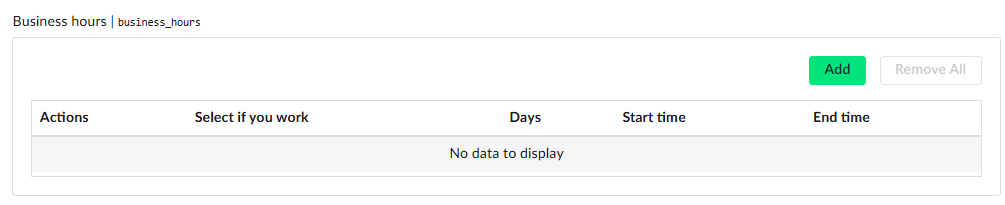
I’m trying to auto-populate a Multi-Row Variable Set to simulate a calendar for a user’s business hours. I would like to use an onLoad script to automatically add multiple rows, one for each day of the week.
How can I write a script that creates these rows and populates each one with the corresponding day and related information, so that the user only needs to adjust the values instead of manually adding a row for each day?
You can see the variable names and the expected result in the screenshots below.
Solved! Go to Solution.

- Mark as New
- Bookmark
- Subscribe
- Mute
- Subscribe to RSS Feed
- Permalink
- Report Inappropriate Content
05-06-2026 03:06 PM
Hello @MiliReinoso
To achieve below via onLoad Client script:


function onLoad() {
    var START_HOUR = 9;
    var END_HOUR = 17;

    var today = new Date();

    // Calculate Monday of the current week
    var day = today.getDay(); // Sunday=0, Monday=1
    var diffToMonday = (day === 0 ? -6 : 1) - day;
    var monday = new Date(today);
    monday.setDate(today.getDate() + diffToMonday);

    var daysOfWeek = [
        { name: "Monday", offset: 0, isWeekday: true },
        { name: "Tuesday", offset: 1, isWeekday: true },
        { name: "Wednesday", offset: 2, isWeekday: true },
        { name: "Thursday", offset: 3, isWeekday: true },
        { name: "Friday", offset: 4, isWeekday: true },
        { name: "Saturday", offset: 5, isWeekday: false },
        { name: "Sunday", offset: 6, isWeekday: false }
    ];

    var varValues = [];

    daysOfWeek.forEach(function (dayObj) {
        var date = new Date(monday);
        date.setDate(monday.getDate() + dayObj.offset);

        var startTime = new Date(date);
        startTime.setHours(START_HOUR, 0, 0, 0);

        var endTime = new Date(date);
        endTime.setHours(END_HOUR, 0, 0, 0);

        varValues.push({
            days: dayObj.name,
            start_time: formatDateTime(startTime),
            end_time: formatDateTime(endTime),
            select_if_you_work: dayObj.isWeekday ? 'Yes' : 'No'
        });
    });

    g_form.setValue('business_hours', JSON.stringify(varValues));
}


//Format: YYYY-MM-DD HH:mm AM/PM

function formatDateTime(date) {
    var yyyy = date.getFullYear();
    var mm = String(date.getMonth() + 1).padStart(2, '0');
    var dd = String(date.getDate()).padStart(2, '0');

    var hours = date.getHours();
    var minutes = String(date.getMinutes()).padStart(2, '0');
    var ampm = hours >= 12 ? 'PM' : 'AM';

    hours = hours % 12 || 12;

    return yyyy + '-' + mm + '-' + dd + ' ' + hours + ':' + minutes + ' ' + ampm;
}
Hope that helps!
- Mark as New
- Bookmark
- Subscribe
- Mute
- Subscribe to RSS Feed
- Permalink
- Report Inappropriate Content
05-06-2026 03:06 PM
Hello @MiliReinoso
To achieve below via onLoad Client script:
function onLoad() {
    var START_HOUR = 9;
    var END_HOUR = 17;

    var today = new Date();

    // Calculate Monday of the current week
    var day = today.getDay(); // Sunday=0, Monday=1
    var diffToMonday = (day === 0 ? -6 : 1) - day;
    var monday = new Date(today);
    monday.setDate(today.getDate() + diffToMonday);

    var daysOfWeek = [
        { name: "Monday", offset: 0, isWeekday: true },
        { name: "Tuesday", offset: 1, isWeekday: true },
        { name: "Wednesday", offset: 2, isWeekday: true },
        { name: "Thursday", offset: 3, isWeekday: true },
        { name: "Friday", offset: 4, isWeekday: true },
        { name: "Saturday", offset: 5, isWeekday: false },
        { name: "Sunday", offset: 6, isWeekday: false }
    ];

    var varValues = [];

    daysOfWeek.forEach(function (dayObj) {
        var date = new Date(monday);
        date.setDate(monday.getDate() + dayObj.offset);

        var startTime = new Date(date);
        startTime.setHours(START_HOUR, 0, 0, 0);

        var endTime = new Date(date);
        endTime.setHours(END_HOUR, 0, 0, 0);

        varValues.push({
            days: dayObj.name,
            start_time: formatDateTime(startTime),
            end_time: formatDateTime(endTime),
            select_if_you_work: dayObj.isWeekday ? 'Yes' : 'No'
        });
    });

    g_form.setValue('business_hours', JSON.stringify(varValues));
}


//Format: YYYY-MM-DD HH:mm AM/PM

function formatDateTime(date) {
    var yyyy = date.getFullYear();
    var mm = String(date.getMonth() + 1).padStart(2, '0');
    var dd = String(date.getDate()).padStart(2, '0');

    var hours = date.getHours();
    var minutes = String(date.getMinutes()).padStart(2, '0');
    var ampm = hours >= 12 ? 'PM' : 'AM';

    hours = hours % 12 || 12;

    return yyyy + '-' + mm + '-' + dd + ' ' + hours + ':' + minutes + ' ' + ampm;
}
Hope that helps!
- Mark as New
- Bookmark
- Subscribe
- Mute
- Subscribe to RSS Feed
- Permalink
- Report Inappropriate Content
05-12-2026 11:53 AM
That works but my MRVS is hidden by a ui policy and doesn't work in that case, what can i do?
- Mark as New
- Bookmark
- Subscribe
- Mute
- Subscribe to RSS Feed
- Permalink
- Report Inappropriate Content
05-13-2026 05:17 AM
- Mark as New
- Bookmark
- Subscribe
- Mute
- Subscribe to RSS Feed
- Permalink
- Report Inappropriate Content
05-13-2026 05:26 AM