
- Mark as New
- Bookmark
- Subscribe
- Mute
- Subscribe to RSS Feed
- Permalink
- Report Inappropriate Content
11-15-2017 08:52 AM
Hello,
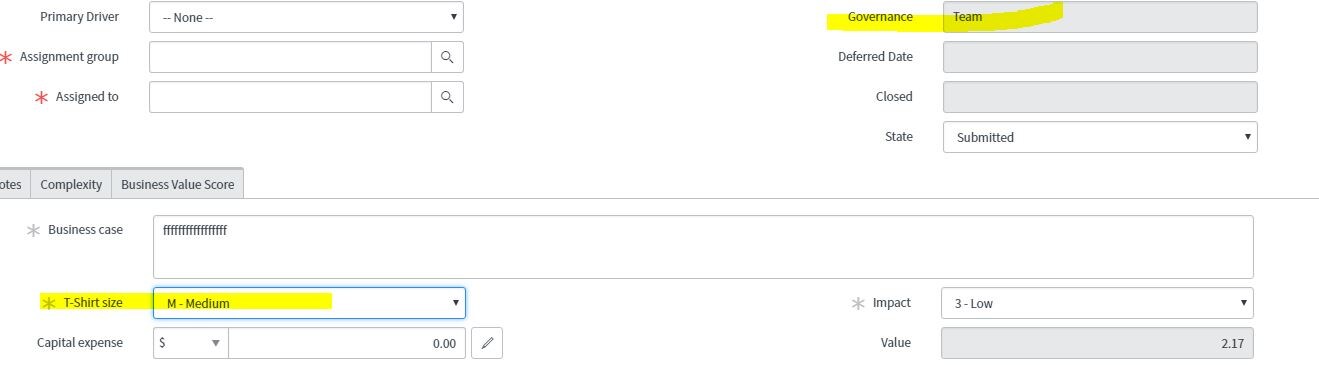
We have two fields, T-Shirt Size and Governance. When T-Shirt Size is set to a size, then the value of the Governance field changes.
For example, I select M-Medium for T-Shirt Size, and Governance changes to team. This works fine for any T-Shirt Size I choose, except '--None--'.

When I change T-Shirt Size to '--None--', I want Governance to be set to '--None--'.

I tried a variety of things, including removing "Dropdown with --None--" from the dictionary entry for both fields, and adding "--None--" as a choice. This works, but then I cannot set the T-Shirt Size to mandatory, because the "--None--" choice is a valid selection, in this case.
Here is the script. I also tried if(newValue == '--None--'), and that did not work either.
function onChange(control, oldValue, newValue, isLoading, isTemplate) {
if (isLoading || newValue === '') {
return;
}
if (newValue != oldValue){
if (newValue == ''){
g_form.setValue('u_governance','');
}
if (newValue == 'small'){
g_form.setValue('u_governance','team');
}
if (newValue == 'medium'){
g_form.setValue('u_governance','team');
}
if (newValue =='large'){
g_form.setValue('u_governance','portfolio');
}
if (newValue == 'xlarge'){
g_form.setValue('u_governance','enterprise');
}
if (newValue == 'xxlarge'){
g_form.setValue('u_governance','enterprise');
}
}
return;
}
Thank you in advance,
Laurie
Solved! Go to Solution.
- Labels:
-
Scripting and Coding



- Mark as New
- Bookmark
- Subscribe
- Mute
- Subscribe to RSS Feed
- Permalink
- Report Inappropriate Content
11-15-2017 11:18 AM
Reply from email… Try this instead since switch statements are a little easier to read and manage than a bunch of If statatement…
function onChange(control, oldValue, newValue, isLoading, isTemplate) {
if (isLoading) {
return;
}
var govValue = "";
switch (newValue.toString()) {
case '':
govValue = "";
break;
case 'small':
govValue = "team";
break;
case 'medium':
govValue = "portfolio";
break;
case 'large':
govValue = "";
break;
case 'xlarge':
govValue = "enterprise";
break;
case 'xxlarge':
govValue = "enterprise";
break;
}
g_form.setValue('u_governance', govValue);
}
- Mark as New
- Bookmark
- Subscribe
- Mute
- Subscribe to RSS Feed
- Permalink
- Report Inappropriate Content
11-15-2017 11:18 AM
Reply from email… Try this instead since switch statements are a little easier to read and manage than a bunch of If statatement…
function onChange(control, oldValue, newValue, isLoading, isTemplate) {
if (isLoading) {
return;
}
var govValue = "";
switch (newValue.toString()) {
case '':
govValue = "";
break;
case 'small':
govValue = "team";
break;
case 'medium':
govValue = "portfolio";
break;
case 'large':
govValue = "";
break;
case 'xlarge':
govValue = "enterprise";
break;
case 'xxlarge':
govValue = "enterprise";
break;
}
g_form.setValue('u_governance', govValue);
}
- Mark as New
- Bookmark
- Subscribe
- Mute
- Subscribe to RSS Feed
- Permalink
- Report Inappropriate Content
11-15-2017 11:28 AM
Well, I made another tweak, and this works with the if statements. I am going to use the switch statement as you suggested, since it is easier to read.
For those of you that want to see how it works with the if statements:
function onChange(control, oldValue, newValue, isLoading, isTemplate) {
if (isLoading) {
return;
}
if (newValue != oldValue){
if (newValue == 'small'){
g_form.setValue('u_governance','team');
}
if (newValue == 'medium'){
g_form.setValue('u_governance','team');
}
if (newValue =='large'){
g_form.setValue('u_governance','portfolio');
}
if (newValue == 'xlarge'){
g_form.setValue('u_governance','enterprise');
}
if (newValue == 'xxlarge'){
g_form.setValue('u_governance','enterprise');
}
return;
}
if (newValue == ""){
g_form.setValue('u_governance',"");
return;
}
}
Laurie
